Need help?
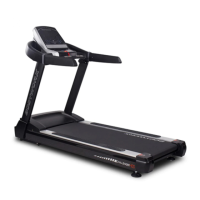
Do you have a question about the Bodyworx CHALLENGER 400 and is the answer not in the manual?
Explains the function of the safety lock key and its effect on the treadmill's operation.
Details how to operate the treadmill in manual mode, including start, stop, and speed/incline adjustments.
Guides users on creating and setting up personalized workout programs (U1, U2, U3) with 10 segments each.
Explains how to use Heart Rate Control (HRC) programs and the recommended settings for optimal training.
Troubleshooting steps for communication failures between the inverter and the computer console.
Solutions for inverter overheating, including checks for fan cleanliness and heat sink.
Troubleshooting for low input voltage errors, advising checks and potential inverter replacement.
Steps to resolve inverter over-current issues, checking rollers, belt lubrication, and tension.
Guidance on addressing overload protection errors, similar checks to over-current issues.
Troubleshooting for incline adjustment problems, focusing on sensor wires and motor connections.
General troubleshooting for other inverter errors, suggesting power cycling and potential replacement.
Solutions for incline system faults, checking sensor wires, motor, and connections.
Steps to diagnose why the computer is not detecting the safety key signal, checking key and wiring.
Troubleshooting steps when the computer display shows no output, checking power and connections.
Offers essential advice on proper maintenance, cleaning, and inspecting the equipment to prevent damage and voiding warranty.
 General
| Motor Power | 2.0 HP |
|---|---|
| Foldable | Yes |
| Programs | 12 pre-set programs |
| Display | LCD |
| Heart Rate Monitoring | Yes, via pulse sensors |

 To Next Page