EasyManua.ls Logo

Bodyworx JTM2500 - User Manual

Bodyworx JTM2500
27 pages
Print Icon
To Next Page IconTo Next Page
Loading...
Model No: JTM2500
BODYWORX
JTM2500 TREADMILL
Retain this owners manual for future reference. Read and follow all instructions in this owners manual.
THE BELT COMES PRE-LUBRICATED
NO LUBRICATION REQUIRED
WARNING
Question and Answer IconNeed help?

Do you have a question about the Bodyworx JTM2500 and is the answer not in the manual?

Summary

Warranty Registration Form

Important Safety Instructions

Children and Pets Safety

Guidelines for keeping children and pets safe around exercise equipment.

Personal Safety During Assembly

Recommendations for safe assembly of the equipment.

Safety Guidelines

Main Technical Parameters

Product Overview

Assembly Instructions

Folding Instructions

Unfolding Instructions

Grounding Methods

Operation Guide

Window Display Overview

Explanation of the treadmill's display screen and its indicators.

Safety Lock Function

How the safety lock feature works and its effect on the treadmill.

Button Functions

Detailed explanation of each button's function on the console.

Start;Stop Button

Instructions for starting and stopping the treadmill.

Program Button

How to select different exercise programs including manual, pre-set, and user-defined.

Mode Button

Function of the mode button for countdown modes and data adjustment.

Speed Adjustment Buttons

How to adjust the treadmill speed using the +/- buttons.

Speed Quick Buttons

Using quick buttons for rapid speed adjustments.

Incline Adjustment Buttons

How to adjust the treadmill incline using the +/- buttons.

Incline Quick Buttons

Using quick buttons for rapid incline adjustments.

Display Functions

Details on what information is shown on the treadmill display.

Speed Display

Displays the current running speed of the treadmill.

Time Display

Shows the elapsed or countdown time of the workout.

Distance Display

Indicates the total distance covered or countdown distance.

Calorie Display

Shows the calories burned during the workout.

Incline Display

Indicates the current incline level of the treadmill.

Pulse Display

Displays the user's heart rate during exercise.

Display Data Ranges

Specifies the maximum and minimum ranges for displayed data.

Pulse Function

How to use the pulse sensor and its limitations.

Program Exercise Chart

A table detailing speed and incline settings for various programs.

Manual Model Operation

Step-by-step guide for operating the treadmill in manual mode.

Countdown Function Parameters

Settings and ranges for time, calorie, and distance countdowns.

Body Fat Tester (Body Quality Index)

How to use the body fat tester and interpret results.

User-Defined Programs

How to set up and use personalized workout programs (U1-U3).

HRC (Heart Rate Control) Programs

Explanation of heart rate control programs and their settings.

Other Features and Functions

Details on power saving, MP3, Bluetooth, and USB functions.

Getting Started Guide

Preparation Before Exercise

Consulting a doctor and learning basic operation before exercising.

Exercise Guidance

Advice on starting exercise slowly and listening to your body.

Amount of Exercise

Recommendations for exercise duration and intensity increase.

Exercise Frequency

Importance of creating a weekly exercise schedule.

Safety Exercise Recommendations

Exercise Instructions

Warm-Up Phase

Stretching exercises to prepare muscles and reduce injury risk.

Exercise Phase

Guidance on working out within the target heart rate zone.

Cool-Down Phase

Repeating warm-up exercises to wind down muscles.

Muscle Toning

Tips for using resistance to tone muscles effectively.

Weight Loss

The role of effort and duration in burning calories for weight loss.

Care and Maintenance

Guidelines for proper cleaning, inspection, and part replacement.

Belt Adjustment

Exploded Drawing

Parts List

Welding Parts

List of welding components with descriptions and quantities.

Plastic Parts

List of plastic components with descriptions and quantities.

Electric and Drive Parts

List of electrical and drive components with descriptions and quantities.

Hardware Parts

List of hardware components (bolts, nuts, washers) with descriptions and quantities.

Error Code and Significance

Overview

This document is the owner's manual for the BODYWORX JTM2500 Treadmill. It provides comprehensive information on assembly, operation, safety, and maintenance of the device.

Function Description:

The BODYWORX JTM2500 Treadmill is an exercise equipment designed for home use, primarily for walking, jogging, and running. It allows users to engage in cardiovascular workouts, tone muscles, and aid in weight loss when combined with a calorie-controlled diet. The treadmill features various pre-set programs, user-defined programs, and heart rate control (HRC) programs to cater to different fitness levels and goals. It also includes a body fat test function to provide an indicative body quality index.

Important Technical Specifications:

  • Model No: JTM2500
  • Input Supply Voltage: 240V
  • Working Temperature: 0-40 °C
  • Speed Range: 0.8-18 KM/H
  • Max. User Weight: 130kg
  • Incline Range: 15 level motor incline
  • Running Surface: 480*1400mm
  • Product Size (Unfolded): 18808101450mm
  • Folding Size: 11508101600mm
  • Calories Display Range: 000-999
  • Distance Display Range: 0.00-99.9km
  • Time Display Range: 00:00-99:59 (min:sec)
  • Heart Rate Range: 50-200 (time/min)
  • Motor: DC motor (C1)
  • Safety Key: Included (C13)
  • Grounding: Product must be grounded to reduce the risk of electric shock.

Usage Features:

  • Console Display: Features a window display showing speed, time, distance, calories, incline, and pulse data.
  • Start/Stop Function: A "START" button initiates the treadmill at a default speed of 0.8 km/h after a 5-second countdown. A "STOP" button halts the treadmill and resets the program to default manual mode.
  • Program Selection: A "PROGRAM" button allows switching between manual mode, 15 pre-set programs (P1-P15), a body fat program, and 3 user-defined programs (U1-U3).
  • Countdown Functions: "MODE" button enables selection of time, distance, or calorie countdown modes. Data can be adjusted using "SPEED+/-" or "INCLINE+/-" buttons.
  • Speed Adjustment: "SPEED+/-" buttons adjust speed in 0.1 km/h increments. Quick speed buttons (4, 8, 12, 16) allow direct speed changes.
  • Incline Adjustment: "INCLINE+/-" buttons adjust incline in 1-level increments. Quick incline buttons (5, 10, 15) allow direct incline changes.
  • Safety Lock Function: The treadmill stops with an alarm noise if the safety key is removed. The console displays "---" in this state.
  • Pulse Function: Users can hold hand pulse sensors for about 5 seconds to display heart rate data (50-200 BPM). This data is for reference only and not for medical use.
  • Body Fat Tester (FAT): A function to calculate a body quality index based on sex, age, height, and weight. The ideal FAT range is 20-25.
  • User Programs (U1-U3): Three user-defined programs, each with 10 segments, allowing users to set desired speed and incline for each segment.
  • HRC Programs (HRC1-HRC3): Heart Rate Control programs that adjust speed and incline based on the user's actual heart rate to maintain a target heart rate zone (60%, 70%, or 80% of (220-age)). Wireless chest belt use is recommended for HRC.
  • Power Saving Mode: The system automatically enters power saving mode after 10 minutes of inactivity, turning off the display and backlit.
  • MP3 Audio Function: Includes an MP3 line input for playing music.
  • Bluetooth Music Function: Allows connecting a Bluetooth device to play music, with control over volume and track selection from the device.
  • USB Function: Supports USB input for playing music, with control over volume and track selection.
  • Folding Mechanism: Designed for easy folding to save space, with a pneumatic cylinder for smooth unfolding.

Maintenance Features:

  • Regular Inspection: Users are advised to inspect the machine before each use, ensuring all fasteners are secure and parts are in good working condition.
  • Cleaning: Wipe off the console and frame surfaces with a clean, water-dampened soft cloth after each workout to remove perspiration. Avoid abrasives, solvents, and direct sunlight.
  • Belt Adjustment: Instructions are provided for adjusting the running belt if it deviates to the right or left, or if it becomes too loose. This involves turning adjusting bolts on the rear roller.
  • Lubrication: The belt comes pre-lubricated, and no additional lubrication is required.
  • Troubleshooting: An "Error Code and Significance" section helps diagnose common issues like communication abnormal (E01), motor wire connection (E02), current overload (E03), explosion-proof protection (E06), safety key detection, and no display on the computer, providing fault processing steps.
  • Part Replacement: Worn or defective parts should be repaired or replaced immediately. The equipment should not be used until worn parts are replaced.
  • Service Hot Line: Users are directed to call a service hot line if the exerciser is not smooth or for other service needs.

The manual emphasizes the importance of safety, recommending consultation with a physician before starting any fitness program and adhering to all safety precautions during assembly and operation. It also provides guidelines for warm-up, exercise, and cool-down phases, along with advice on exercise frequency and intensity.
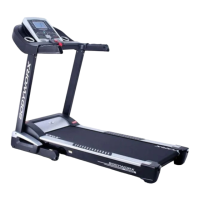
Bodyworx JTM2500 Specifications

General IconGeneral
BrandBodyworx
ModelJTM2500
CategoryTreadmill
LanguageEnglish

Related product manuals