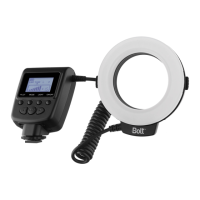
The Bolt VM-110 LED Macro Ring Light is a compact and versatile lighting solution designed for close-up photography and portraits. It consists of two main components: a power control unit and an LED ring light, offering creative lighting control and ease of use.
Function Description:
The VM-110 operates as an on-camera LED macro ring light. Its primary function is to provide continuous or flash illumination for macro photography, ensuring even and shadow-free lighting for subjects at close range. The device offers six levels of brightness adjustment, allowing users to fine-tune the light output according to their specific needs and desired effects.
A key feature of the VM-110 is its ability to operate in different illumination modes:
- Light Mode: In this mode, the LED light remains continuously on, which is ideal for shooting video or for previewing how the light will fall on the subject before taking a still photograph.
- Flash Mode: To conserve battery power, the flash mode activates the LED for approximately half a second when the camera's shutter is released. This mode is particularly useful for still photography where continuous light is not required. It's important to note that flash mode only works when the control unit is mounted on the camera's hot shoe.
- Left and Right Mode: For more dramatic lighting effects, the VM-110 can be set to illuminate only from the left or right half of the LED array. This allows for creative control over shadows and highlights, adding depth and dimension to macro shots.
The device also incorporates an automatic power-saving function, which activates after thirty minutes of inactivity to conserve battery life. The LCD screen on the power control unit is illuminated for about twenty seconds when the device is turned on or any button is pressed, aiding visibility in various lighting conditions.
Important Technical Specifications:
- Type: On-camera LED macro ring light.
- Compatible Cameras: All cameras equipped with a standard hot shoe and a lens filter thread of 49, 52, 55, 58, 62, 67, 72, or 77mm.
- Guide Number (GN): 15 (at 50mm focal length, ISO 100).
- Effective Distance: Up to 4.9 ft. (1.5 m).
- Color Temperature: 3,000–15,000 K (when using diffusers).
- Power Source: Requires four AA batteries of lithium (1.5 V), nickel-metal hydride (Ni-MH) (1.2 V), or alkaline (1.5 V) types. Lithium or Ni-MH batteries are recommended for the longest battery life.
- Dimensions:
- Power control unit: Approximately 4.5 x 2.75 x 1.4 inches (114 x 70 x 35 mm).
- LED ring: Approximately 4.5 x 4.3 x 0.75 inches (114 x 109 x 19 mm).
- Weight: 7.1 oz. (200 g) without batteries.
Usage Features:
- Battery Installation: The VM-110 is powered by four AA batteries. Users must ensure the device is turned off before installing batteries. The battery compartment cover slides open, and batteries should be inserted according to the indicated orientations. It's crucial to replace all four batteries at the same time and avoid mixing battery types or brands, or using old and new batteries together. The LCD features a battery level indicator that blinks when power is low.
- Mounting the Power Control Unit: The power control unit mounts onto a camera's hot shoe. To do this, the locking wheel is rotated counterclockwise to loosen, the mounting foot is slid all the way into the hot shoe, and then the locking wheel is rotated clockwise until secure.
- Mounting the LED Ring Light: The LED ring light attaches to the camera lens via one of the eight included adapter rings (49, 52, 55, 58, 62, 67, 72, and 77mm). Users must select the adapter ring that matches their lens' filter thread, screw it onto the lens, and then press and hold the adapter ring locks while mounting the ring light. The Bolt logo on the ring light should face away from the camera and be on the bottom.
- Dismounting: To dismount, users press and hold the adapter ring locks to release the LED ring, rotate the locking wheel counterclockwise to release the power control, and slide the mounting foot out of the hot shoe. The adapter ring can then be removed from the lens if desired.
- Stand/Tripod Mount: The power control unit can also be mounted on the included stand, which allows it to be placed on a flat surface or attached to a tripod head, light stand, or clamp with a compatible 1/4"-20 screw mount. This frees up the camera's hot shoe.
- Diffusers: The VM-110 comes with four diffusers: clear, frosted white, blue, and amber. These modify the light output. The frosted white diffuser provides a softer light, while the blue and amber diffusers cool and warm the light, respectively. To mount a diffuser, align the red alignment line on the diffuser with the OFF alignment line on the LED ring, then rotate it until it matches the ON alignment line. Removing a diffuser involves rotating it back to the OFF alignment line. Using the VM-110 without a diffuser provides maximum brightness but the least soft light.
- Brightness Adjustment: The brightness output can be adjusted from -1.5 to +1.5 using the right or left navigation buttons on the power control unit. The current brightness output is indicated on the LCD's power output level indicator.
- Pilot Button: A pilot button is available to fire a test flash.
Maintenance Features:
- Troubleshooting: The manual provides solutions for common issues, such as the VM-110 being stuck in the hot shoe (ensure mounting foot lock is released), not lighting up in Light mode (check batteries and orientation), not firing in Flash mode (check batteries, secure control unit, clean electrical contact), or rotating during focusing (use manual focus if the lens has a rotating front element).
- Battery Replacement: When the battery indicator fluctuates between full and empty, it suggests batteries are nearly exhausted and should be replaced.
- Cleaning: If the electrical contact on the foot of the control unit is dirty, it should be cleaned.
The Bolt VM-110 is designed to be a reliable and flexible tool for photographers seeking enhanced lighting control for their close-up and portrait work.


 To Next Page
 General