Advanced Settings
P-SETTINGS
P-Settings are used to control your Bolzzen Gladiator’s Advanced Settings. To enter the P-Settings screen, press the Power and
Mode buttons on the LCD controller simultaneously. After 5-seconds of no activity, the P-Settings menu will time-out and return
to normal. Use the Power button to cycle through the menu and the Mode button to make changes.
GET GOING
– QUICKLY!
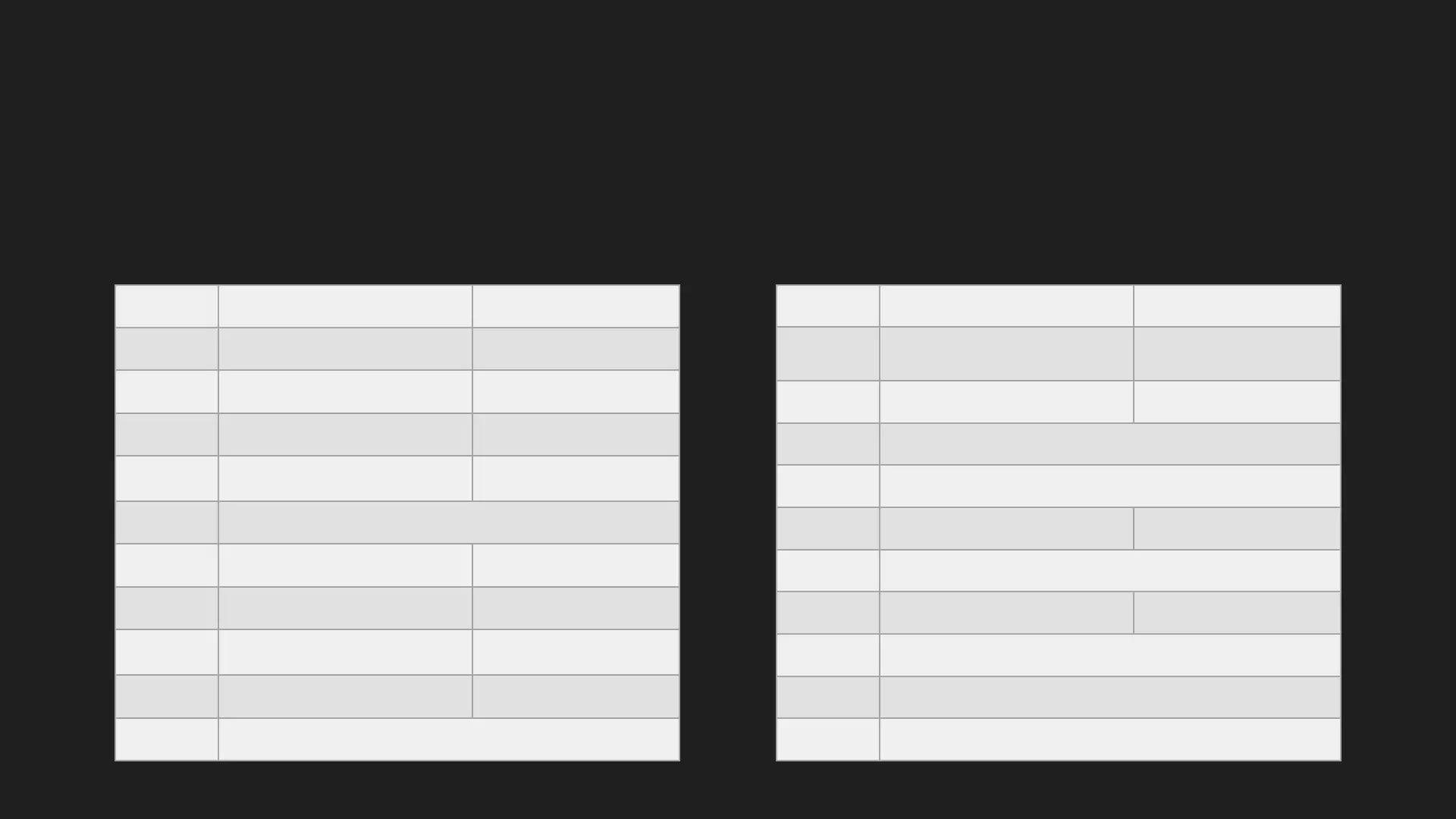
P-Setting Use Recommended Value
P01 Backlight Brightness Level 3
P02 Speed Unit Selection 0
P03 Rated Voltage Selection
52 (for 5218)
60 (for 6021)
P04
Auto Shut Down Time (In Minutes)
If Your Bolzzen Gladiator Is Idle, It’ll Auto Turn Off To Save Battery
5
P05 Not Used
P06 Wheel Size (In Inches) 10
P07 Number Of Magnets For Speed Detection 28
P08
Speed Limit Value (Percentage)
This Value Restricts Your Bolzzen Gladiator To The Australian
Regulation 25km/Hr Top Speed
34
P09 Zero Speed Start 1
P10 Not Used
P-Setting Use Recommended Value
P11 EABS Switch Selection
1 is Default
0 = Off
1-5 = Weakest To Strongest
P12 Take Off Power/Torque Setting
3 is Default
1-5 = Weakest To Strongest
P13 Not Used
P14 Not Used
P15 Controller Undervoltage Value
42 (for 5218)
49 (for 6021)
P16 Not Used
P17 Cruise Control
0 = Disabled
1 = Enabled
P18 Not Used
P19 Not Used
P20 Communication Protocol (Cannot Be Changed)


 To Next Page