use cookware made from conventional stai
less steel, glass, ceramic, copper, or aluminum.
Lid does not close properly.
Heat loss!
Correct! To save time a
Correct! To save time aCorrect! To save time a
Correct! To save time and energy!
nd energy!nd energy!
nd energy!
Diameter of the cookware corresponds
The cookware base is fully resting
properly.
CAUTION:
CAUTION:CAUTION:
CAUTION:
The cooking surface and the base of the cookware
must always be clean and dry.
Pot detection
Pot detectionPot detection
Pot detection
The heatin
g function is interrupted, if:
- cookware of unsuitable size or
- of non-magnetic material
a foreign body is placed on the hob or
- the cookware has removed.
In the display of the
respective cooking zone flashes
If suitable cookware is not placed onto the r
spective zone within one minute, the appliance
switches to standby mode.
switches off automatically.
General
General General
General information
information information
information to the
to theto the
to the
operation
operationoperation
operation
The appliance is operated via touch buttons at the
control panel.
• The buttons react to the slightest
not need to apply any pressure.
• The appliance reacts best when
buttons with the fingertips and
use cookware made from conventional stai
less steel, glass, ceramic, copper, or aluminum.
Lid does not close properly.
Diameter of the cookware corresponds
The cooking surface and the base of the cookware
g function is interrupted, if:
a foreign body is placed on the hob or
respective cooking zone flashes
If suitable cookware is not placed onto the r
spective zone within one minute, the appliance
switches off automatically.
The appliance is operated via touch buttons at the
dry hands.
• Once a touch has been
will sound.
• Ensure that the control
ation.
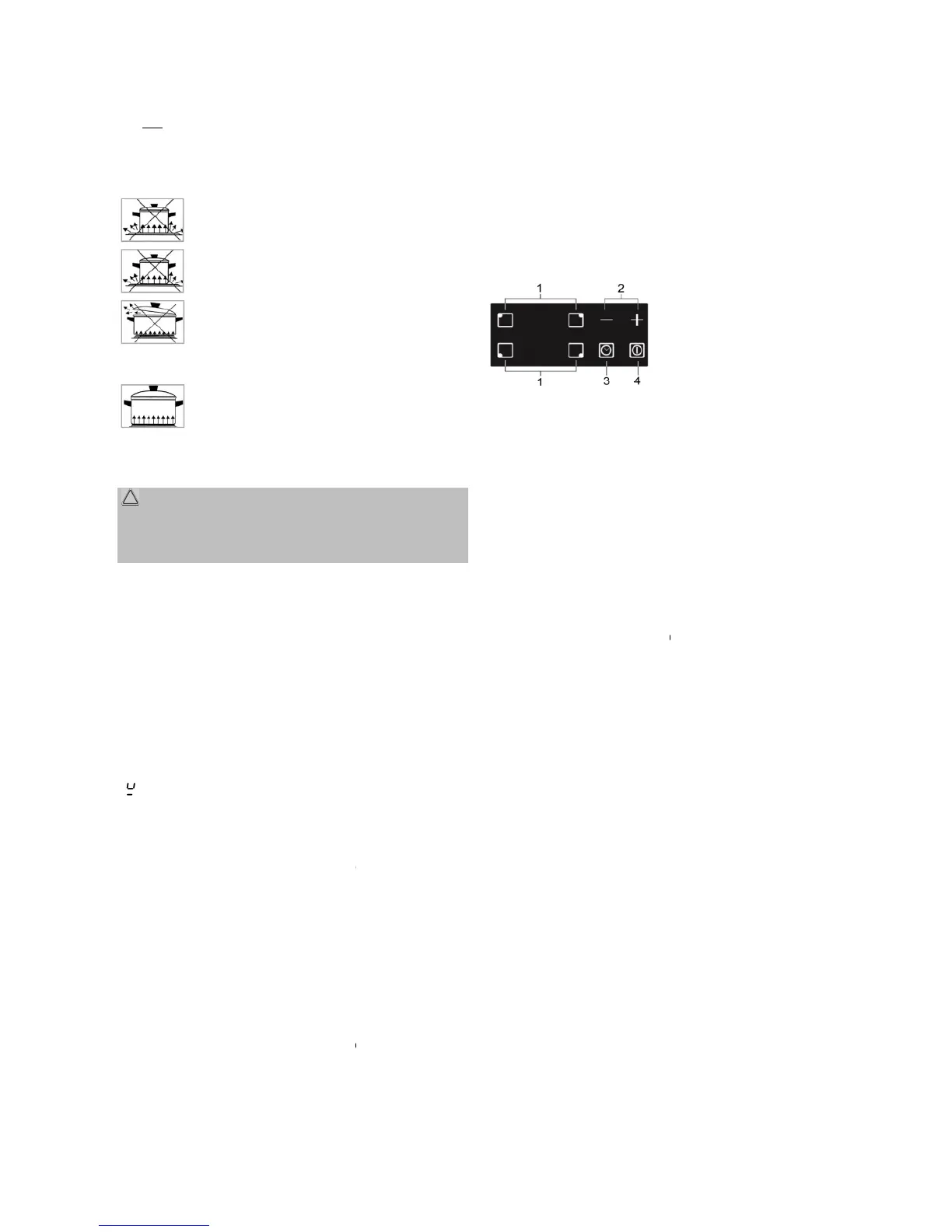
Control panel
Control panelControl panel
Control panel
1
11
1 Cooking zone selection,
use the buttons to select
the cooking zone to be used.
2
22
2 Power / timer control, us
(+)
(+)(+)
(+) Increase / (
((
(-
--
-)
))
) decrease
3
33
3 Timer
, use the button to select the t
4
44
4 On/off, use the button to
off.
Switching on and off
Switching on and off Switching on and off
Switching on and off
the cooking zone
the cooking zonethe cooking zone
the cooking zone
Place suitable cookware on the respectively coo
ing zone.
• Switch on the hob
Select the cooking zone using the
display next to the appropriate cooking zone
Set a power level from 1 to 9 with the
To switch off the cooking zone
appears [
[[
[
0
]
]]
].
Alternatively,
and the cooking zone is switched off.
use the buttons to select
the cooking zone to be used.
, use the button to select the t
the cooking zone
the cooking zonethe cooking zone
the cooking zone
Place suitable cookware on the respectively coo
Select the cooking zone using the
display next to the appropriate cooking zone
Set a power level from 1 to 9 with the
(+)
(+)(+)
(+) or (
((
(-
--
-)
))
) the setting
To switch off the cooking zone
(
((
(-
--
-)
))
) until the display
buttons (+)
(+) (+)
(+) and (
((
(-
--
-)
))
)
and the cooking zone is switched off.


 To Next Page
 Loading...