8
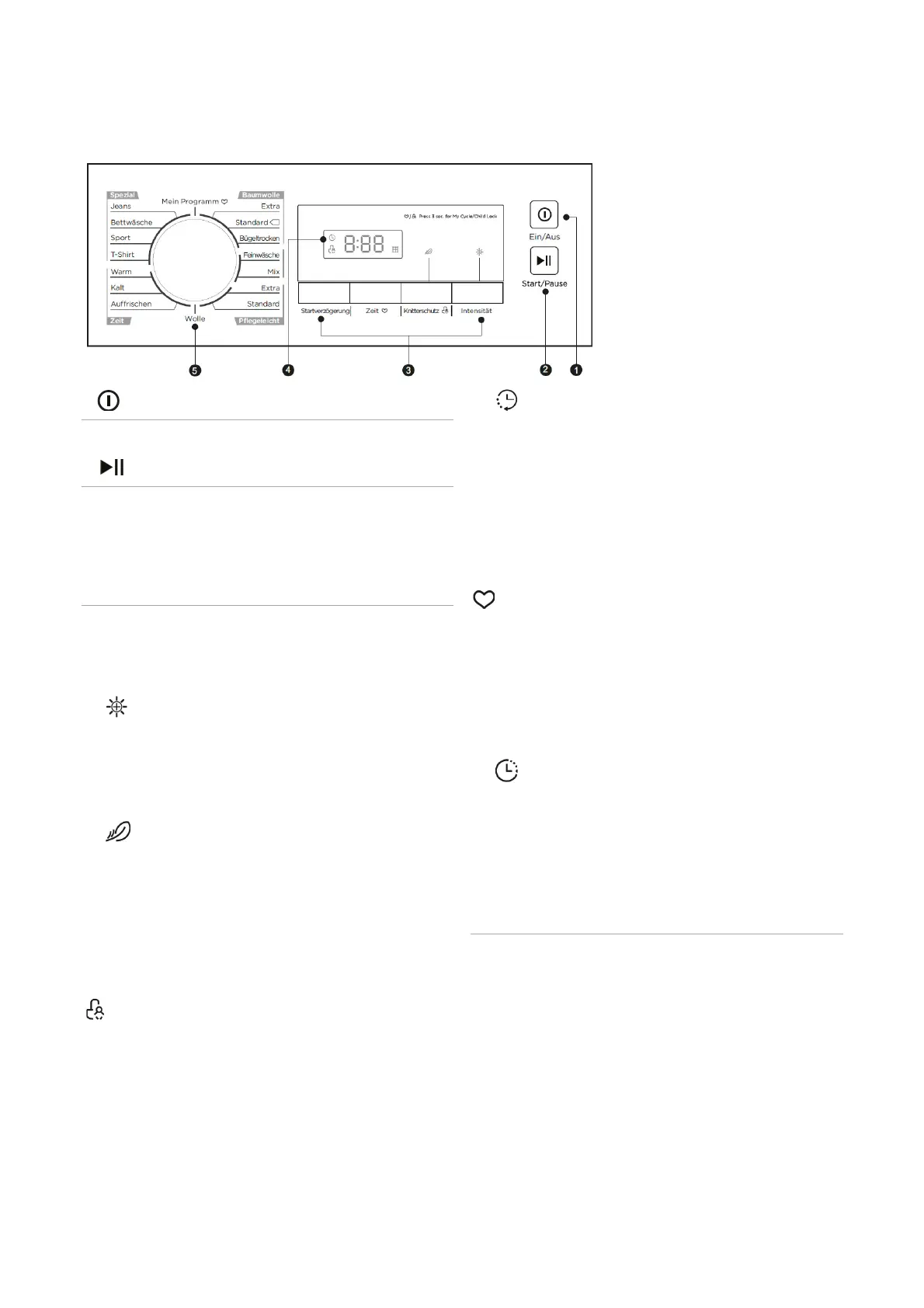
Control panel
1 EIN/AUS (Power)
Button to switch the power supply on and off.
2 START/PAUSE
Button to start/pause the selected or running pro-
gram. If the appliance is in pause mode, the current
display stops flashing.
3 Function buttons
Button to select the functions. The flashing control
lamps / display icons indicate the selection.
Note that
the functions are partially program-dependent!
INTENSITÄT
(Intensity)
Button to activate/deactivate the dry intensity level.
Extends the drying time at the end of the drying pro-
gram by approx. 10 minutes.
KNITTERSCHUTZ (Anti-Crease)
Activate/deactivate the anti-crease function by simply
pressing the button.
Extends the automatic anti-crease phase (30
minutes) at the end of the drying program to approx.
120 minutes; prevents wrinkles.
Safety child lock
Activate/deactivate the safety child lock by keep
pressing the Anti-crease button for approx. 3 sec-
onds after the program starts.
ZEIT (Time)
In the time programs, you can specify the drying
time. Press repeatedly to select a drying time,
in 10 minutes increments:
-
Warm: 0:10 to 2:00 h
-
Cold: 0:10 to 0:30 h
-
Refresh: 0:20 to 2:30 h
My program
After the program has been selected, keep pressing
the Time button for approx. 3 seconds. Your favorite
program is saved under "My program" (program se-
lector switch). The program remains stored until you
change it using the same procedure.
STARTVERZÖGERUNG (Delay)
By repeatedly pressing the button, the program start
can be delayed by 1 to 24 hours. Select and start a
program, the appliance starts automatically after the
selected time delay has expired.
4 LED Display:
Display for settings and information:
- The start delay and the drying time are selected via
the display.
- The remaining running time of the start delay is
displayed, the program is started after [xx] hours.
- After the program starts, the remaining running time
is displayed as [x:xx] hours and minutes.
- Symbol display:



 To Next Page