EasyManua.ls Logo

BONTEC CT130E - Step 3 Select Monitor Plate Configuration

Default Icon
8 pages
Print Icon
To Next Page IconTo Next Page
To Previous Page IconTo Previous Page
Loading...
4
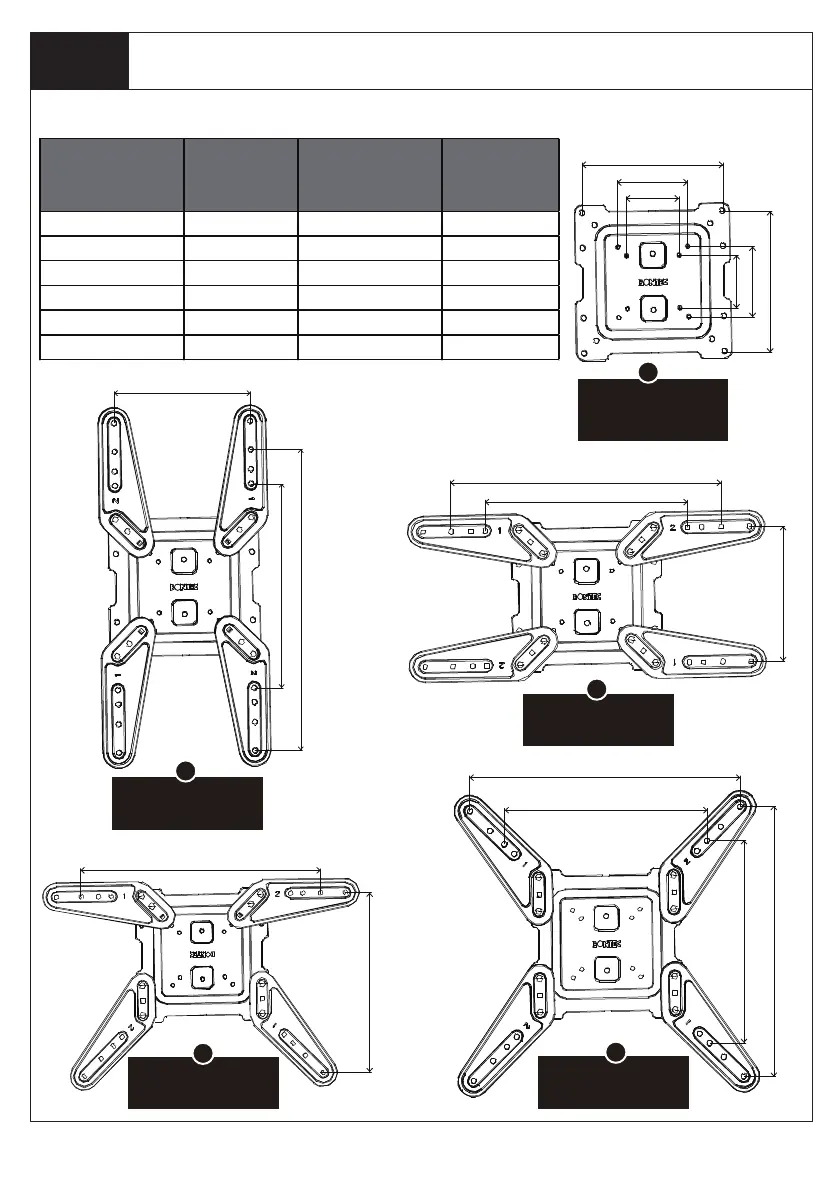
Select the configuration A,B,C,D,or E to use based on the measurement from STEP 2.
Step 3
Select monitor plate configuration
for VESA hole pattern:
300x300mm,400x400mm
for VESA hole pattern:
400x300mm
for VESA hole pattern:
200x300mm,200x400mm
for VESA hole pattern:
400x200mm,300x200mm
B
C
D
E
for VESA hole pattern:
75x75mm,100x100mm
200x100mm,200x200mm.
A
VESA Pattern
(WxH)
Configuration
VESA Pattern
(WxH)
Configuration
75mmx75mm A C
100mmx100mm A E
200mmx100mm A C
200mmx200mm
200mmx300mm
200mmx400mm
300mmx200mm
400mmx200mm
400mmx300mm
400mmx400mm
300mmx300mm
A D
B E
B
75mm
100mm
200mm
75mm
100mm
200mm
400mm
300mm
400mm
400mm
300mm
300mm
400mm
300mm
200mm
400mm
300mm
200mm

Related product manuals