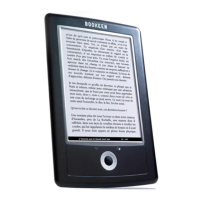
Need help?
Do you have a question about the Bookeen Cybook Opus and is the answer not in the manual?
Guides through initial startup, including connecting to power, charging the battery, and switching the device on/off.
Explains how to transfer content using a standard USB connection to a computer.
Explains how to open, navigate pages, and interact with eBooks, including hyperlinks.
Describes the on-screen elements and contextual menu options available during reading.
Details the reading interface and contextual menu options specific to reflowable ePUB files.
Details the reading interface and contextual menu options for non-reflowable PDF files.
Covers charging the battery and provides power-saving tips for maximizing battery life.
Explains how to reset the device using the reset hole or a button combination for troubleshooting.
 General
| Display diagonal | 5 \ |
|---|---|
| Grayscale levels | 4 |
| Built-in processor | Samsung ARM |
| Processor frequency | 400 MHz |
| Internal storage capacity | 1 GB |
| Battery life | 8000 pages |
| Battery capacity | 1000 mAh |
| Battery life (max) | 336 h |
| Dimensions (WxDxH) | 10 x 108 x 151 mm |
| Compatible operating systems | Linux Windows Mac |
| Operating system installed | Linux |
| Product color | White |
| Document formats supported | epub, pdf |
 Weight and Dimensions
| Weight | 150 g |
|---|---|
| Dimensions (W x D x H) (imperial) | 0.4 x 4.2 x 6 \ |

 To Next Page