2
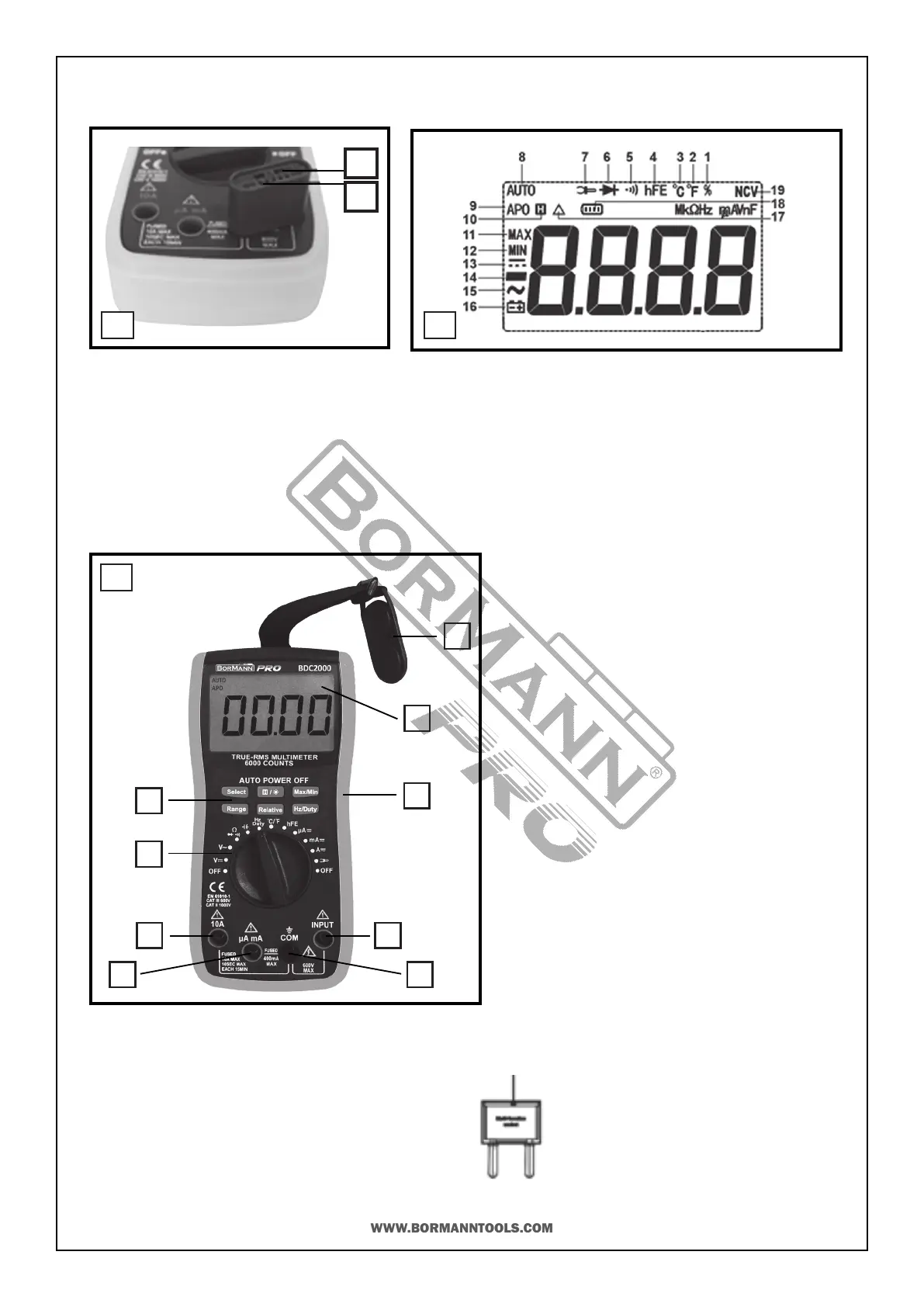
1. Capacitance Test Socket
2. Transistor Test Socket
1. Duty Cycle is selected
2. Fahrenheit temperature test is selected
3. Celsius degree test is selected
4. Transistor hFE test is selected
5. Connuity test is selected
6. Diode test is selected
7. External current test is selected
8. Auto-range mode is selected
9. Automac power-o mode is selected
10. Data Hold is enabled
11. Maximum reading is being displayed
12. Minimum reading is being displayed
13. DC
14. Negave sign
15. AC
16. Low Baery and replaced immediately
17. Relave mode is acve
18. Baery test is selected
19. Non-connect voltage is selected
1
2
A
B
C
How to Connect the Adapter
LCD Diplay
1. Hang by magnec-iron (not included in all models)
2. LCD
3. Holster
4. INPUT Jack
5. COM Jack
6. μΑ/mA Jack
7. 10A Jack
8. Funcon Switch
9. Silicone Buons
1
2
3
4
56
7
8
9
Panel Descripon
Mul-funcon
Socket


 To Next Page