EasyManua.ls Logo

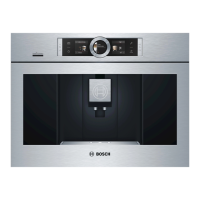
Bosch BCM8450UC/03 - User Manual

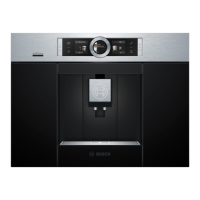
Bosch BCM8450UC/03
116 pages
Print Icon
To Next Page IconTo Next Page
Loading...
EN Instruction manual
FR Mode d’emploi
ES Instrucciones de uso
Built-in Coffee Machine
Use and Care Manual
BCM8450UC
EN Instruction manual
FR Mode d’emploi
ES Instrucciones de uso
Built-in Coffee Machine
Use and Care Manual
BCM8450UC
EN Instruction manual
FR Mode d’emploi
ES Instrucciones de uso
Built-in Coffee Machine
Use and Care Manual
BCM8450UC

Table of Contents

Questions and Answers

Summary

Overview

How to use these instructions

Explains manual navigation and symbol interpretation.

Safety Definitions

Defines warning, caution, notice, and note symbols used in the manual.

Important Safety Precautions

Included in delivery

Controls

Power switch

Describes the function of the appliance's main power switch.

Control panel (touch field)

Explains the operation of the touch-sensitive control panel and its buttons.

Initial use

Provides guidance for the first-time setup and use of the appliance.

Initial use

Setting up the appliance

Step-by-step instructions for setting up the coffee machine, including filling water and beans.

Control panel

Operation

Details how to navigate and interact with the control panel for various functions.

Preparing drinks

Explains the process of preparing coffee drinks using beans or ground coffee.

Beverage selection

Guides users on selecting and customizing beverage options.

Preparing drinks

Drink adjustment

Explains how to customize drink settings like strength, quantity, and temperature.

Available drinks selection

Lists all available beverage options that can be prepared by the coffee machine.

Preparation using coffee beans

Milk container

Information on the milk container's design, usage, and connection.

Preparation using ground coffee

Coffee drinks with milk

Steps for preparing milk-based coffee drinks using ground coffee.

Milk froth or warm milk

Instructions for preparing milk froth and warm milk separately.

Personalized drinks

Entering or changing drinks

Guides on saving, selecting, and modifying personalized drink recipes.

Adjusting the grind setting

Deleting a drink

How to remove saved personalized drink settings from memory.

Select a personalized drink and dispense

Instructions for selecting and preparing a saved custom drink.

Child-proof lock

Explains how to activate and deactivate the child lock feature for safety.

Menu

Overview of the menu system for changing settings and accessing information.

Menu

Settings management

Details available settings like language, water hardness, and water filter status.

Care and daily cleaning

Device Info

Displays network and appliance identification details like SSID and MAC address.

Remote diagnostics

Information on how customer service can remotely diagnose appliance faults.

Information on data protection

Details on data transmitted to the Home Connect server during initial registration.

Rinsing the milk system

Cleaning the milk system manually

Step-by-step guide for manually disassembling and cleaning milk system components.

Cleaning the milk container

Cleaning the brewing unit

Instructions for regularly removing and cleaning the brewing unit.

Service programs

Descaling

Procedure for running the descaling program to remove limescale build-up.

Cleaning

Instructions for executing the cleaning program for the appliance.

CalcnClean

Guide for running the combined descaling and cleaning program.

Tips on energy saving

Frost protection

Instructions on how to empty the appliance to prevent frost damage during storage.

Storing accessories

Guidance on where to store accessories like the measuring spoon and filter.

Accessories

Simple troubleshooting

Technical specifications

Warranty

What this Warranty Covers & Who it Applies to

Defines the scope of the limited warranty and who it covers.

How Long the Warranty Lasts

Specifies the duration of the warranty and exclusions for cosmetic damage.

Warranty Coverage Details

Warranty Exclusions

Lists conditions and damages not covered by the product warranty.

How to Obtain Warranty Service

Instructions on how to contact Bosch for warranty service.

Summary

Overview

How to use these instructions

Explains manual navigation and symbol interpretation.

Safety Definitions

Defines warning, caution, notice, and note symbols used in the manual.

Important Safety Precautions

Included in delivery

Controls

Power switch

Describes the function of the appliance's main power switch.

Control panel (touch field)

Explains the operation of the touch-sensitive control panel and its buttons.

Initial use

Provides guidance for the first-time setup and use of the appliance.

Initial use

Setting up the appliance

Step-by-step instructions for setting up the coffee machine, including filling water and beans.

Control panel

Operation

Details how to navigate and interact with the control panel for various functions.

Preparing drinks

Explains the process of preparing coffee drinks using beans or ground coffee.

Beverage selection

Guides users on selecting and customizing beverage options.

Preparing drinks

Drink adjustment

Explains how to customize drink settings like strength, quantity, and temperature.

Available drinks selection

Lists all available beverage options that can be prepared by the coffee machine.

Preparation using coffee beans

Milk container

Information on the milk container's design, usage, and connection.

Preparation using ground coffee

Coffee drinks with milk

Steps for preparing milk-based coffee drinks using ground coffee.

Milk froth or warm milk

Instructions for preparing milk froth and warm milk separately.

Personalized drinks

Entering or changing drinks

Guides on saving, selecting, and modifying personalized drink recipes.

Adjusting the grind setting

Deleting a drink

How to remove saved personalized drink settings from memory.

Select a personalized drink and dispense

Instructions for selecting and preparing a saved custom drink.

Child-proof lock

Explains how to activate and deactivate the child lock feature for safety.

Menu

Overview of the menu system for changing settings and accessing information.

Menu

Settings management

Details available settings like language, water hardness, and water filter status.

Care and daily cleaning

Device Info

Displays network and appliance identification details like SSID and MAC address.

Remote diagnostics

Information on how customer service can remotely diagnose appliance faults.

Information on data protection

Details on data transmitted to the Home Connect server during initial registration.

Rinsing the milk system

Cleaning the milk system manually

Step-by-step guide for manually disassembling and cleaning milk system components.

Cleaning the milk container

Cleaning the brewing unit

Instructions for regularly removing and cleaning the brewing unit.

Service programs

Descaling

Procedure for running the descaling program to remove limescale build-up.

Cleaning

Instructions for executing the cleaning program for the appliance.

CalcnClean

Guide for running the combined descaling and cleaning program.

Tips on energy saving

Frost protection

Instructions on how to empty the appliance to prevent frost damage during storage.

Storing accessories

Guidance on where to store accessories like the measuring spoon and filter.

Accessories

Simple troubleshooting

Technical specifications

Warranty

What this Warranty Covers & Who it Applies to

Defines the scope of the limited warranty and who it covers.

How Long the Warranty Lasts

Specifies the duration of the warranty and exclusions for cosmetic damage.

Warranty Coverage Details

Warranty Exclusions

Lists conditions and damages not covered by the product warranty.

How to Obtain Warranty Service

Instructions on how to contact Bosch for warranty service.

Bosch BCM8450UC/03 Specifications

General IconGeneral
Colorstainless steel, multi
Built-In Grinderyes
Removable Water Tankyes
Double Shotyes
Programmableyes
Automation Levelsuper automatic
Steam Nozzleyes
Removable Drip Trayyes
Control Typebutton, touchpad
Power Consumption1600 watts
Voltage120 volts
Weight and Dimensions IconWeight and Dimensions
Depth22 1/2 inches
Height17 7/8 inches
Width23 3/8 inches
Net Weight42.99 pounds

Related product manuals