EasyManua.ls Logo

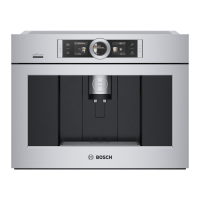
Bosch BCM8450UC/03 - User Manual

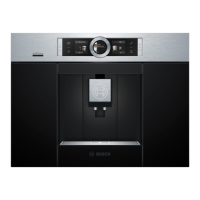
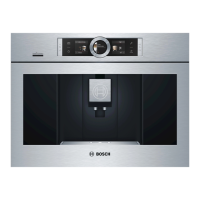
Bosch BCM8450UC/03
116 pages
Print Icon
To Next Page IconTo Next Page
Loading...
EN Instruction manual
FR Mode d’emploi
ES Instrucciones de uso
Built-in Coffee Machine
Use and Care Manual
BCM8450UC
EN Instruction manual
FR Mode d’emploi
ES Instrucciones de uso
Built-in Coffee Machine
Use and Care Manual
BCM8450UC
EN Instruction manual
FR Mode d’emploi
ES Instrucciones de uso
Built-in Coffee Machine
Use and Care Manual
BCM8450UC

Table of Contents

Questions and Answers

  • A
    Ashley DennisAug 21, 2025
    How to fix 'Clean brewing unit' message on my Bosch BCM8450UC/03?
    • S
      simmonsjosephAug 22, 2025
      The 'Clean brewing unit' message on your Bosch Coffee Maker indicates that the brewing unit is soiled or there is too much ground coffee in it, or the mechanism of the brewing unit is stiff. You should clean the brewing unit and avoid placing more than two level measuring spoons of ground coffee in the drawer.
  • S
    Sarah MillerSep 4, 2025
    Why is there water under the drip tray of my Bosch Coffee Maker?
    • J
      Jacob StewartSep 4, 2025
      Water under the drip tray of your Bosch Coffee Maker is likely condensation. Ensure you do not insert the drip tray without its cover.
  • M
    Michael AllenSep 2, 2025
    What to do if my Bosch Coffee Maker display shows 'Switch off with power switch, then back on after 30 sec!'?
    • D
      Donald HunterSep 2, 2025
      If your Bosch Coffee Maker displays 'Switch off with power switch, then back on after 30 sec!', it could be because the appliance is too warm or the brewing unit is dirty. Try leaving the appliance to cool down or cleaning the brewing unit.
  • K
    Kelly LeeSep 1, 2025
    Why is the grinding level adjustment stiff on my Bosch BCM8450UC/03?
    • C
      Caleb DiazSep 1, 2025
      If the grinding level adjustment is stiff on your Bosch Coffee Maker, it could be due to too many beans in the grinding unit. Try dispensing a drink using coffee beans. Make any subsequent changes to the grinding level in small steps.
  • M
    Michelle CollinsAug 30, 2025
    What does it mean if my Bosch BCM8450UC/03 Coffee Maker display shows 'Overvoltage or undervoltage'?
    • V
      vanessa71Aug 31, 2025
      If your Bosch Coffee Maker displays 'Overvoltage or undervoltage', it indicates that the voltage is either too high or too low. Contact your electricity or grid provider and have the power supply checked by an expert.
  • G
    Gerald LloydAug 29, 2025
    Why does my Bosch Coffee Maker display 'Please allow machine to cool'?
    • S
      Sherry AlexanderAug 29, 2025
      The 'Please allow machine to cool' message on your Bosch Coffee Maker indicates that the appliance is too hot. To resolve this, switch off the appliance for 30 minutes to allow it to cool down.
  • K
    Katherine AndersenAug 27, 2025
    What to do if my Bosch Coffee Maker display shows 'Insert drip trays' even though they are in use?
    • K
      Kimberly YoungAug 28, 2025
      If your Bosch Coffee Maker displays 'Insert drip trays' even when the drip tray is in use, the inside of the appliance (tray holder) might be dirty, or the coffee grounds container might not be fully inserted. Try cleaning the inside of the appliance. Also, ensure that the coffee grounds container is pushed all the way in.
  • R
    Randy CortezAug 27, 2025
    What does it mean when my Bosch Coffee Maker display shows 'Fill bean container' even when full?
    • Y
      Yvette EdwardsAug 27, 2025
      If your Bosch Coffee Maker displays 'Fill bean container' even when the container is full, or if the grinder isn't grinding beans, it's possible that the beans aren't falling into the grinding unit, potentially because they are too oily. Try gently tapping the bean container or changing the type of coffee beans you use. If the bean container is empty, wipe it with a dry cloth.
  • E
    Evan RamosAug 25, 2025
    What to do if my Bosch Coffee Maker display shows 'Empty drip trays' even though they are empty?
    • R
      Rachel CraneAug 25, 2025
      If your Bosch Coffee Maker displays 'Empty drip trays' despite the trays being empty, it could be that the drip tray is soiled and wet, or the emptying wasn't detected when the appliance was switched off. Try cleaning and drying the drip tray thoroughly. If that doesn't work, remove and re-insert the drip tray while the appliance is switched on.
  • L
    Lisa GarciaAug 23, 2025
    Why does my Bosch BCM8450UC/03 display 'Refill with still water or remove filter'?
    • T
      Tammy BarkerAug 23, 2025
      The 'Refill with still water or remove filter' message on your Bosch Coffee Maker can appear due to several reasons: the water tank might be incorrectly inserted, there may be carbonated water in the tank, the float could be stuck, the water filter might not be rinsed properly or is defective, or there might be air in the water filter. To resolve this, ensure the water tank is correctly inserted, use fresh tap water, clean the water tank thoroughly, rinse or replace the water filter as per instructions, or dip the water filter in water to remove air bubbles before replacing it.

Summary

Overview

How to use these instructions

Explains manual navigation and symbol interpretation.

Safety Definitions

Defines warning, caution, notice, and note symbols used in the manual.

Important Safety Precautions

Included in delivery

Controls

Power switch

Describes the function of the appliance's main power switch.

Control panel (touch field)

Explains the operation of the touch-sensitive control panel and its buttons.

Initial use

Provides guidance for the first-time setup and use of the appliance.

Initial use

Setting up the appliance

Step-by-step instructions for setting up the coffee machine, including filling water and beans.

Control panel

Operation

Details how to navigate and interact with the control panel for various functions.

Preparing drinks

Explains the process of preparing coffee drinks using beans or ground coffee.

Beverage selection

Guides users on selecting and customizing beverage options.

Preparing drinks

Drink adjustment

Explains how to customize drink settings like strength, quantity, and temperature.

Available drinks selection

Lists all available beverage options that can be prepared by the coffee machine.

Preparation using coffee beans

Milk container

Information on the milk container's design, usage, and connection.

Preparation using ground coffee

Coffee drinks with milk

Steps for preparing milk-based coffee drinks using ground coffee.

Milk froth or warm milk

Instructions for preparing milk froth and warm milk separately.

Personalized drinks

Entering or changing drinks

Guides on saving, selecting, and modifying personalized drink recipes.

Adjusting the grind setting

Deleting a drink

How to remove saved personalized drink settings from memory.

Select a personalized drink and dispense

Instructions for selecting and preparing a saved custom drink.

Child-proof lock

Explains how to activate and deactivate the child lock feature for safety.

Menu

Overview of the menu system for changing settings and accessing information.

Menu

Settings management

Details available settings like language, water hardness, and water filter status.

Care and daily cleaning

Device Info

Displays network and appliance identification details like SSID and MAC address.

Remote diagnostics

Information on how customer service can remotely diagnose appliance faults.

Information on data protection

Details on data transmitted to the Home Connect server during initial registration.

Rinsing the milk system

Cleaning the milk system manually

Step-by-step guide for manually disassembling and cleaning milk system components.

Cleaning the milk container

Cleaning the brewing unit

Instructions for regularly removing and cleaning the brewing unit.

Service programs

Descaling

Procedure for running the descaling program to remove limescale build-up.

Cleaning

Instructions for executing the cleaning program for the appliance.

CalcnClean

Guide for running the combined descaling and cleaning program.

Tips on energy saving

Frost protection

Instructions on how to empty the appliance to prevent frost damage during storage.

Storing accessories

Guidance on where to store accessories like the measuring spoon and filter.

Accessories

Simple troubleshooting

Technical specifications

Warranty

What this Warranty Covers & Who it Applies to

Defines the scope of the limited warranty and who it covers.

How Long the Warranty Lasts

Specifies the duration of the warranty and exclusions for cosmetic damage.

Warranty Coverage Details

Warranty Exclusions

Lists conditions and damages not covered by the product warranty.

How to Obtain Warranty Service

Instructions on how to contact Bosch for warranty service.

Bosch BCM8450UC/03 Specifications

General IconGeneral
Colorstainless steel, multi
Built-In Grinderyes
Removable Water Tankyes
Double Shotyes
Programmableyes
Automation Levelsuper automatic
Steam Nozzleyes
Removable Drip Trayyes
Control Typebutton, touchpad
Power Consumption1600 watts
Voltage120 volts
Weight and Dimensions IconWeight and Dimensions
Depth22 1/2 inches
Height17 7/8 inches
Width23 3/8 inches
Net Weight42.99 pounds

Related product manuals