en | 33
7 620 000 130 - 133 | 10.2010Robert Bosch Car Multimedia GmbH
en
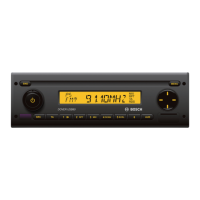
1 Volume control
2 BND
Short press: Selects the memory bank or
waveband.
Long press: Start the Travelstore function
3 On/Off button
Short press: Switches the device on
In operation: Muting (Mute)
Long press: Switches the device off
4 CD eject button
5 CD tray
6 Display
7 MENU
Calls up the menus for basic settings
8 Multifunction rocker
9 Front AUX-IN socket
: Mini USB socket
; AUD button
Short press: Opens Audio menu for
setting bass, treble, balance, fader and
loudness
Long press: Restore factory tone settings
(treble and bass adjustments for the
audio source currently being used)
< Button group 1– 6
= TA button
Switches priority for traffic information
on/off
Cancels an ongoing traffic announcement
> SRC button
Source selection between radio and (if
inserted, connected and switched on)
CD, USB and AUX
? Code LED
Controls
02_Calais USB_en.indd 33 26.10.10 15:18











 To Next Page