en | 67
03.2011Robert Bosch Car Multimedia GmbH
en
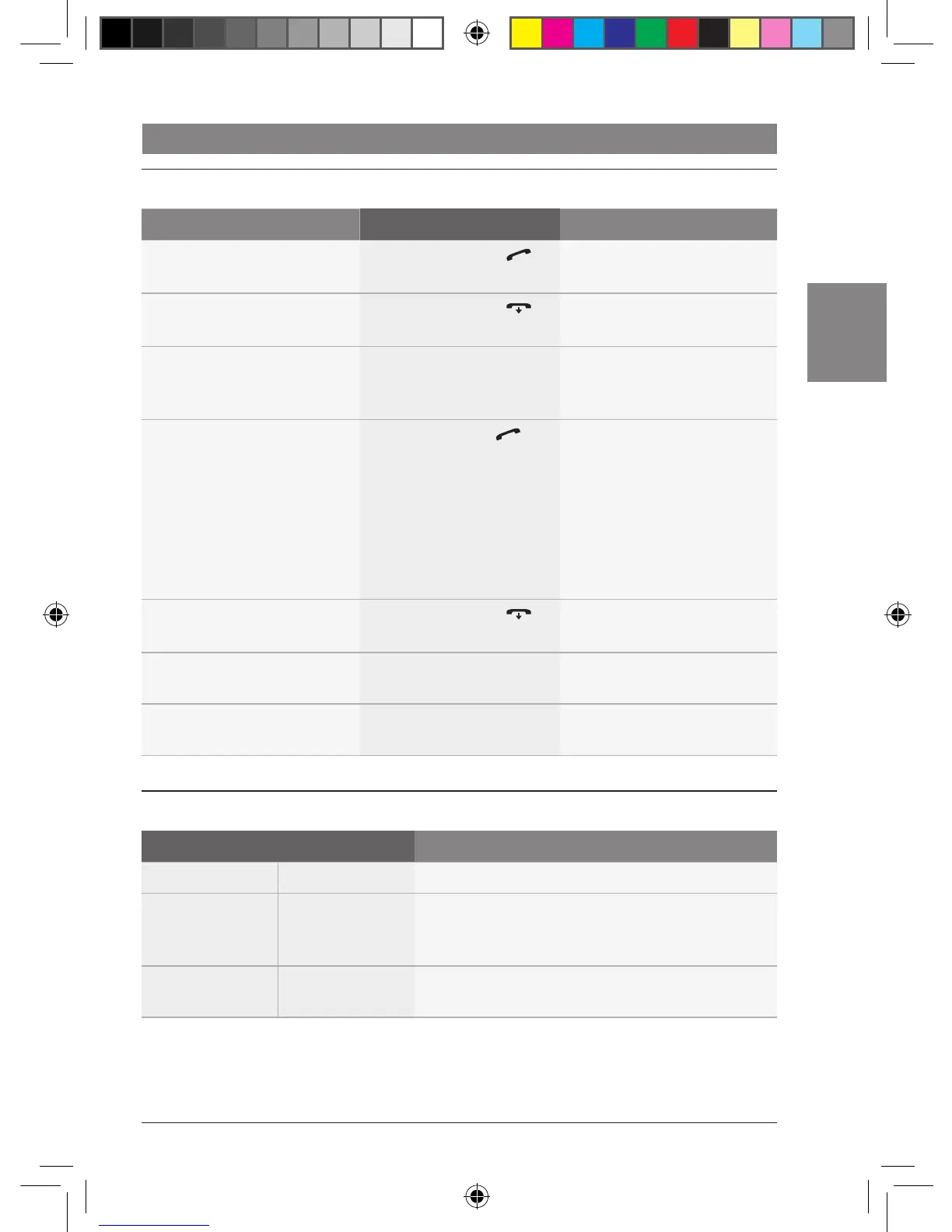
Bluetooth telephone functions
Functions on the CCD
Function Action Note
Answer a call f Briefly press the
button :
–
Reject or end a call f Briefly press the
button 6
–
Adjust the volume when the
ring signal sounds and during a
call
f Turn the control knob
<
–
Open the phone book f Long press the
button :
It is not possible to open the
phone book whilst entries are
being transferred from the
mobile phone to the system
(e.g. after pairing the mobile
phone). The Bluetooth®
symbol flashes during a
transfer.
Close the phone book f Briefly press the
button 6
–
Transfer an active call to the
mobile phone
f Long press the AM
button
–
Transfer an active call back to
the system
f Long press the FM
button
–
Bluetooth® settings in the main menu
1
st
Menu level 2
nd
Menu level Function
*BTOOTH BT ON/OFF Switch the Bluetooth® function on/off
BT-PAIR Make the system visible for mobile phones so you can
initiate (on the mobile phone) a connection to the
system
BT-JOIN Display the name of the currently connected mobile
phone
02_ProLine3_en.indd 67 16.03.11 17:23












 To Next Page