70 | en
03.2011 Robert Bosch Car Multimedia GmbH
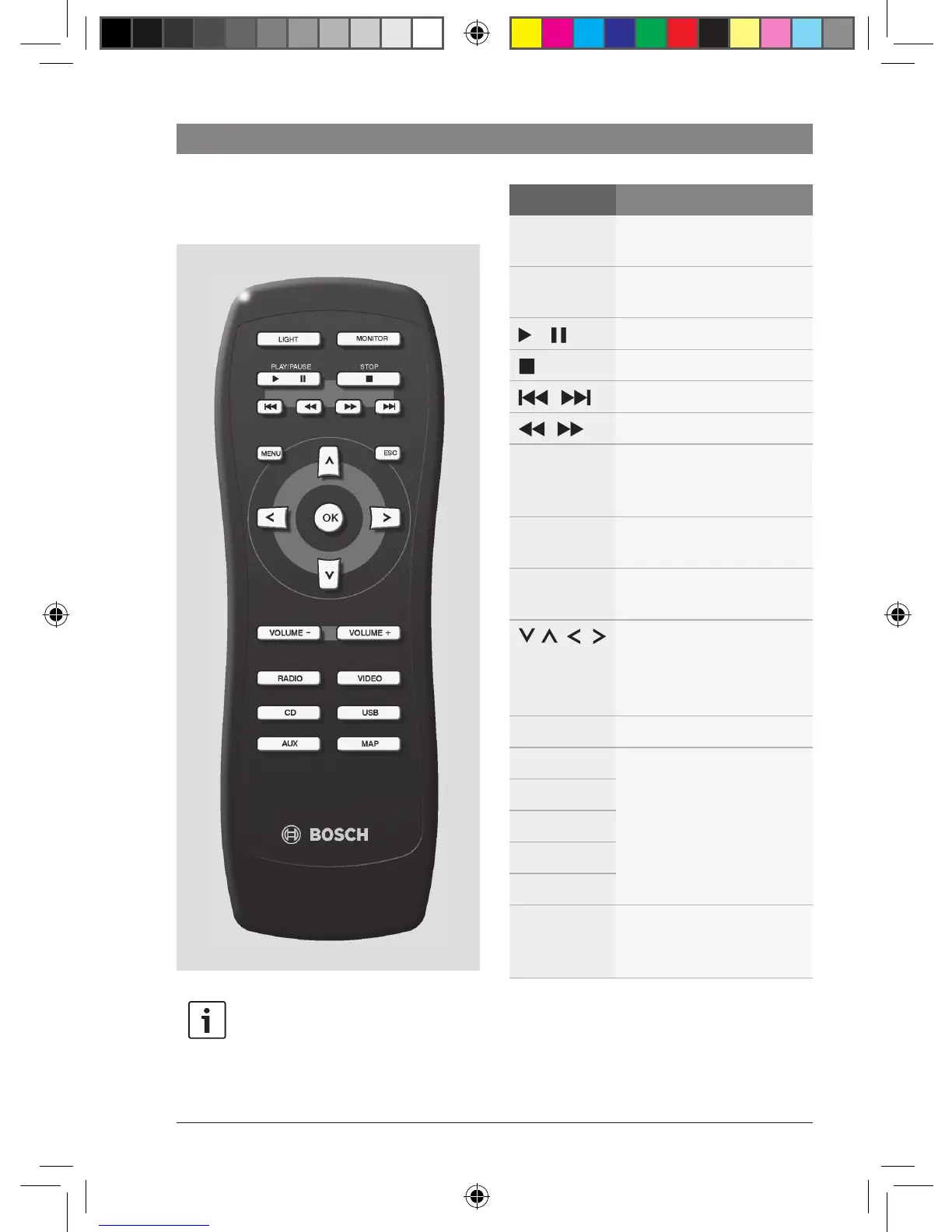
Remote control
Note:
You can use the remote control to
control the playback of audio/video
sources in the cabin.
Button Function
LIGHT
Switch the button illumina-
tion on/off
MONITOR
Activate/deactivate
monitors in the cabin
Start/pause playback
Stop playback
/
Skip a track/chapter
/
Fast search
MENU
Open the menu of a DVD
Long press: Changer menu
(e.g. for changing disc)
ESC
Backwards in the menu of a
DVD
OK
Confirm an item in the
menu of the DVD
/ / /
Corresponds to the remote
buttons >
DVD mode: Select an item
in the menu of the DVD
VOLUME ±
Adjust the volume
RADIO
Select an audio/video
source
VIDEO
CD
USB
AUX
MAP
Display the navigation
system's map view on the
monitors in the cabin
Remote control
02_ProLine3_en.indd 70 16.03.11 17:23












 To Next Page