en | 59
7 620 210 016 | 11.2013Robert Bosch Car Multimedia GmbH
en
IR remote control
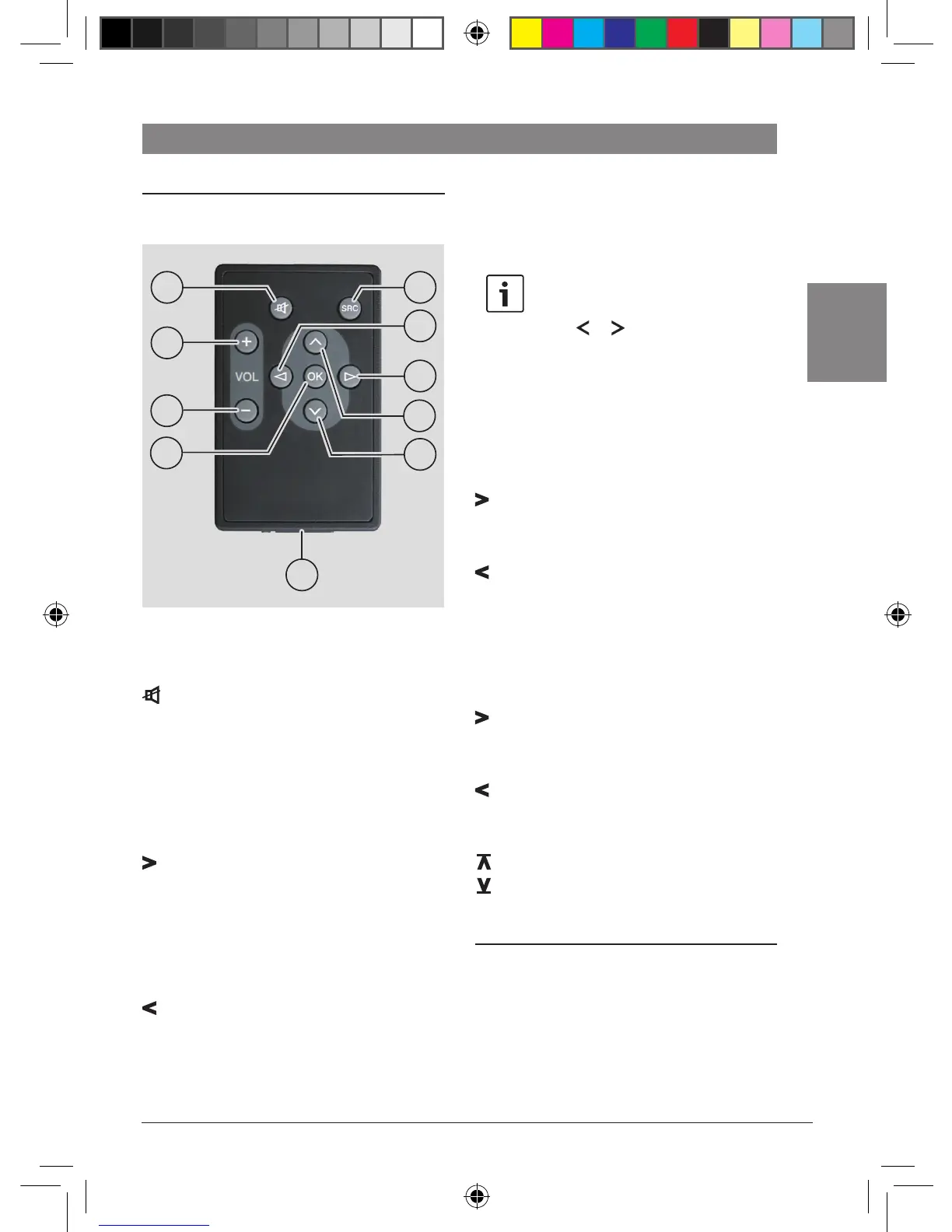
Functions of the remote control
General:
Button Function
C Mute the device
SRC D Change between sources
VOL + B Increase the volume
VOL – A Reduce the volume
In radio mode:
Button Function
F Short press: Automatic station
search/ PTY search/ manual
station tuning/ scan through
preset stations
Long press: Change the
frequency quickly
E Short press: Automatic station
search/ PTY search/ manual
station tuning/ scan through
preset stations
Long press: Change the
frequency quickly
Note:
The function called by a short press
to the or
8
buttons must be
selected in the menu (see the section
on "Setting button functions" in the
chapter on "Radio Operation").
In CD mode:
Button Function
F Short press: Select the next
track
Long press: Search forwards
E Short press: Select the previous
track
Long press: Search backwards
MP3 mode
Button Function
F Short press: Select the next
track
Long press: Search forwards
E Short press: Select the previous
track
Long press: Search backwards
G Play the next directory
H Play the previous directory
Changing the battery
In order to change the battery of the IR remote
control unit,
f Unlock the battery compartment I by
pressing the release lever on the battery
compartment.
17
21
2019
22
23
24
25
18
16
02_CR24_en.indd 59 20.11.13 16:54











 To Next Page