Familiarising yourself with your appliance en
15
4.5 Connecting the appliance
to the electricity supply
1. Insert the mains plug of the appli-
ance's power cable in a socket
nearby.
The connection data of the appli-
ance can be found on the rating
plate. →Fig.
1
/
2. Check the mains plug is inserted
properly.
a The appliance is now ready for
use.
Familiarising yourself with your appliance
5 Familiarising yourself
with your appliance
Familiarising yourself with your appliance
5.1 Appliance
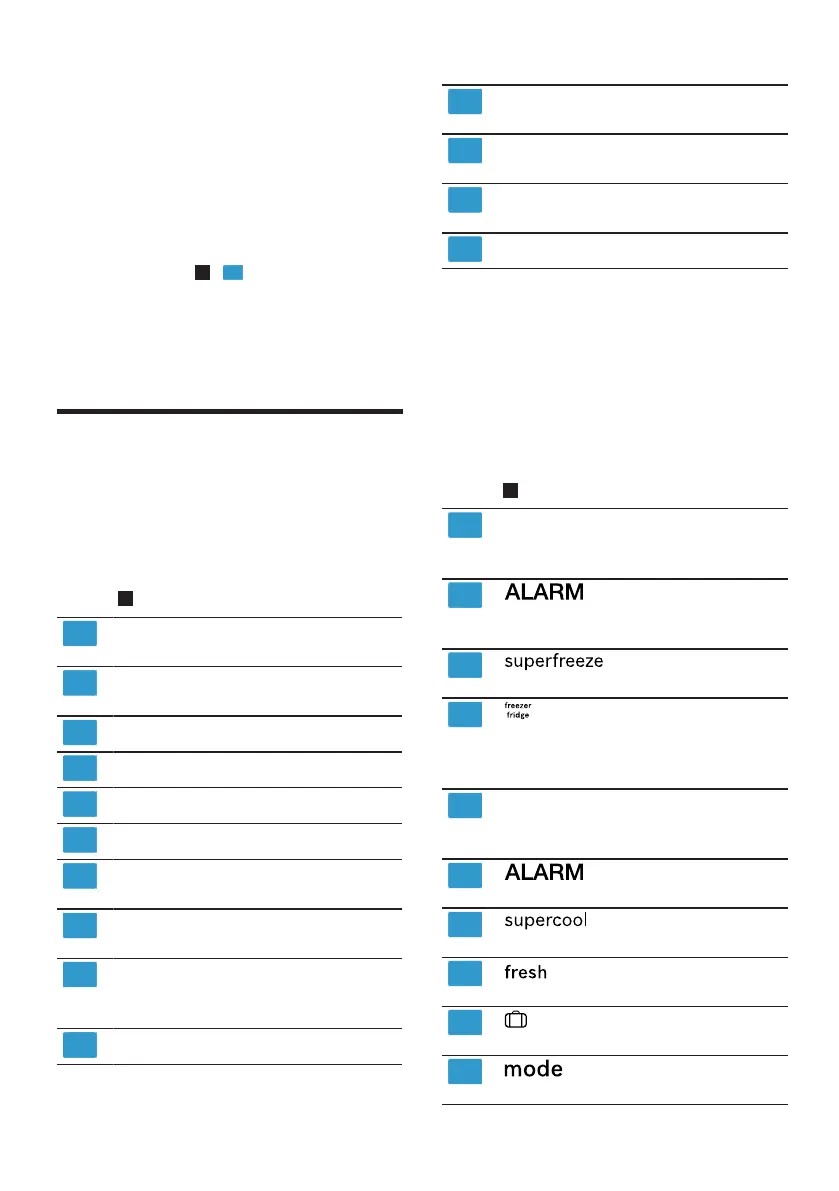
You can find an overview of the parts
of your appliance here.
→Fig.
1
Freezer compartment
→Page21
Refrigerator compartment
→Page21
Lighting
Ice cube maker →Page17
Rating plate →Page30
Snack container →Page16
Temperature controller (stor-
age container) →Page18
Storage container
→Page16
Fruit and vegetable container
with humidity control
→Page16
Control panel →Page15
Interior ventilation opening
(refrigerator compartment)
Butter and cheese compart-
ment →Page17
Door storage compartment
for large bottles →Page17
Screw foot
Note:Deviations between your appli-
ance and the diagrams may differ
with regard to their features and size.
5.2 Control panel
You can use the control panel to con-
figure all functions of your appliance
and to obtain information about the
operating status.
→Fig.
2
Displays the set temperature
for the freezer compartment
in °C.
lights up when the
temperature alarm is switched
on.
lights up when Su-
per freezing is switched on.
is used to select a com-
partment in order to change
the temperature or switch on
certain additional functions.
Displays the set temperature
for the refrigerator compart-
ment in°C.
lights up when the
door alarm is switched on.
lights up when Su-
per cooling is switched on.
lights up when the fresh-
ness mode is switched on.
lights up when holiday
mode is switched on.
is used to select a
mode.




 To Next Page