-12-
The variable speed control settings are
marked on the speed control dial. The
settings for approximate /min (OPM) are:
&D6A05&2AA6;4 &=221%.;42
:6; #$!
1 8,000
2 10,400
3 12,800
4 15,200
5 17,600
6 20,000
You can refer to the charts on next page to
determine the proper speed, based on the
material and accessory being used. These
charts enable you to select both the correct
accessory and the optimum speed at a glance.
''%,%#"'#"
"'#% '&
!<129@''
''<;9F
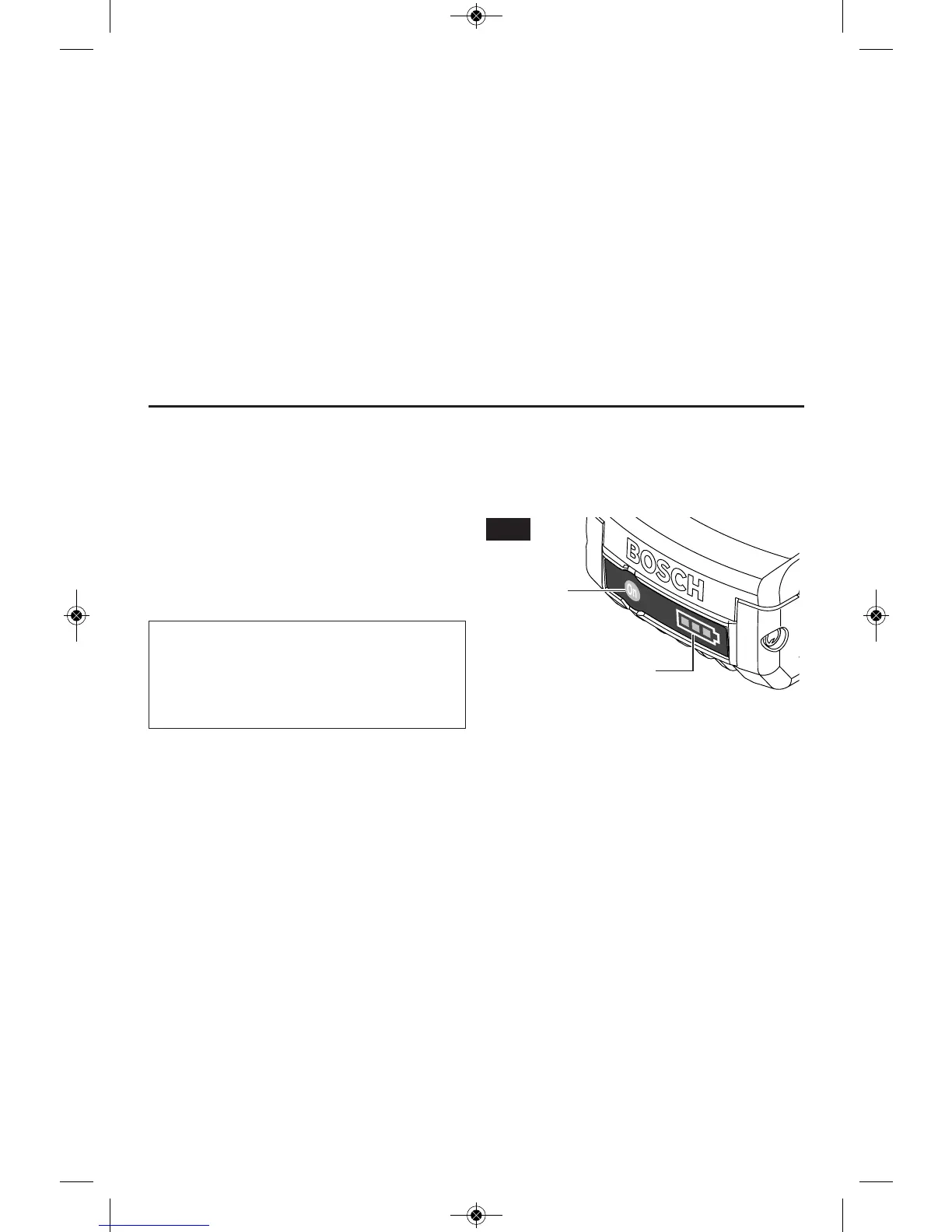
Your battery is equipped with charge condition
indicator lights (Fig. 4). The indicator lights
shows the charge condition of the battery
during operation.
To check the charge condition, press and hold
the charge condition indicator button with the
tool in the off position.
.=.06AF
Continuous lighting 3 x green > 2/3
Continuous lighting 2 x green > 1/3
Continuous lighting 1 x green < 1/3
Flashing light 1 x green reserve
CHARGE
CONDITION
INDICATOR
BUTTON
BATTERY CHARGE
CONDITION INDICATOR
LIGHTS
FIG. 4



 To Next Page