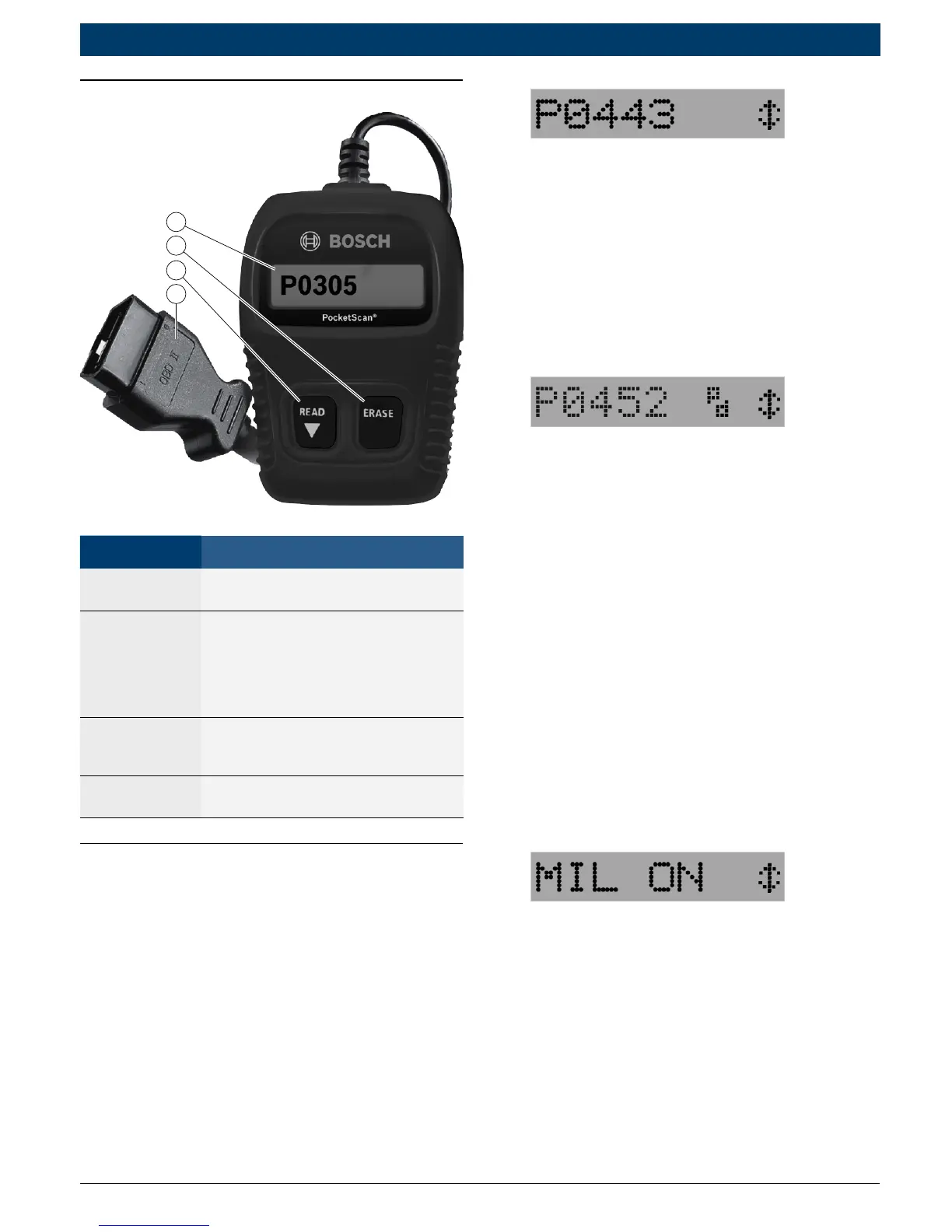
Part Description
1
LCD
display
Single-line display with 8 char
-
acters.
2 ERASE
Used to Erase Trouble Codes and
I/M Monitor status from Vehicle’s
Computer Modules and scroll up
through screens. (I/M Monitors
are currently used for state emis
-
sions tests.)
3 READ
Used to view Read Codes, MIL
Status, I/M Readiness Status and
scroll down through screens.
4
OBD II
Connector
Used to communicate with OBD II
compliant vehicles.
PocketScan™ Code Reader
Features
Read Codes
Reading Diagnostic Trouble Codes
allows the PocketScan
Code Reader to read the codes
from the vehicle’s computer
modules.
• Diagnostic Trouble Codes:
Diagnostic Trouble Codes are
used to help determine the
cause of a problem or problems
with a vehicle. Diagnostic Trou-
ble Codes are set when a fault is
present for a sufficient amount
of time.
• Pending Codes:
Pending Codes are also referred
to as “continuous monitor
codes” and “maturing codes.”
Pending Codes occurs when the
code has not occurred a specific
number of times (depending on
vehicle,) causing the code to
mature.
MIL Conditions
MIL (Malfunction Indicator Lamp)
Status displays the
state of the vehicles computer
module(s).
• MIL ON:
Indicates that the Malfunction
Indicator Lamp on vehicle should
be ON indicating a possible
emissions problem.
9 If the MIL Status is ON and the
MIL is not illuminated with the
engine running, then a problem
exists in the MIL circuit.
• MIL OFF:


 To Next Page