8
|
User guide
|
OBD 1000
|
en
574694 REV A | 11.2014 Bosch Automotive Service Solutions
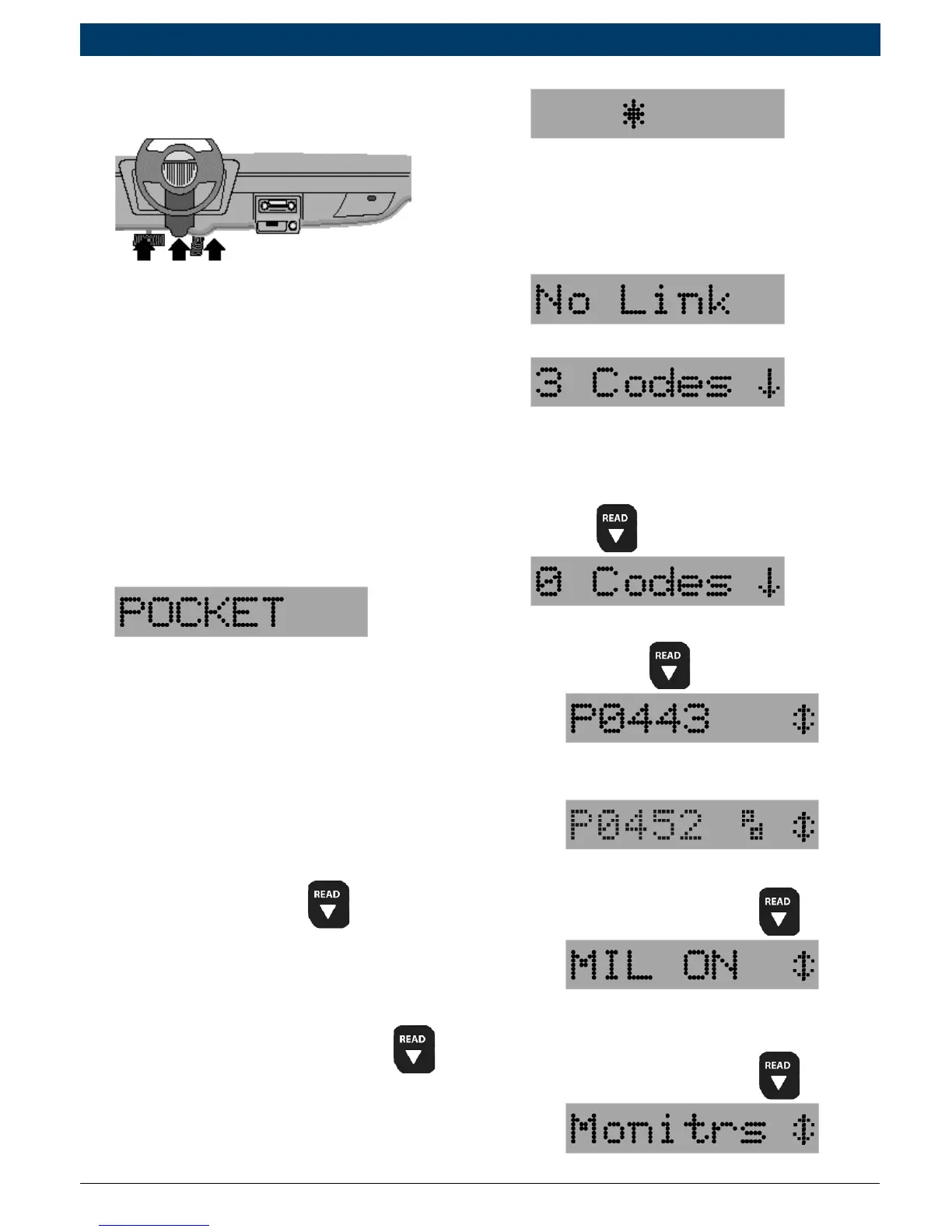
2. Locate and plug in data link
connector (DLC).
NOTE: The data link connector
should be located under the
dashboard on the driverside of
the vehicle. If the data link con-
nector is not located under the
dashboard as stated, a label
describing the location of the
data link connector should be
there.
3. Observe display toggles between
“Pocket” and “Scan”.
NOTE: For a correct reading for
diagnostic trouble codes and I/M
monitor status, ignition key must
be in the ON position and engine
does not require starting. To get
a correct reading for MIL status,
engine must be started.
4. Start engine.
5. Press and release
key.
NOTE: If diagnostice trouble
codes (DTCs) are already being
displayed from a previous read
operation, press and hold
for 3 seconds and release.
6. Observe a moving * on display.
NOTE: If “No Link” message
displays, cycle ignition key to the
OFF position for 10 seconds,
then back ON and repeat “Read-
ing Diagnostic Data” procedure.
7. View codes on display.
NOTE: If
there are no codes present, the
tool will display “0 Codes” and
proceed to display MIL Status
when
is pressed.
• To view codes, press and
release
.
• If the code is a pending code,
pd will be displayed.
8. View MIL status:
• Press and release
.
9. View I/M monitors that are
incomplete.
• Press and release
.


 To Next Page