7
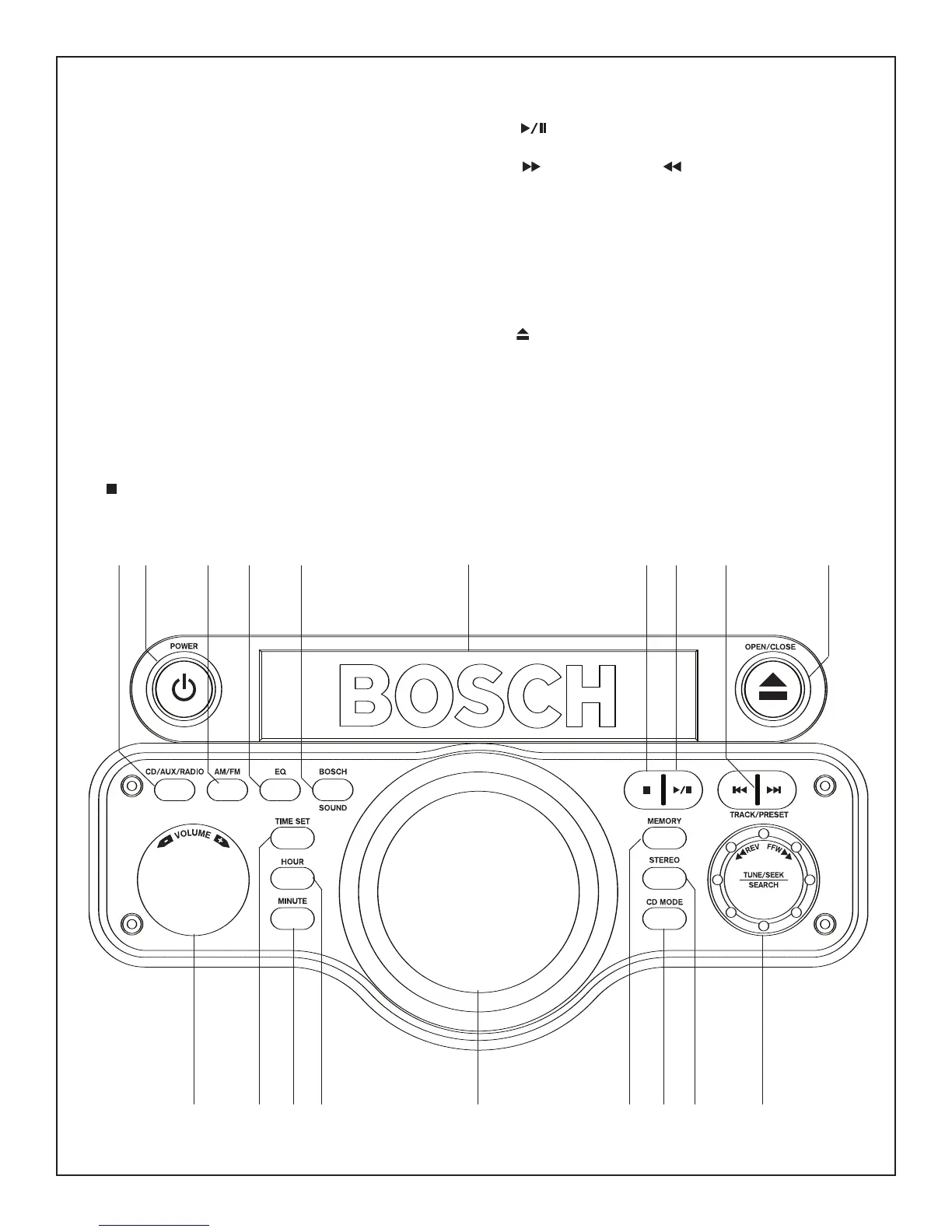
1. CD/AUX/RADIO Button– Pressing repeatedly selects
between the CD player, the Auxiliary Input, and the Radio.
2.
AM/FM Button – Pressing switches between AM and FM
when in Radio mode.
3.
EQ Button – Pressing repeatedly selects between 5 preset
equalizer settings, Rock, Pop, Classical, Jazz, and Normal.
4.
BOSCH SOUND Button – Pressing turns Bosch’s digitally
enhanced sound on or off.
5.
TIME SET Button – Pressing allows for the setting of time
using Hour and Minute Buttons.
6.
HOUR Button – Pressing sets the hour, on the clock, after
the Time Set Button is pressed.
7.
MINUTE button – Pressing sets the minute, on the clock,
after the Time Set Button is pressed.
8.
POWER Button – Pressing turns the unit on or off. (Power
outlets are not controlled by power button. Outlets always have
power if the unit is plugged in to a power source.)
9.
VOLUME CONTROL KNOB – Turning increases or
decreases the sound volume of the unit.
10.
STOP Button – Press to stop the CD playing while in CD
mode.
11.
PLAY / PAUSE Button – Pressing Plays a CD while
in CD mode or Pauses a playing CD.
12.
TRACK / PRESET / TRACK / PRESET – Pressing
skips/searchs for a track in CD mode or to select a Preset
radio frequency in Radio mode.
13.
MEMORY – Pressing sets radio tuner Presets, or sets CD
tracks into memory.
14.
STEREO – Pressing switches between Stereo and Mono
in FM
Radio mode.
15. CD MODE – Pressing selects Random or Repeat in CD
mode.
16. OPEN/CLOSE – Pressing opens or closes the CD tray for
loading or removing the CD.
17. TUNER CONTROL KNOB - Turning increases or decreases
the radio tuner frequency.
18.
LCD DISPLAY-Shows the various modes, clock time, and
radio frequency.
19.
CD TRAY-Opens and closes to insert or remove a CD.
PB10 – CD Controls
9
5
76
13
14
17
15
2
3
4
8
1
10
11
12
16
19
18



 To Next Page