English | 37
Bosch TCC78K751 | 01/2014
Controls and display
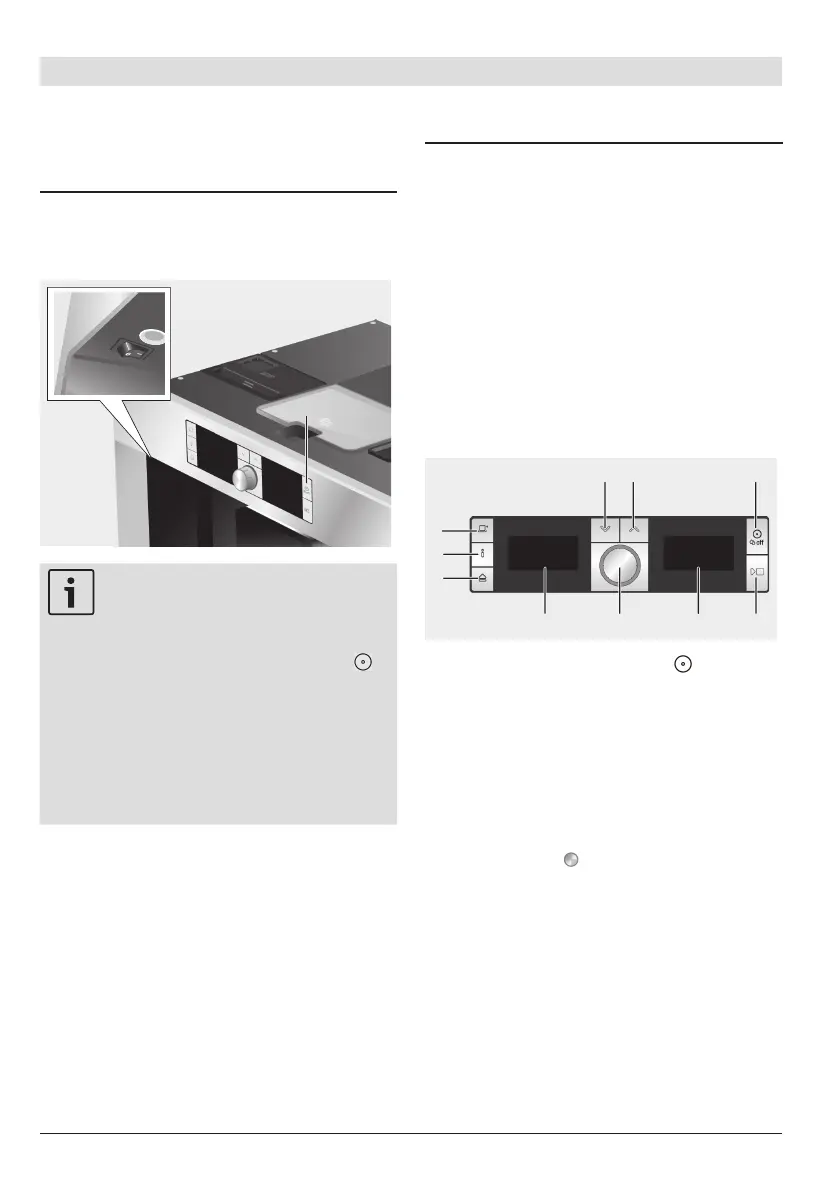
Power switch O/I
The appliance is switched on and off using
the power switch O/I (2).
Important: Do not press the
power switch while the appliance
is operating. To activate the
rinsing function, switch off the
appliance with the button (3)
(rinsing and switching off) or wait
until the appliance automatically
switches off (the length of time
this takes can be set, see Auto off
after in the section “Displaying
Settings”). The power switch is
automatically set to “0”.
Menu and display
The appliance features user-friendly menu
navigation to ensure that operation is as
easy as possible while at the same time
offering a wide range of functions. It
allows you to select from a multitude of
options in only a few steps once you know
how. The display shows which programme
you have selected and lets you know when
you need to top up the appliance with
water or coffee, or run one of the service
programmes. Basic menu operation is
described in the following pages.
Rinsing and switching off
(3):
With this button, the automatic rinsing
process is started and the appliance
switched off. The rinsing process does
not take place if there was no coffee
drawn.
X
Y
(4): These buttons are used to
navigate upwards and downwards in
the display (6).
Rotary knob
(5): This is turned
to select and change settings in the
display (e.g. coffee strength or per-cup
quantity).
Display (6): The display uses symbols
and texts to indicate settings, ongoing
processes and messages.
Symbol display (7): Icons shown in the
symbol display give information and
prompts in addition to the display text.




 To Next Page