37
TES7.. | 08/2013
en
Settings – Per-cup quantity
�
small
Ð
medium
Ò
large
Settings – Personal per-cup quantity
The preset per-cup quantity
�
,
Ð
or
Ò
can
be individually adjusted to the size of the
cup in use by turning the rotary knob 6. The
per-cup quantity can be adjusted according
to the drink selected. An arrow in the
Ò
symbol in the top right-hand corner of
the display indicates whether the per-cup
quantity was increased or decreased. If you
set for example Coffee Á, the adjustment
of the per-cup quantity in ml, and in the
case of a milk-based coffee drink, for
example Cappuccino
Æ
, the adjustment of
the per-cup quantity including the volume of
milk (froth) in ml, is indicated.
Important: The selected amount in ml is
an approximate value and can vary sig-
nicantly as a result of crema forming, the
grind setting or the type of milk used, etc.
Settings – My coffee (only TES715)
In addition to selecting coffee strength and
per-cup quantity, you can choose the exact
mix of espresso and milk for your own coffee
setting Mycoffee Ç:
● The setting can be dened in 20 % steps
by turning the rotary knob 6.
Customising
You can store up to 6 user proles in the
User settings menu. The required coffee
and hot water temperatures are saved in
the user proles.
Important: The “Customising” settings
(á button 2) are not identical to those
under “Menu settings” (j button 7) and vice
versa.
Storing or changing the user
● Hold down the
á button 2 for at least
3 seconds.
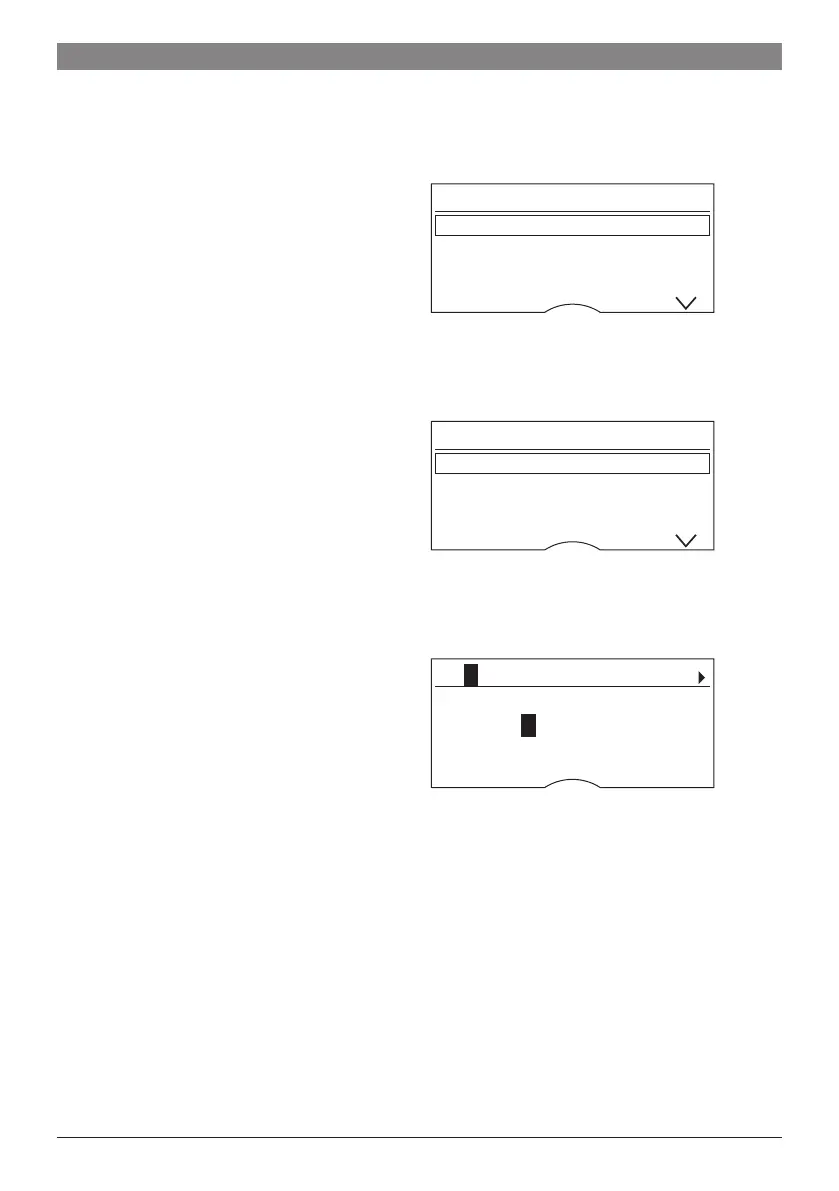
The menu appears:
User settings
User 1
start
User 2
User 3
● Select the required user using the selec-
tion button and press the start button 8.
The following selection appears in the
display:
User settings: User 1
Edit name
start
Delete name
Coffee temp.
● To change the user name, use the selec-
tion button to go to Edit name
start
and press the start button 8.
The input eld appears in the display:
â ABCDEFGHIJKLMNOPQ
_ _____
Abort Store
● Turn the rotary knob 6 to select a letter or
number.
● Conrm by pressing the start button 8.
There are 6 characters available for the
user name.
To delete entries made, select the symbol
â and press the start button 8.
Note:
Press the selection button
> to save your
entry. Press the selection button < to cut
the process short.
Info: The entry can be overwritten at any
time.




 To Next Page