en Basic settings
32
Basic settings
14 Basic settings
Basic settings
You can configure the basic settings
for your appliance to meet your
needs.
14.1 Overview of the basic
settings
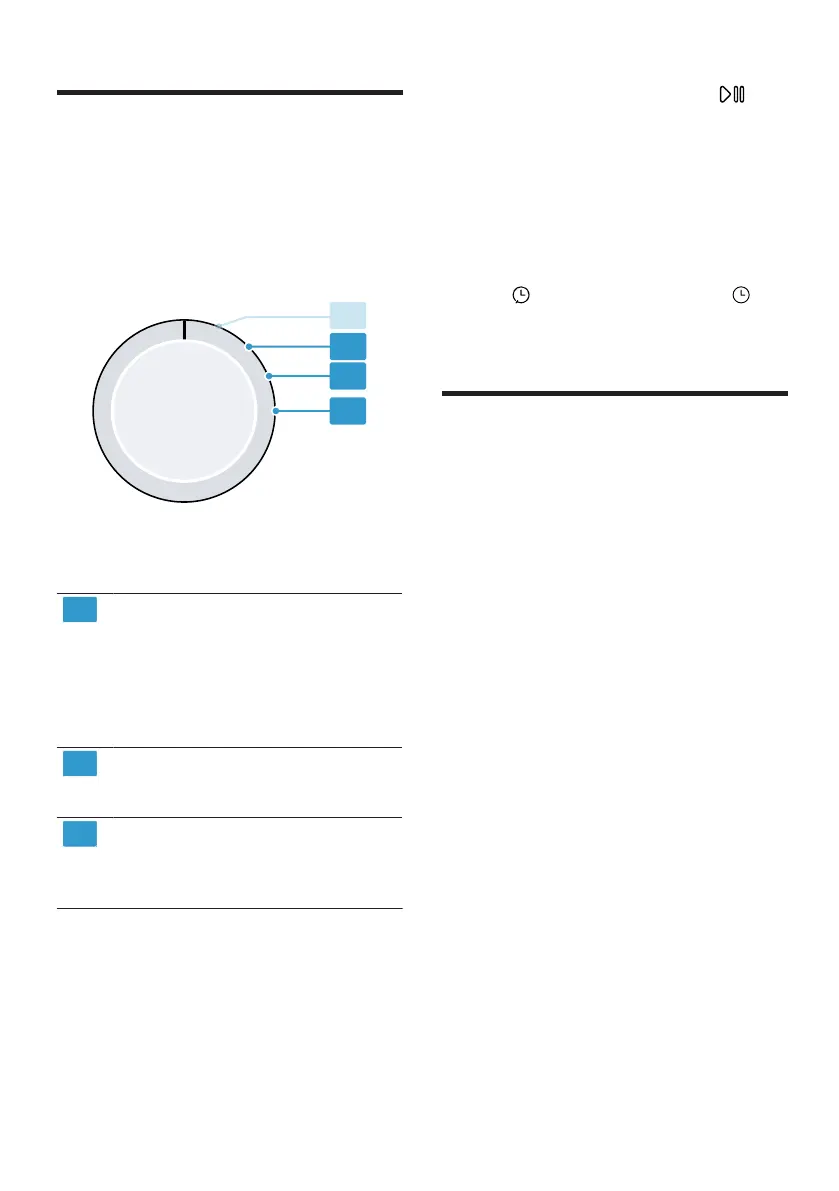
Programme selector with programme
positions
Set the spin speed of the
washing machine:
600 (low) to 1800 (high)
1
The set value increases or de-
creases the displayed dura-
tion of the automatic pro-
grammes.
Set the volume of the signal
at the end of the programme:
0 (off) to 4 (very loud)
Set the volume of the signal
tone emitted when the but-
tons are pressed:
0 (off) to 4 (very loud)
1
Example
14.2 Changing the basic set-
tings
1. Set the programme selector to po-
sition 1. →Page32
2. Press Inicio/Pausa +Carga
and, at the same time, turn the
programme selector to position2.
a The display shows the current
value.
3. Use the programme selector to se-
lect the required basic setting.
→Page32
4. To change the value, press Ter-
min. / Duración/Duração .
5. To save the changes, switch off
the appliance.
Cleaning and servicing
15 Cleaning and servi-
cing
Cleaning and servicing
To keep your appliance working effi-
ciently for a long time, it is important
to clean and maintain it carefully.
15.1 Base unit
The base unit is the accessible area
at the bottom of the appliance in
which you will find the heat ex-
changer.
Opening the base unit
Requirements
¡ The appliance has cooled down
for 30 minutes.
¡ The appliance door is closed.



 To Next Page