XDK110 BCDS
© Bosch Connected Devices and Solutions GmbH reserves all rights even in the event of industrial property rights. We reserve all rights of disposal such as
copying and passing on to third parties. BOSCH and the symbol are registered trademarks of Robert Bosch GmbH, Germany.
Note: Specifications within this document are subject to change without notice.
1.2.2.4 XDK Device Information
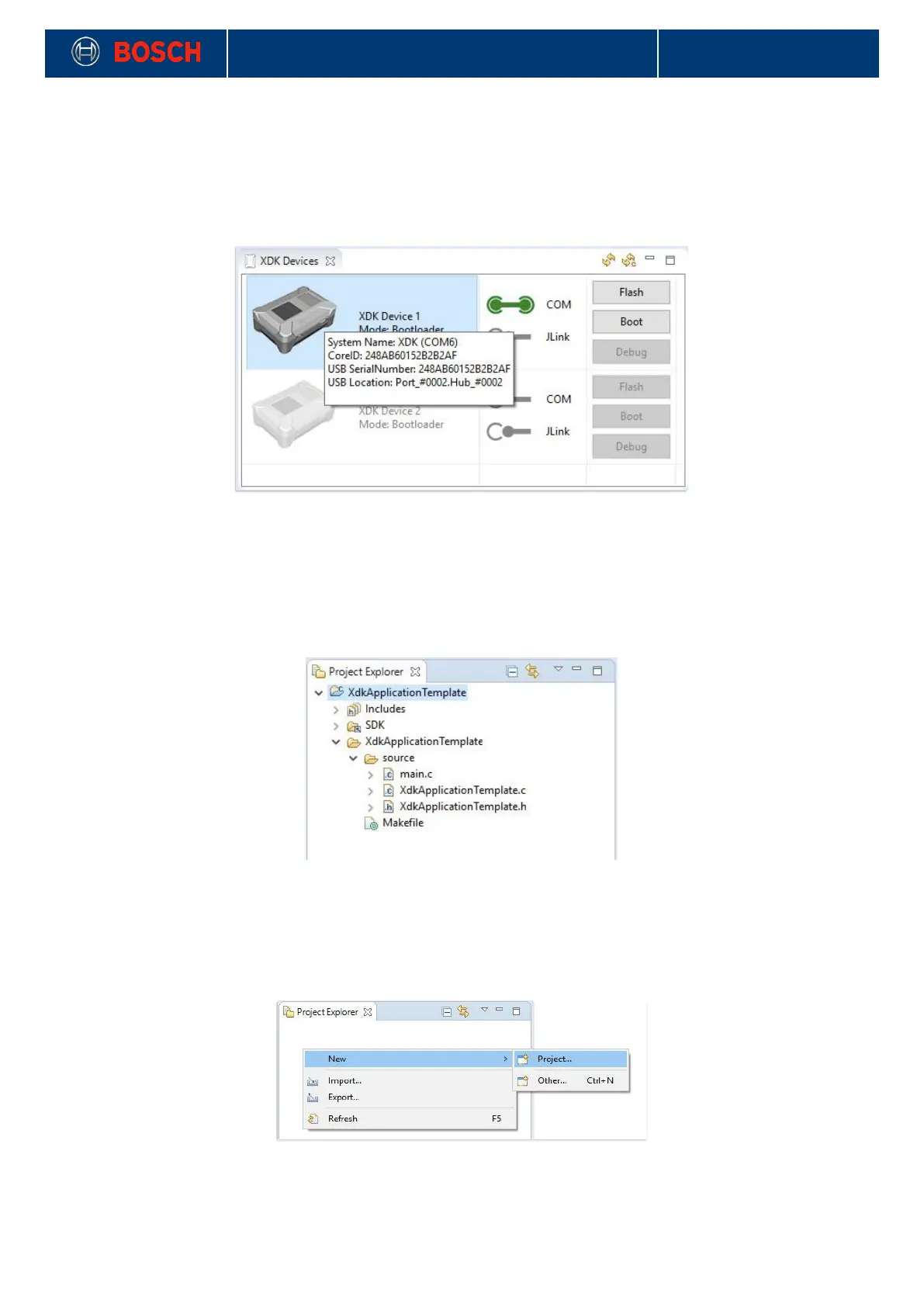
To get some system relevant information like the connected XDK’s CoreID or the USB serial number you can
mouse over a device . A window will appear and display the information. The CoreID is unique for each XDK
and is based on it’s micro controller ID.
Picture 9: XDK device information
!
1.2.3 Project Explorer
The project explorer stores all current XDK projects. It allows the creation of new projects and the
implementation of example projects from the welcome screen. It is also possible to import and export
projects from and to the XDK community.
Picture 10: Project explorer
!
Creating a new Project
It is possible to create new projects in the project explorer. For this you have to right-click in the project
explorer area -> select New -> select Project.
Picture 11: Project wizard
!
Now you have to choose between certain project types. It is recommended to create a C project.


 To Next Page