EasyManua.ls Logo

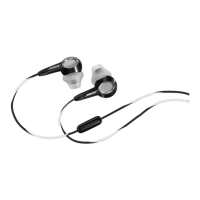
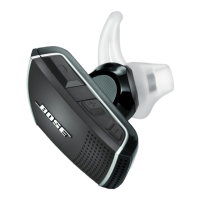
Bose MIE2 - User Manual

Bose MIE2
18 pages
Print Icon
To Next Page IconTo Next Page
Loading...
BOSE®
MIE2
MOBILE
HEADSET
Owner's Guide IGufa de usuario INotice d'utilisation

Other manuals for Bose MIE2

Questions and Answers

  • A
    Amanda SmithAug 14, 2025
    Why is there no audio from my Bose Headsets?
    • A
      Alyssa KaneAug 14, 2025
      If you are experiencing no audio, intermittent sound, or sound from only one earpiece in your Bose Headsets, ensure the headset plug is securely connected to the headphone/headset jack and not the line out jack. Also, try another audio device and consider using the additional 3.5 mm adapter cable.
  • A
    Angela BatesAug 17, 2025
    What to do if my Bose MIE2 have low volume or poor audio?
    • G
      gtorresAug 18, 2025
      If you are experiencing low volume or poor audio with your Bose Headsets, first, turn off any “sound checker” or other audio signal altering features on the audio source. Then, ensure the ear tips and headset nozzles are clear of any debris or wax build-up. Finally, make sure the volume level of the audio source is turned up.
  • D
    David DicksonAug 21, 2025
    What to do if I can't hear the incoming call ring tone through my Bose Headsets?
    • J
      Joseph SheltonAug 21, 2025
      If you cannot hear the incoming call ring tone through your Bose Headsets, ensure that your phone is set to pass the ring tone through to the headset. Check your phone settings and make adjustments as needed.
  • R
    Ryan BrightAug 25, 2025
    What to do if my phone unexpectedly ends call using Bose Headsets?
    • J
      Jaclyn SuarezAug 25, 2025
      If your phone unexpectedly ends a call when using Bose Headsets, it may be because some phones will end a call if the headset is unplugged during a call. Ensure that the headset plug is securely connected to the headphone/headset jack. You should also check your phone's signal strength to ensure network coverage.
  • S
    sweissAug 28, 2025
    How to fix muffled sound from Bose MIE2 Headsets earpiece?
    • J
      justinortizAug 28, 2025
      If the sound from your Bose Headsets earpiece is muffled, start by ensuring the ear tips and headset nozzles are clear of any debris or wax build-up. Next, unplug the headset from the audio source and then plug it back in, making sure it's securely connected. You can also try another audio device to check if the issue persists.
  • J
    John JacksonAug 31, 2025
    Why microphone is not picking up sound on Bose MIE2?
    • R
      Roy RiveraAug 31, 2025
      If the microphone on your Bose Headsets is not picking up sound, try using the additional 3.5 mm adapter cable. Also, ensure that the microphone is not being blocked or covered. The microphone is located on the back of the Answer/End button (you may notice the small opening for the microphone).
  • K
    Kimberly JacksonSep 3, 2025
    What to do if the phone is not responding when Answer/End button is pressed on Bose Headsets?
    • J
      John KirkSep 3, 2025
      If your phone is not responding when the Answer/End button is pressed on your Bose Headsets, try using the additional 3.5 mm adapter cable. Some phones may require you to press and hold the Answer/End button for a few seconds to perform functions.
  • M
    Melissa WatsonSep 6, 2025
    Why is there excessive bass on my Bose MIE2 Headsets?
    • C
      Christina ReyesSep 7, 2025
      If you are experiencing excessive bass with your Bose Headsets, turn off any audio enhancement features on the audio source.
  • S
    Stephanie GibsonSep 9, 2025
    How to stop Bose Headsets ear tips from falling off?
    • C
      Cathy BooneSep 9, 2025
      To prevent the ear tips on your Bose Headsets from falling off, ensure that the ear tips are securely attached to the earpiece and nozzle hook.

Bose MIE2 Specifications

General IconGeneral
BrandBose
ModelMIE2
CategoryHeadsets
LanguageEnglish

Related product manuals