Need help?
Do you have a question about the Bose QC35 II and is the answer not in the manual?
Highlights the removable gaming module, boom mic, and PC controller as key differences from standard QC35 II headphones.
Explains wireless use via Bluetooth in lifestyle mode and wired aux use with the gaming module for low-latency gaming.
Wired connection ensures lowest latency and continued audio playback even if the headset battery is depleted during gaming.
Instructions on pinching the clip by the ear cushion and gently pulling the boom mic straight down to detach it.
Confirms that plugging in the aux cable for gaming mode disables the Bluetooth connection.
Noise cancellation is not mandatory but highly recommended for an enhanced gaming experience, improving audio clarity.
The PC controller is typically auto-recognized; ensure it's set as the default audio device in sound settings if issues arise.
Third-party chat applications commonly used by gamers for communication with teammates during gameplay.
The top dial controls system volume, allowing quick adjustments for all active applications.
Cycles through mic monitoring levels (off, low, medium, high) and can be held to disable it instantly.
Allows users to hear their own voice through the microphone, aiding in self-regulation of speaking volume.
A method using electronically generated anti-noise signals to cancel unwanted ambient sound for clearer audio.
Achieved through active noise reduction using internal/external microphones and passive reduction via acoustic design and materials.
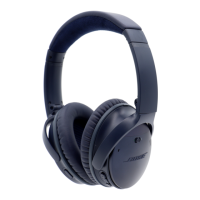
The QC35 II Gaming Headset is a versatile audio device designed to cater to both gaming and everyday lifestyle needs, consolidating the functionalities of a gaming headset and wireless headphones into a single unit. This hybrid design allows users to seamlessly transition between immersive gaming sessions and casual listening without needing multiple devices.
At its core, the QC35 II Gaming Headset provides world-class noise cancellation, a feature inherited from the QuietComfort® 35 wireless headphones II. This technology actively reduces unwanted ambient noise by electronically generating an opposing signal, creating a quieter listening environment. Microphones positioned both inside and outside the earcups continuously monitor surrounding sounds, allowing the headset's electronics to instantly process and counteract noise, ensuring a clean, high-fidelity sound signal at the ear. This active noise cancellation is complemented by passive noise reduction, achieved through the acoustic design and materials used for the earcups and cushions, contributing to comprehensive noise isolation.
The headset delivers acclaimed lifelike sound, ensuring a rich and detailed audio experience whether you're engrossed in a game or enjoying music. A key differentiator for the gaming variant is its removable gaming module. This module integrates a boom mic for clear voice communication, a mic mute function for privacy, and comes with a PC desktop controller. The desktop controller facilitates convenient volume adjustments and mic monitoring, enhancing the gaming experience.
In its lifestyle mode, the QC35 II Gaming Headset operates as standard wireless headphones, connecting wirelessly via Bluetooth. This allows for untethered listening to music, podcasts, or other audio content from compatible devices. When the gaming module is attached, the headset transitions to a wired connection using a built-in aux cord. This wired connection is specifically implemented to provide the lowest possible latency, which is crucial for competitive gaming where even milliseconds can impact performance. The wired connection also ensures that gaming can continue even if the headset's battery is depleted, though noise cancellation will be unavailable in this scenario.
The PC desktop controller, a central component of the gaming setup, is designed for ease of use. It typically connects to your computer and is automatically recognized as the default audio input and output device. The controller features a top dial for intuitive volume control, allowing users to adjust the overall operating system volume for all active applications. Additionally, a button on the front of the controller, located next to the aux jack, cycles through four levels of mic monitoring: off, low, medium, and high. This button can also be pressed and held to quickly disable mic monitoring.
Mic monitoring is a crucial feature for gamers, allowing them to hear their own voice as it's picked up by the microphone. This self-regulation mechanism helps prevent users from speaking too loudly, which can be uncomfortable for others in a shared space or during online communication.
The QC35 II Gaming Headset offers flexible usage modes. For wireless listening, simply use the headset in its lifestyle mode, leveraging Bluetooth connectivity. To engage in gaming, attach the removable gaming module. This automatically switches the headset to a wired connection via the aux cable, disabling Bluetooth to prioritize low-latency audio.
Noise cancellation is a user-selectable feature. While not mandatory for gaming, it is highly recommended to enhance the immersive experience by blocking out distractions and allowing gamers to hear more subtle in-game audio cues.
The boom mic is designed for easy attachment and removal. To remove it, users need to pinch the clip near the ear cushion with their forefinger and thumb, then gently pull straight down while wiggling slightly.
The PC desktop controller simplifies audio management during gaming. The rotary dial provides quick access to volume control, while the dedicated button manages mic monitoring levels. For online communication, the headset is compatible with popular third-party chat applications like Discord and TeamSpeak, which are widely used by gamers to coordinate with teammates and friends.
While the manual does not explicitly detail maintenance features, the design implies certain aspects. The removable boom mic suggests that individual components can be detached, potentially for cleaning or replacement if necessary. The robust construction, typical of Bose products, indicates durability for prolonged use. The combination of active and passive noise reduction technologies, along with the choice of materials for earcups and cushions, suggests a design intended for comfort and longevity, likely requiring standard care for audio devices such as keeping them clean and protected from extreme conditions. The wired option for gaming, allowing continued use even with a depleted battery, can be considered a practical maintenance feature, ensuring uninterrupted gaming sessions.
 General
| Type | Over-Ear |
|---|---|
| Bluetooth | Yes |
| Microphone | Yes |
| Voice Assistant Support | Yes (Google Assistant, Amazon Alexa) |
| Bluetooth Version | 4.1 |
| Charging Time | 2.25 hours |
| Battery Life (wired) | Up to 40 hours |
| Wired Option | Yes |
| Foldable Design | Yes |
| Noise Cancellation | Active |
| Battery Life | Up to 20 hours (wireless) |
| Connectivity | Bluetooth, wired |
| Colors | Black, Silver |
| Weight | 240 grams |

 To Next Page