
 Need help?
Do you have a question about the Bose QC25 and is the answer not in the manual?
Identifies and explains the numbered parts of the BTunes device.
Procedure for powering the BTunes device on and off using the MFB button.
Steps to pair BTunes with a Bluetooth-enabled mobile phone.
Instructions for pairing BTunes with a Bluetooth transmitter.
Connecting BTunes to two Bluetooth devices simultaneously.
Covers answering, rejecting, ending calls, and call transfer.
The BTunes for Bose QC25 is a device designed to enhance the functionality of Bose QC25 headphones by enabling wireless audio streaming and phone call capabilities. This user manual provides comprehensive instructions for its operation, ensuring users can fully leverage its features.
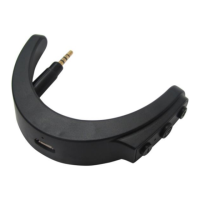
The primary function of the BTunes for Bose QC25 is to transform wired Bose QC25 headphones into wireless Bluetooth-enabled headphones. It supports streaming CD quality music from smart devices and facilitates hands-free phone calls. The device integrates seamlessly with the Bose QC25, plugging into the headphone's audio input jack.
Before initial use, users are advised to read the manual carefully. Installation involves plugging the BTunes into the 2.5mm audio input jack on the left side of the Bose QC25 headphones. The device is then ready for use with the headset worn according to the L/R side.
The BTunes features a USB charging jack. When the battery is low, the device emits a "Battery low" prompt, and a red LED flashes instead of blue. To charge, users connect the provided USB charging cable to a PC or charger and then to the BTunes' USB port. A red light indicates charging, which turns off when fully charged. A full charge takes approximately 1.5 hours. Users are warned that the battery is recyclable and should not be exposed to excessive heat.
To power on, users press and hold the MFB (Multi-Function Button) for 2 seconds until a blue LED illuminates and a "Power on" prompt is heard. To power off, the MFB is pressed and held for 3 seconds, resulting in a red LED and a "Power off" prompt. The device will automatically power off to save energy if not connected to a device within a limited time.
The BTunes supports pairing with Bluetooth cellphones and Bluetooth transmitters, as well as multi-point connections with two Bluetooth devices simultaneously.
Pairing with a Bluetooth Cellphone: For first-time use, the BTunes must be paired with a Bluetooth-enabled cellphone. Users place the BTunes and cellphone within 1 meter, then press and hold the MFB for about 7 seconds until red and blue LEDs flash alternately, accompanied by a "Pairing" voice prompt. Users then select "The BTunes QC25/5" from their cellphone's Bluetooth list. Upon successful connection, the blue LED flashes twice every 4 seconds, and a "Your device is connected" prompt is heard. The pairing mode lasts for 2 minutes; if no connection is made, the BTunes enters standby mode. After successful pairing, the devices remember each other for future automatic connections. If the BTunes is not connected, a short press of the MFB will attempt to connect to the last connected device. If the BTunes moves out of effective range, it will disconnect but can automatically reconnect within 5 minutes upon returning to range; otherwise, a short MFB press is needed.
Pairing with a Bluetooth Transmitter: The BTunes can connect to a Bluetooth transmitter (e.g., BTT005, not included) for wireless music. The process involves keeping both devices within 1 meter, making the BTunes enter pairing mode, and then turning on the Bluetooth transmitter to enter its pairing mode. The transmitter will automatically search for and send a pairing request. Upon successful pairing, the blue LED on the BTunes flashes twice every 4 seconds, and "Your device is connected" is prompted. The pairing password for the BTunes is "0000," meaning it can only pair with transmitters using the same password. If pairing fails, users should consult the transmitter's manual.
Multi-point Devices: The BTunes can connect to two Bluetooth devices concurrently. The procedure involves pairing with the first device, then turning on the BTunes again to enter pairing mode and pairing with the second device. Finally, the first device is operated to connect with the BTunes, establishing a connection with both devices. To enable multi-point power on, users simultaneously press the MFB and Volume Up buttons until a blue LED appears for 1 second. To power off multi-point, users simultaneously press the MFB and Volume Down buttons until a red LED appears for 1 second. For optimal user experience, it is recommended to power off the multi-point function when connecting with only one device.
When connected to iOS or some Android devices, the BTunes' battery level is displayed on the device. A red power symbol indicates a low battery.
The BTunes offers various call management functions:
The BTunes provides controls for music playback:
The LED indicator provides visual feedback on the device's status:
To perform a factory reset, while the device is powered off or charging, long press the MFB and Volume Up buttons simultaneously for about 3 seconds until the red and blue LEDs flash simultaneously. After a factory reset, the paired device list is deleted, and the BTunes will automatically enter pairing mode upon power-on, requiring re-pairing with Bluetooth devices.
To ensure the longevity of the BTunes, users are advised to follow these recommendations:
The manual addresses common issues:
 General
| Type | Over-ear |
|---|---|
| Connectivity | Wired |
| Connector | 3.5mm |
| Battery Type | AAA |
| Foldable | Yes |
| Noise Cancellation | Active |
| Battery Life | Up to 35 hours |
| Weight | 195 grams |
| Cable Length | 1.42 meters |
| Included Accessories | Carrying case, Airline adapter |
| Warranty | 1 year limited warranty |



 To Next Page