EasyManua.ls Logo

Bose SOUNDSPORT FREE - User Manual

Bose SOUNDSPORT FREE
36 pages
Print Icon
To Next Page IconTo Next Page
Loading...
Owners Guide
Brugervejledning
Bedienungsanleitung
Gebruikershandleiding
Guía del usuario
yttöohje
Notice d’utilisation
Manuale di istruzioni
Kezelési útmutató
Brukerveiledning
Podręcznik użytkownika
Bruksanvisning
SOUNDSPORT
®
FREE
WIRELESS

Other manuals for Bose SOUNDSPORT FREE

Questions and Answers

  • E
    Erin HardyJul 27, 2025
    What to do if my Bose Headphone doesn’t charge?
    • M
      Mark WellsJul 27, 2025
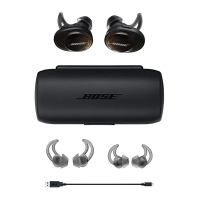
      If your Bose Headphone isn’t charging, ensure the headphones are correctly placed in the charging case. Also, verify that the charging case battery isn't depleted. Check for any dirt or debris on the charging conductors inside the case or on the earbuds. If the headphones have been exposed to extreme temperatures, allow them to return to room temperature before attempting to charge again.
  • R
    Ronald SmithJul 31, 2025
    Why won't my Bose Headphone connect to my mobile device?
    • K
      Kristine JamesJul 31, 2025
      If your Bose Headphone isn't connecting to your mobile device, first ensure that your device supports Bluetooth. Then, on your mobile device, turn Bluetooth off and then on again. Delete your Bose Headphone from the Bluetooth list and reconnect. Move your mobile device closer to the headphones, away from obstructions. You can also clear the headphone pairing list and try connecting again.
  • A
    Arthur WaltersAug 4, 2025
    How can I find my lost Bose Headphone earbuds?
    • K
      Kyle WalkerAug 5, 2025
      To find your lost Bose Headphone earbuds, use the Bose® Connect app. Note that the Find My Buds setting must be enabled in the app before the earbuds are lost.
  • J
    Jill HouseAug 9, 2025
    What to do if there is no sound from my Bose Headphone?
    • M
      meyersstevenAug 9, 2025
      If you're not getting any sound from your Bose Headphone, start by ensuring the audio is playing on your mobile device. Check the headphone charging status by placing them in the charging case; charge if needed. Increase the volume on both the headphones and your device. Press the Bluetooth button to confirm the correct device is connected. Move closer to your device, ensuring no obstructions. You might also try a different music source.
  • G
    Gregory CarsonAug 13, 2025
    Why is my Bose Headphone charging case not charging?
    • M
      Michael WilliamsAug 13, 2025
      If the charging case for your Bose Headphone isn’t charging, check the case battery level by pressing the button on the front. If needed, charge the case using the supplied USB cable, ensuring both ends are securely connected. If the case has been exposed to extreme temperatures, let it return to room temperature before trying again.
  • L
    Leon TranAug 17, 2025
    Why does my Bose Headphone have poor sound quality?
    • R
      Robert ShieldsAug 17, 2025
      If you experience poor sound quality with your Bose Headphone, ensure both headphones fit securely in your ear. Try a different music source or another mobile device. Move your device closer to the headphones, away from obstructions. Also, clear any debris or wax from the earbuds and nozzles. Finally, confirm your headphones are connected via the Stereo A2DP Bluetooth profile in your device's Bluetooth settings.
  • H
    Heather MartinezAug 21, 2025
    What to do if there is no sound from one earbud of my Bose Headphone?
    • A
      Angela SullivanAug 22, 2025
      If you're not getting sound from one earbud of your Bose Headphone, place both earbuds in the charging case until they magnetically snap into place, and the charging indicators blink white. Then, remove the earbuds.

Summary

IMPORTANT SAFETY INSTRUCTIONS

Warnings and Cautions

Detailed safety warnings and precautions for product usage.

Regulatory Compliance Notes

Compliance information for FCC, Industry Canada, and radio frequency regulations.

REGULATORY INFORMATION

EU Declarations and Bluetooth Specs

EU compliance declarations and Bluetooth frequency band specifications.

China Hazardous Substances Table

Table detailing hazardous substance content in product components per China regulations.

Taiwan RoHS and Importer Details

Taiwan hazardous substance table and contact information for regional importers.

BOSE CONNECT APP

App Functionality and Features

Overview of app features like Find My Buds, customization, and software updates.

WHATS IN THE CARTON?

Included Product Components

Lists and illustrates all items included in the product packaging.

SWEAT AND WEATHER RESISTANCE

Headphone Resistance Rating

Details the IPX4 sweat and weather resistance rating of the headphones.

HEADPHONE CONTROLS

Earbud and Case Control Overview

Explains the buttons and functions on the headphones and charging case.

Opening the Charging Case

Instructions on how to open the charging case using its button.

Powering On and Standby Mode

How to turn the headphones on and how the standby timer functions.

Powering Off the Headphones

Steps to turn off the headphones by placing them in the charging case.

Media Playback and Volume Control

Details on controlling music playback and volume using earbud buttons.

Call Management and Voice Control

How to answer, end, manage calls, and activate voice control features.

SECURE FIT

Choosing and Fitting Ear Tips

Guidance on selecting and properly inserting StayHear+ Sport ear tips for an optimal fit.

Changing StayHear+ Sport Ear Tips

Step-by-step guide on how to remove and attach StayHear+ Sport ear tips.

BATTERY CHARGING

Charging the Headphones

Instructions for placing earbuds in the case to charge them.

Charging Time and Battery Level Check

Information on headphone charging time, usage duration, and checking battery levels.

Charging the Case and Time

How to charge the case and details on charging time and its capacity for earbuds.

Checking Case Battery Level

How to check the remaining battery charge of the charging case using indicators.

STATUS INDICATORS

Bluetooth Indicator Status

Explains the meaning of Bluetooth indicator light states on the earbuds for connection status.

Charging Case Battery Indicators

Details the battery level indicators on the charging case and their meanings.

Headphone Charging Indicators

Describes the charging status indicators for individual earbuds.

VOICE PROMPTS

Language Options and Changing Prompts

Information on available languages for voice prompts and how to change them.

BLUETOOTH CONNECTIONS

Connecting via Bose Connect App

Instructions for connecting the device using the recommended Bose Connect app.

Connecting via Mobile Bluetooth Menu

Steps to connect the headphones using the device's native Bluetooth settings.

Disconnecting and Reconnecting Devices

How to disconnect and reconnect mobile devices to the headphones.

MULTIPLE BLUETOOTH CONNECTIONS

Connecting and Managing Multiple Devices

Guide to pairing and managing multiple Bluetooth devices with the headphones.

Managing Paired Device List

Instructions for identifying, reconnecting, and clearing paired devices.

CARE AND MAINTENANCE

Cleaning and Replacement Parts

Procedures for cleaning the headphones and information on ordering replacement parts.

Limited Warranty Information

Details about the product's limited warranty and registration.

TROUBLESHOOTING

Common Solutions Overview

Troubleshooting common issues like power, connection, and charging problems.

Specific Symptom Solutions

Solutions for specific problems like no sound, poor sound quality, or tips falling off.

Bose SOUNDSPORT FREE Specifications

General IconGeneral
Rechargeable batteryYes
Battery recharge time2 h
Continuous audio playback time5 h
Quantity1
Cables includedUSB
Headset typeBinaural
Product typeHeadset
Product colorBlack
Wearing styleIn-ear
Volume controlDigital
Recommended usageSports
Protection featuresRain proof, Sweat resistant
International Protection (IP) codeIPX4
3.5 mm connectorNo
USB connectivity-
Bluetooth profilesHFP
Connectivity technologyTrue Wireless Stereo (TWS)
Impedance- Ω
Ear couplingIntraaural
Headphone frequency- Hz
Intraaural headphones typeEarbuds
Microphone typeBuilt-in
Weight and Dimensions IconWeight and Dimensions
Depth30.48 mm
Width25.4 mm
Height31.75 mm
Charging case weight80 g
Left earpiece weight9 g
Charging case dimensions (W x D x H)100 x 47.5 x 37.5 mm

Related product manuals