14
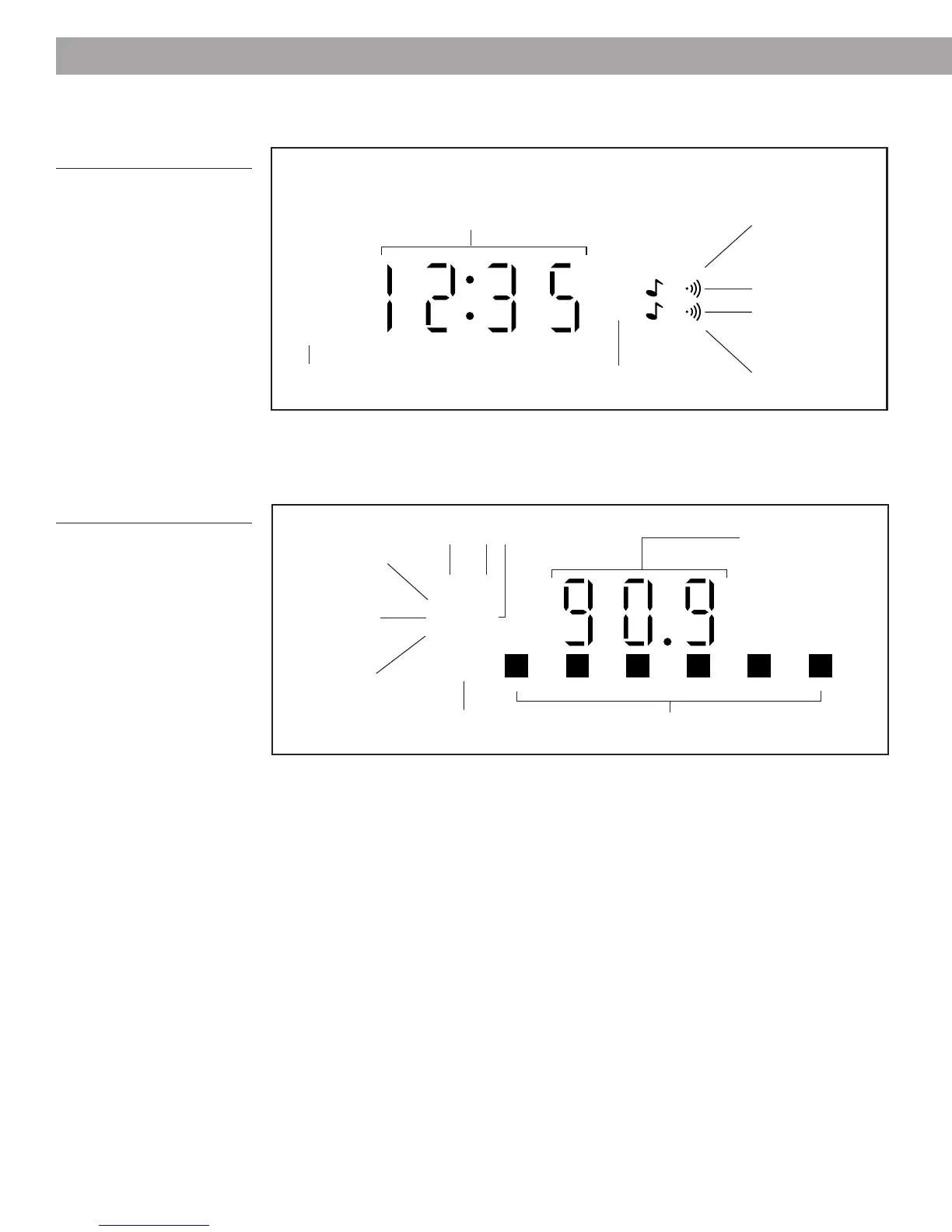
Reading the clock display
Figure 8
The clock display
SLEEP
PM
ALARM
ALARM 2
Lights to indicate
sound selected for
Alarm 1.
Lights to indicate
Alarm 1 is on.
AM
One will light to
indicate AM or PM.
Lights to indicate
Alarm 2 is on.
Lights to indicate
sound selected for
Alarm 2.
Reading the radio display
Figure 9
The radio display
AUX FM
STEREO
VOL AM
SEEK
PRESET
1 2 3 4 5 6
Lights when you
preset a station.
Lights when you select
a preset station.
Shows station
frequency, current
time, wakeup time,
time remaining before
automatic shutoff, or
volume setting.
Lights to show auxiliary source, FM,
or AM band selected.
Lights while
radio
automatically
searches for a
strong signal.
Lights while
receiving FM
stereo broadcast.
Lights while
volume setting
is displayed.
Operating Your Wave
®
Radio
Lights to indicate
sleep mode is selected.
Shows current time, wakeup time, time remaining before
automatic shutoff, station frequency, or volume setting.


 To Next Page
 Loading...