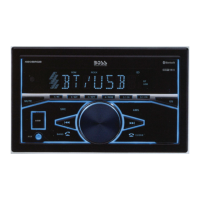
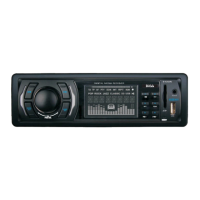
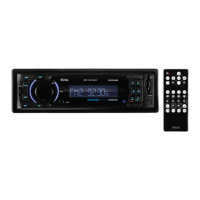
Press the /SRC button to turun on the unit. Press and hold the /SRC button to turn off the unit.
Press the /SRC button to select the different modes: Radio, USB(with USB device inserted). AUX-
IN(auxiliary input) and BT(Bluetooth) modes. Adjust the volume (VOL) Rotate the VOL knob to increase or
decrease the volume level.
Adjust Menu Options (SEL)
Press SEL button repeatedly to cycle through the following adjustable audio functions:
BASS/TREBLE:-7, -6, ~, 1, 0, +1,~, +6, +7
BALANCE:L7, L6,~, L1, 0, R1,~,R6, R7
FADER:R7, R6, ~, R1, 0, F1, ~ ,F6, F7
EQ(Equalizer) Setting: OFF, CLASS, ROCK, POP, FLAT
Loudness: LOUD ON/OFF
DX/LOCAL: Enables or disables the local broadcast mode (LOCAL).
Stereo/Mono: Switches between MONO and STEREO reception mode for radio frequencies.
CLOCK 12/24: Select between 12 hours and 24 hours display.
Note: If 12 hour display is selected , AM= Morning; PM= Afternoon
AREA US/EU: This car radio is equipped the USA / Europe frequency. Rotate the volume knob to switch
between USA and Europe frequency. The system will change the frequency setting in about 3 seconds.
7 color-changing illumination in buttons:
This car radio device is equipped 7 color-changing illumination in buttons. The illumination color can be preset
Auto(color automatically change one by one), blue, red, Cyan, Green, Purple, Yellow, White.
Rotate the VOL knob to adjust the selected item.
Setting the Clock
Press and hold the CLK button to display time. Press the CLK button, the hours digits start flashing on the display.
Set hours by pressing the and button. Then briefly press the CLK button. The minute digits start flashing. Set
minutes by pressing the and Finally press the CLK button to confirm your settings.
LCD Display
Mute On/Off
In power on mode, briefly press the MUTE button to toggle mute on or off.
USB Port
Hands-free Microphone
Auxiliary Input Jack
Reset
Push the RESET button with a thin object with a pointed end to reset all parameters to factory default settings.This
function may be used when the LCD does not display normally or sound is distorted, or when any of controls are
disabled.
Radio Operation
Switch Between USA area and Europe area Frequency
In radio mode, press the SEL button to enter the switch state of the US (USA) and EU(europe)frequency, then rotate
it to switch between US(USA) and EU(europe) frequency. The system will change the frequency setting in about 3
seconds.
Change Bands
In radio mode, shortly press the BAND/AMS button to switch between the FM1(F1), FM2(F2), FM3(F3) and
AM1(A1), AM2(A2) bands.
To Store / Recall Preset Stations
The radio can be stored 6 preset stations for each band (FM1, FM2, FM3, AM1 and AM2) for atotal of 30 preset
stations.
To memorize a station:
Press and hold the desired preset buttons (1-6) to save a radio station.
To recall a preset station:
Briefly press the respective station button (1-6) to recall the corresponding preset station.



 To Next Page