EasyManua.ls Logo

Boss AX1-2.5E - User Manual

Boss AX1-2.5E
44 pages
Print Icon
To Next Page IconTo Next Page
Loading...
Operation &
Maintenance Manual
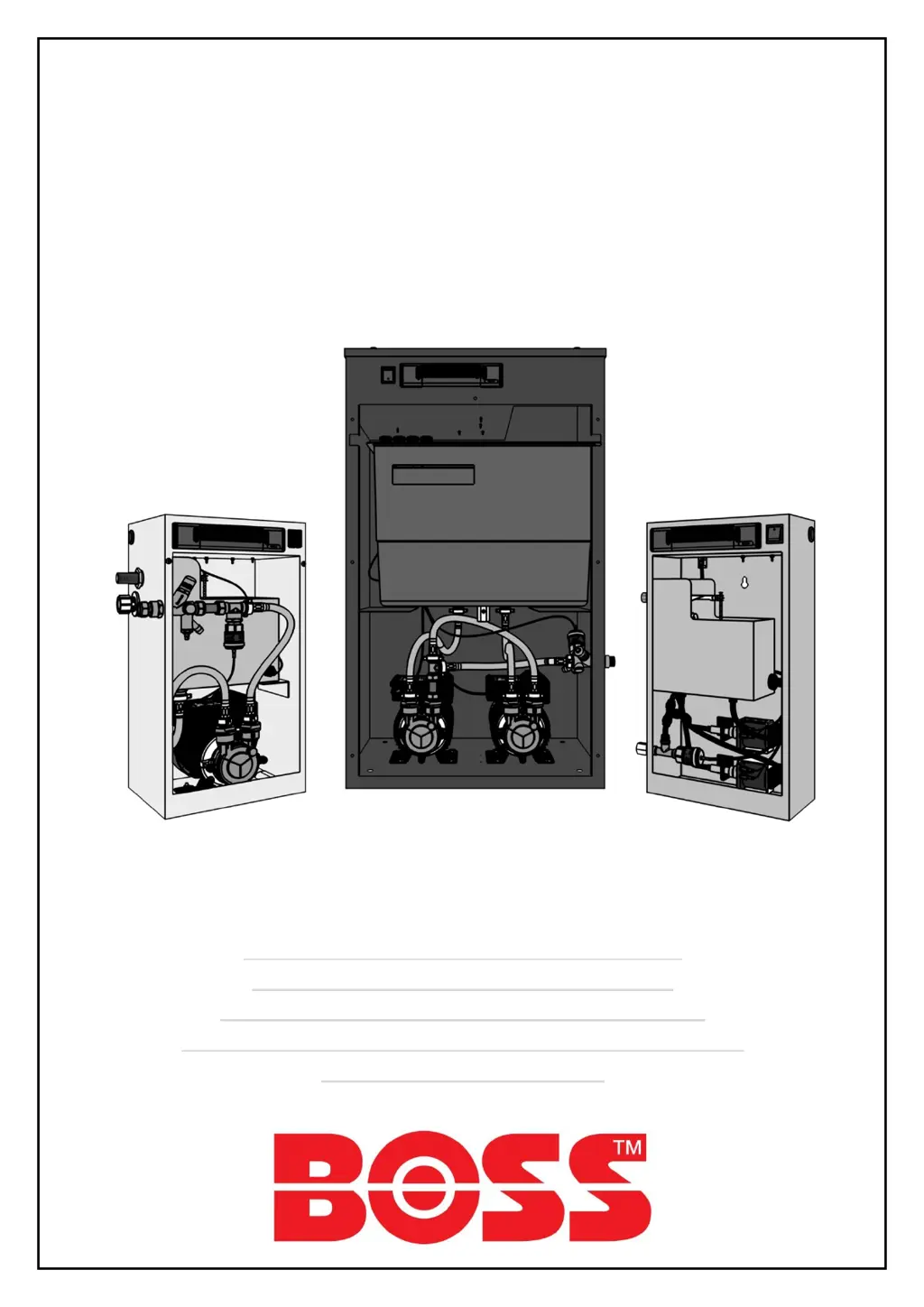
BOSS Digital Pressurisation Equipment
AX Models (AX1-2.5E, AX2-2.5E, AX1-5E, AX2-5E)
PF Models (PF1-2.5E, PF2-2.5E, PF1-5E, PF2-5E)
Midi Models (MD1-2.5E, MD2-2.5E, MD1-5E, MD2-5E)
Digifiller (Digifiller 0.5, Digifiller 1.0, Digifiller 1.5, Digifiller 2.0)
Mini Models (MX1-3E, MX2-3E)

Questions and Answers

  • T
    Teresa MartinezAug 18, 2025
    Why is the LOW PRESSURE fault displayed on my Boss AX1-2.5E Industrial Equipment and the pumps aren't running?
    • D
      dhernandezAug 18, 2025
      If the LOW PRESSURE fault is displayed and the pumps aren't running on your Boss Industrial Equipment, there are several possible causes. First, the internal isolation valve within the unit might be closed; open it. Second, the system pressure may have fallen below the LOW PRESSURE set point; increase system pressure using a filling loop, or enable the SYSTEM FILL option. Third, the SPC CONTROLLER option might be enabled; disable it. Finally, the LOW PRESSURE set point could be too high; review the system specifications.
  • M
    Megan CoxAug 20, 2025
    What to do if the HIGH PRESSURE fault is displayed on my Boss Industrial Equipment?
    • S
      Sheila JohnsonAug 21, 2025
      If a HIGH PRESSURE fault is showing on your Boss Industrial Equipment, there are several reasons why. The internal isolation valve within the unit may be closed; open it. The system pressure may have risen above the HIGH PRESSURE set point; decrease system pressure using a suitable drain point. The expansion vessel may have failed or lost its pre-charge; check the expansion vessel pre-charge and re-charge if necessary. The expansion vessel might be undersized; review the expansion vessel selection. Finally, the HIGH PRESSURE set point could be too low; review the system specifications.
  • D
    Daniel MaloneAug 23, 2025
    How to fix LOW H20 fault on Boss AX1-2.5E?
    • W
      williamsmichaelAug 23, 2025
      If the LOW H20 fault is displayed on your Boss Industrial Equipment, here's what might be happening. The mains water supply to the unit may have been isolated; turn it on. The mains pressure could be poor; the fault will clear once the break tank has been re-filled. A non-standard electrical connection may have been made into terminals 19 & 20; remove all non-standard electrical connections. The low water float switch may have failed; replace it. The digital controller could have failed; replace it.
  • K
    Kyle CoxAug 26, 2025
    Why is the pump repeatedly running in short bursts on my Boss AX1-2.5E Industrial Equipment?
    • M
      Michael CooperAug 26, 2025
      If the pump is repeatedly running in short bursts on your Boss Industrial Equipment, consider these potential causes. The internal isolation valve within the unit may be partially closed; fully open it. The restriction in the connecting pipe work could be too great; increase bore/ reduce number of bends/ reduce length of connecting pipe work. A pump non-return valve may have failed; replace it. The expansion vessel might have failed or lost its pre-charge; check the expansion vessel pre- charge and re-charge if necessary. The point of connection of the unit could be too far away from the expansion vessel; move unit/expansion vessel connection points closer together.
  • J
    Jessica McfarlandAug 27, 2025
    What causes the pressure reading to not match actual system pressure in Boss AX1-2.5E Industrial Equipment?
    • M
      Michael MortonAug 28, 2025
      If the pressure reading does not match the actual system pressure on your Boss Industrial Equipment, check the following: The internal isolation valve within the unit may be closed; open it. The SENSOR TYPE option might be set incorrectly; review the SENSOR TYPE setting. A non-return valve may have been installed between the unit and the system; remove the non-return valve. The pressure sensor could have failed; replace the pressure sensor.
  • T
    Tracy LawsonAug 30, 2025
    Why is the break tank overfilling in my Boss Industrial Equipment?
    • R
      Robert WattsAug 30, 2025
      If the break tank is overfilling and discharging water to drain on your Boss Industrial Equipment, here are a few things to check: The wrong/no flow restrictor may be installed in the float valve (MX, Digifiller and midi units only); check float valve flow restrictor selection (MX, Digifiller and midi units only). The float valve position could be set incorrectly; set the float valve to its lowest possible position. The float valve may have failed; replace the float valve. A pump non-return valve might have failed; replace the non-return valve.
  • S
    Shelia StrongSep 1, 2025
    What does P1 and/or P2 FLOOD LIMIT displayed mean on Boss AX1-2.5E Industrial Equipment?
    • K
      Kevin EdwardsSep 1, 2025
      If the P1 and/or P2 FLOOD LIMIT is displayed on your Boss Industrial Equipment, it could be due to a few reasons. A large amount of water may have been lost from the system; investigate the cause. The relevant pump could be air-locked and not pumping water; bleed the pump. The unit may be undersized for the system; review unit selection. The FLOOD LIMIT time might be too short.
  • C
    Cassandra FoxSep 3, 2025
    How do I troubleshoot the HIGH H20 fault on Boss Industrial Equipment?
    • L
      Lauren WalkerSep 3, 2025
      If the HIGH H20 fault is displayed on your Boss Industrial Equipment, it could be due to: A non-standard electrical connection has been made into terminals 21 & 22; remove all non-standard electrical connections. The digital controller has failed; replace digital controller.
  • D
    David WhiteheadSep 6, 2025
    What does ERROR 1 fault mean on Boss AX1-2.5E?
    • M
      Mark MartinSep 6, 2025
      If ERROR 1 fault is displayed on your Boss Industrial Equipment, the causes may be: The SENSOR TYPE option is set incorrectly; review SENSOR TYPE setting. The pressure sensor has failed; replace pressure sensor.
  • C
    Cheryl ZamoraSep 8, 2025
    What causes P1 and/or P2 FAIL to appear on Boss AX1-2.5E?
    • L
      Lisa GoodSep 8, 2025
      If P1 and/or P2 FAIL is displayed on your Boss Industrial Equipment, it might be because: The PUMP TYPE option is set incorrectly; review PUMP TYPE setting. The relevant pump has failed; replace pump.

Summary

About this Manual

Conventions used in this Manual

Explains symbols and their meanings used in the manual.

Typography

Explains different typography used to identify information types.

Where to find more Information

Provides contact details and website for further information.

Equipment Overview

Principal of Operation

Explains the internal arrangement and working principle of the pressurisation unit.

Installation

Pipe Connections

Details requirements for making pipe connections to the unit.

Typical Installation Diagram

Illustrates a typical installation setup with key components.

Flow Restrictors (Mini, Midi & Digifiller models only)

AX Skid Clearance and Connection Requirements

Pressfill (PF) Clearance and Connection Requirements

Digifiller & Midi (MD) Clearance and Connection Requirements

Mini (MX) Clearance and Connection Requirements

Electrical Power Supply

Fault Contacts

Power Filter

Commissioning

Pre-Commissioning Checklist

Lists essential conditions to be met before starting the commissioning process.

Controller Overview

Controller Programming

Cold Fill Pressure Setting

Defines the required fill pressure and pump cut-out pressure.

High Pressure Alarm Setting

Sets the high pressure alarm point for the system.

Low Pressure Alarm Setting

Sets the low pressure alarm point and pump cut-off.

Pump Differential Setting

Defines the pressure differential between pump cut-in and cut-out.

Flood Limit Setting

Sets the maximum continuous run time for pumps to prevent flooding.

Pump 1 Counters

Tracks cumulative pump starts and run time for pump 1.

Pump 2 Counters

Tracks cumulative pump starts and run time for pump 2.

Alarm and Power Interruption Counts

Logs alarm incidents and power interruptions for the unit.

Pump Seizing Prevention

Enables a pulse function to prevent pumps from seizing during inactivity.

Excessive Demand Alarm

Triggers an alarm for frequent pump runs within a set period.

Service Reminder

Provides a reminder for annual servicing of the unit.

System Fill Function

Enables filling the system and disables low pressure/flood limit alarms.

Pump Configuration

Sets the number and type of pumps installed in the unit.

Pump Sense Setting

Controls pump monitoring by the controller to detect faults.

Pressure Sensor Configuration

Selects the type and range of the pressure sensor installed.

SPC Controller Link

Enables linking the unit to an SPC controller for automat equipment.

Glycol Unit Setting

Enables the low glycol level switch for glycol pressurisation units.

Relay Inversion

Inverts normally open fault contacts to normally closed.

Pump Overrun Setting

Allows pumps to run for a set period after pressure is reached to prevent hunting.

Pressure Alarm Auto Reset

Automatically clears pressure alarms when the system pressure returns to normal.

Pump Cascade and Boost Modes

Configures pump operation in duty/assist mode and boost mode.

Flo-Mat Control

Enables a solenoid valve for top-up triggered by the 'sensor healthy' contact.

Hydraulic Commissioning

Float Valve Setting

Ensures the break tank float valve is set to its lowest position.

Bleeding Pumps

Details the procedure for bleeding air from the pumps.

Forcing Pumps to Run

Describes how to manually force pumps to run for bleeding or testing.

Initial Start-up

Testing

Commissioning Record

Operation

Fault Codes

Lists and explains all fault codes displayed on the digital controller.

Shutdown Procedure

Start-Up Procedure

Outlines the steps for restarting the unit after a shutdown.

Troubleshooting

Low Pressure Faults

Addresses symptoms and solutions for low pressure faults.

High Pressure Faults

Addresses symptoms and solutions for high pressure faults.

Flood Limit Faults

Addresses symptoms and solutions for pump flood limit faults.

Pump Fail Faults

Addresses symptoms and solutions for P1/P2 fail faults.

Water Level Faults

Addresses symptoms and solutions for LOW H20/HIGH H20 faults.

Pressure Reading Issues

Addresses issues where pressure readings do not match actual system pressure.

Pump Operation Issues

Addresses issues with pumps not making up pressure or running erratically.

Break Tank Overfilling

Addresses symptoms and solutions for break tank overfilling.

Short Burst Pump Operation

Addresses symptoms and solutions for pumps running in short bursts.

Controller Responsiveness Issues

Addresses issues with the digital controller not responding.

Controller Power Issues

Addresses issues with the digital controller not powering up.

Service Reminder Display

Addresses the 'SERVICE' display on the screen indicating maintenance is due.

Maintenance

Visual Inspection

Details the steps for performing a visual inspection of the unit for faults.

Interrogate Controller

Explains how to check the controller's logged data for maintenance purposes.

Test Unit Operation

Describes how to test the unit's operation by simulating pressure drops.

Check Float Valve Operation

Details how to test the operation of the break tank float valve.

Check Float Switch Operation

Details how to test the operation of the break tank low level float switch.

Check Break Tank Water Condition

Advises on checking and cleaning the break tank water for debris.

Check Strainer (AX & PF units only)

Details the inspection and cleaning of the mesh strainer on specific models.

Check Expansion Vessel Pre-Charge

Explains how to check and set the expansion vessel pre-charge pressure.

Wiring Diagram

Service Log

Spares

Electrical Items (All Models)

Lists common electrical components and their part codes.

AX Models Spares

PF Models Spares

Digifiller & Midi Models Spares

MX;Mini Models Spares

Boss AX1-2.5E Specifications

General IconGeneral
BrandBoss
ModelAX1-2.5E
CategoryIndustrial Equipment
LanguageEnglish

Related product manuals