EasyManua.ls Logo

Boss BE-5 - Panel Description; Chorus; Noise Suppressor; Digital Delay

Boss BE-5
8 pages
Print Icon
To Next Page IconTo Next Page
To Previous Page IconTo Previous Page
Loading...
Hi
PANEL
DESCRIPTION
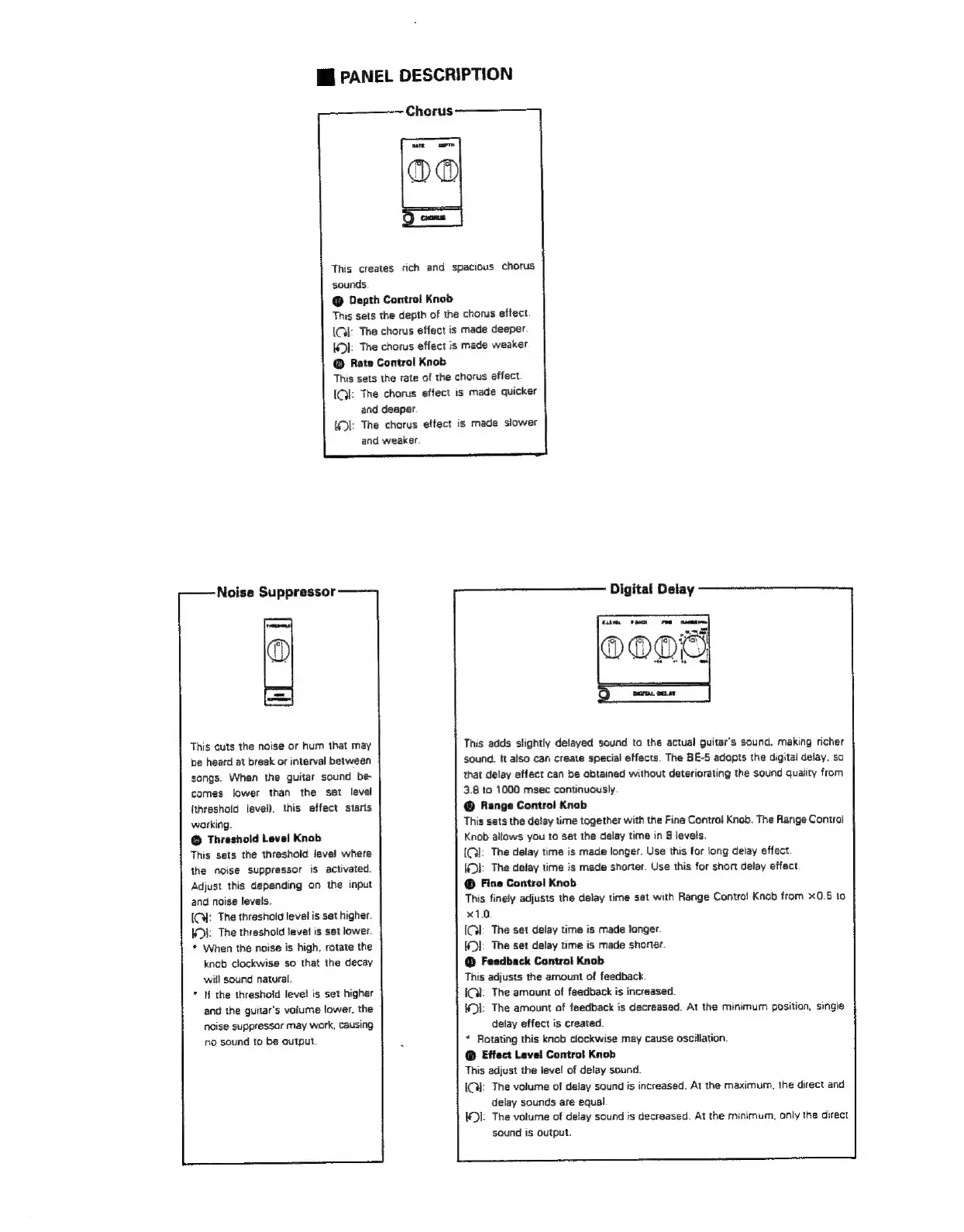
Chorus
This
creates
sich
and
spacious
chorus
sounds.
Depth
Control
Knob
This
sets
the
depth
of
the
chorus
effect.
(Gk:
The
chorus
effect
is
made
deeper.
KD):
The
chorus
effect
is
made
weaker
Rate
Control
Knob
This
sets
the
rate
of
the
chorus
effect.
(GI:
The
charus
effect
is
made
quicker
and
deeper.
{(D|:
The
chorus
effect
is
made
slower
and
weaker.
Noise
Suppressor
This
cuts
the
noise
or
hum
that
may
be
heard
at
break
or
interval
between
songs.
When
the
guitar
sound
be-
comes
ower
than
the
set
level
(threshold
level).
this
effect
starts
working.
©
Threshold
Level
Knob
This
sets
the
threshold
leve!
where
the
noise
suppressor
is
activated
Adjust
this
depending
on
the
input
and
noise
levels.
IC:
The
threshold
level
is
set
higher
KDE:
The
thrashold
level
is
set
lower.
*
When
the
noise
is
high,
rotate
the
knob
clockwise
so
that
the
decay
will
sound
natural.
if
the
threshold
levei
is
set
higher
and
the
guitar's
volume
lower.
the
noise
suppressor
may
work,
causing
no
sound
to
be
output.
Digital
Delay
This
adds
slightly
delayed
sound
to
the
actual
guitar's
sound.
making
richer
sound.
it
also
can
create
special
effects.
The
BE-5
adopts
the
digital
delay.
so
that
delay
effect
can
be
obtained
without
deteriorating
the
sound
quaiity
from
3.8
to
1000
msec
continuously.
Range
Controi
Knob
This
sats
the
delay
time
together
with
the
Fine
Control
Knob.
The
Range
Control
Knob
alfows
you
to
set
the
delay
time
in
8
levels.
{Q]:
The
delay
time
is
made
longer.
Use
this
for
long
delay
effect.
(Oi:
The
delay
time
is
made
shorter.
Use
this
for
short
delay
effect
@
Fine
Control
Knob
This
finely
adjusts
the
delay
time
set
with
Range
Control
Knob
fram
x0.5
to
x10
IGI:
The
set
delay
time
is
made
longer.
KDI:
The
set
delay
time
is
made
shorter.
@
Feedback
Control
Knob
This
adjusts
the
amount
of
feedback.
iQ:
The
amount
of
feedback
is
increased.
4D:
The
amount
of
feedback
is
decreased.
At
the
minimum
position,
single
delay
effect
is
created.
*
Rotating
this
knob
clockwise
may
cause
oscillation.
©
Effect
Levei
Controt
Knob
This
adjust
the
level
of
delay
sound.
|;
The
volume
of
delay
sound
is
increased.
At
the
maximum,
the
direct
and
delay
sounds
are
equal.
:
The
volume
of
delay
sound
is
decreased.
At
the
minimum,
oniy
the
direct
sound
is
output.

Related product manuals