1
For Your Safety
FEATURES
2 Video Outputs
1
2
2
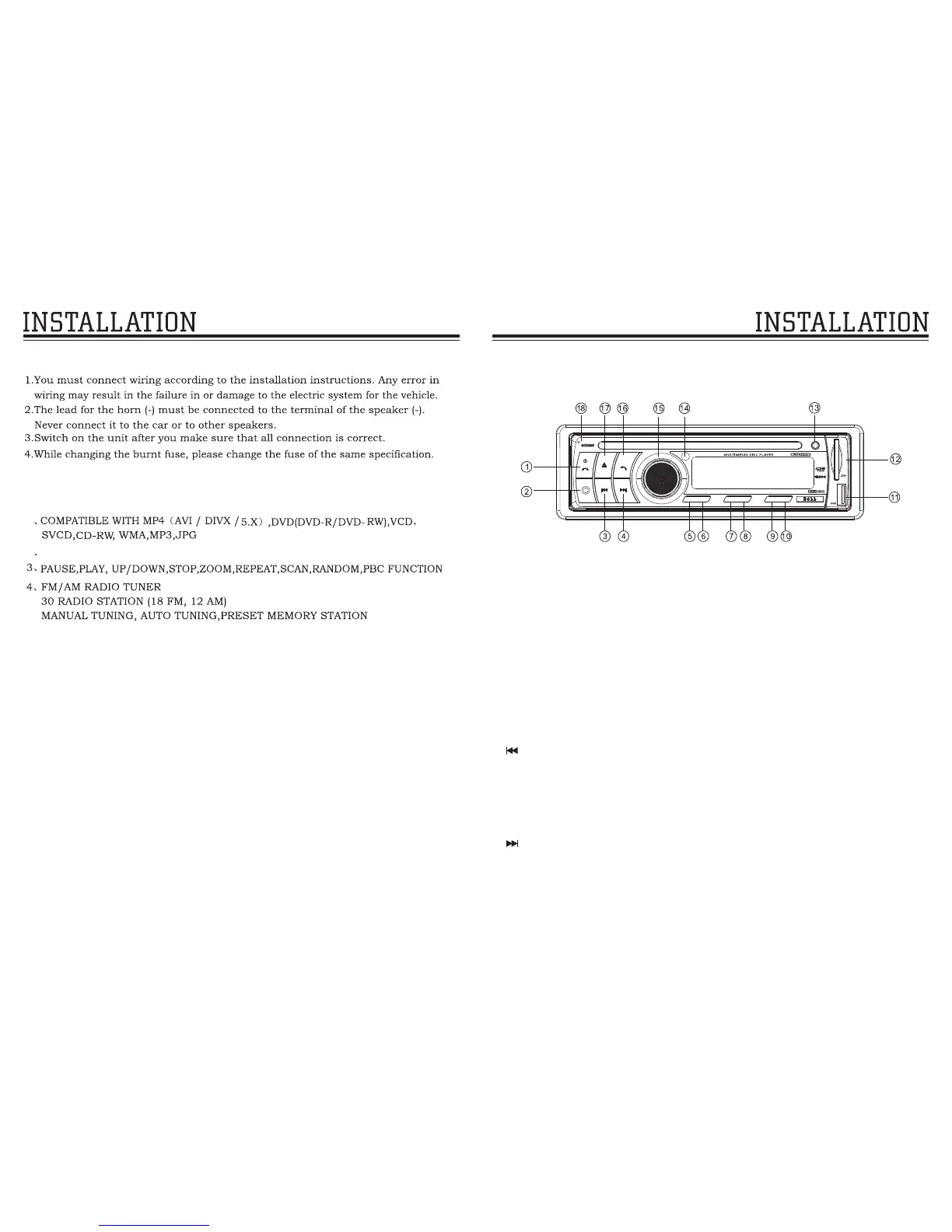
FRONT PANEL
1. SRC (Power button / Audio mode switching/Hang up the phone button)
short press to turn on the unit, under the boot state, short press again to
switch mode, RADIO/DISC/USB/SD/AUX IN1/AUX IN2/PHONE long press for
more than 3 seconds to turn off the unit.
In BT phone mode, short press to hang up the phone.
2. REL(Panel release button)
Press this button to release the panel.
3.
Radio: short press to downward scan station search and play, long press to step
up the search function.
Playing DVD discs: short press to select a former song playing, long press to
rewind function.
Playing BT music: short press to select a former song playing.
4.
Radio: short press to upward scan radio station and play, long press to
downward step search function.
Playing DVD discs: short press to select the next song playing, long press to fast
forward function.
Playing BT music: short press to select the next song playing.
BASIC FUNCTION
BAND
M1
M2
M3
M4
M5
M6
BV 66 5 4B
IN T RP T RD M
L/ R N/ P
PL AY
RE L
AU X
SE L.V OL
MI C
SR C


 To Next Page