BV7300 User’s Manual - page 11
AV Menu Settings
You can adjust various settings of the unit from the AV menu.
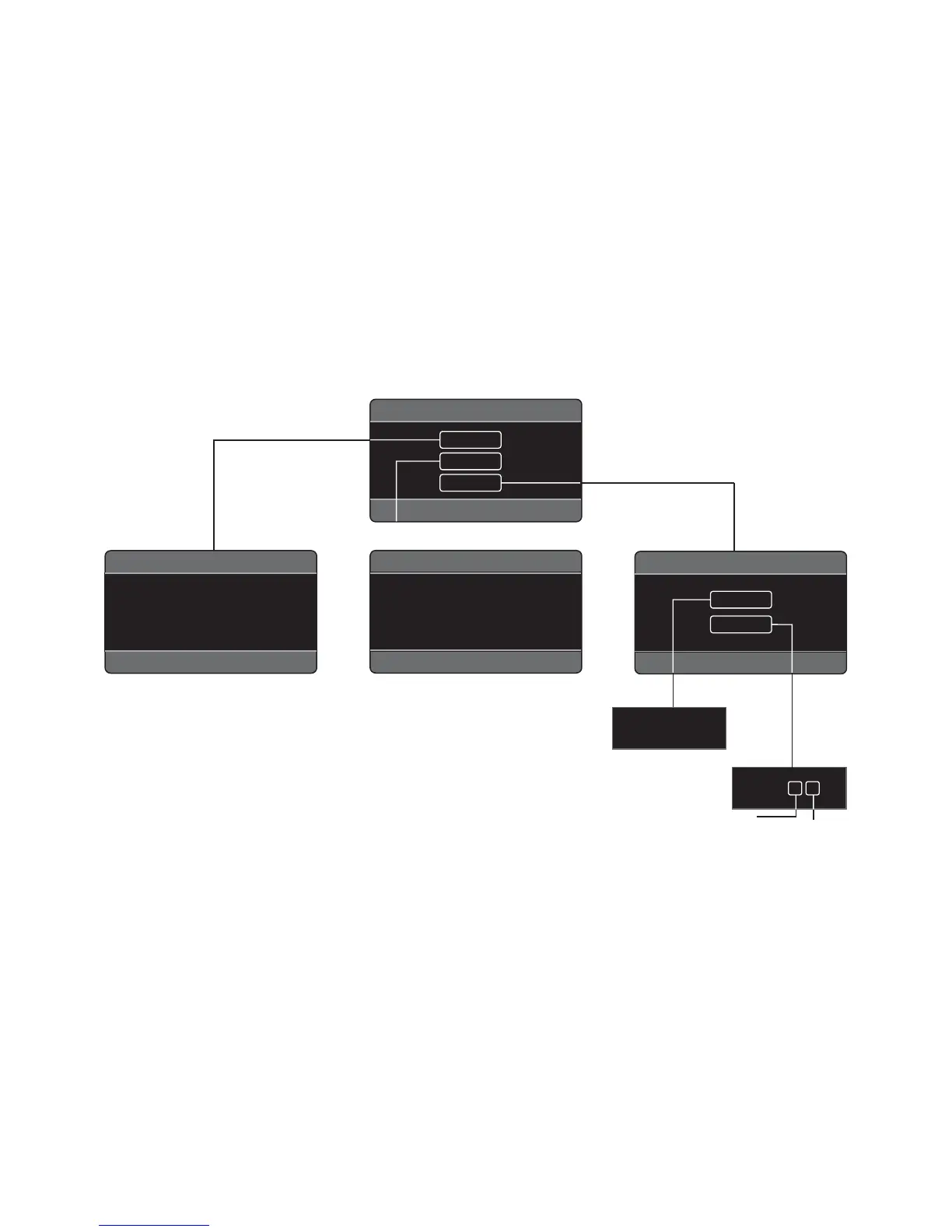
The AV menu contains the menu items and submenus shown in the fi gure below:
1. Press MENU to activate AV menu.
2. Use the arrow buttons to select a menu item.
3. Press VOL+/- button to increase or decrease the parameter you have selected.
4. Repeat steps 2 and 3 to adjust other items if necessary.
5. Press ZOOM or MODE to return to previous menu.
6. Press MENU to fi nish the procedure.
AUDIO
SYSTEM
TIME ON
TIME.M 12
AM 11 : 0 0
PICTURE
SETUP
MAIN MENU
SETUP MENU
PICTURE MENU
BRIGHT 00 TINT 00
CONTRAST 00 DISP.M 4:3
COLOR 00 DEFAULT OFF
AUDIO MENU
VOLUME 00 FADER R.F
BASS 00 EQ CLAS
TREBLE 00 LOUD OFF
BALANCE L.R SUB.W ON
Hour
Minute


 To Next Page