14
Operation
Storing Settings (Write Operation)
Storing the “MANUAL” Sound in Memory
Do not switch off the power while a write operation is in progress.
1.
Create the sound you want when set to “MANUAL.”
2.
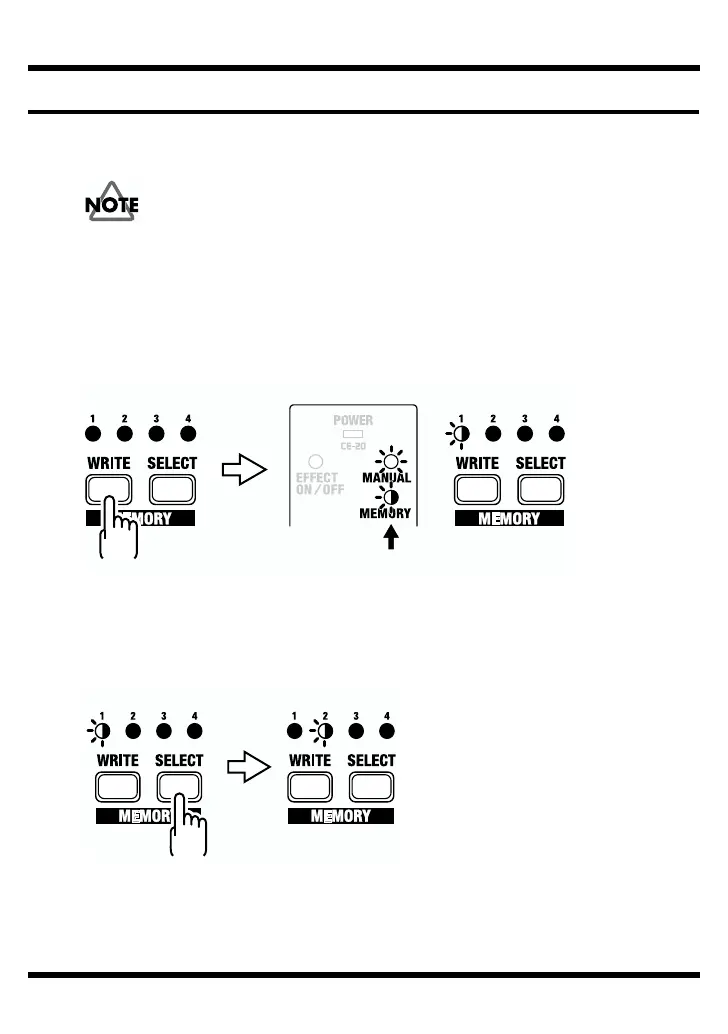
Press the WRITE button.
The MEMORY indicator and the indicator for the currently selected memory flash,
and the CE-20 is put into write standby.
fig.19a
3.
Press the SELECT button to select the memory (number) to which you want
to store the sound.
The indicator for the selected MEMORY number flashes.
fig.19b
Write standby
Blink
Blink
BlinkBlink



 To Next Page