16
Operation
Changing and Storing the “MEMORY” Sound
Do not switch off the power while a write operation is in progress.
1.
Press the MANUAL/MEMORY pedal or the SELECT button to change to the
“MEMORY” sound.
2.
Operate the knobs to change the sound.
* To avoid sudden inadvertent changes in sound, the E.LEVEL, LOW, HIGH,
BRILLIANCE, AMBIENCE, RATE, and DEPTH knobs are designed so that the setting
does not change unless the knob is first turned as far as the stored setting value. Once the
position of the knob matches the setting value stored in memory, the sound starts to change.
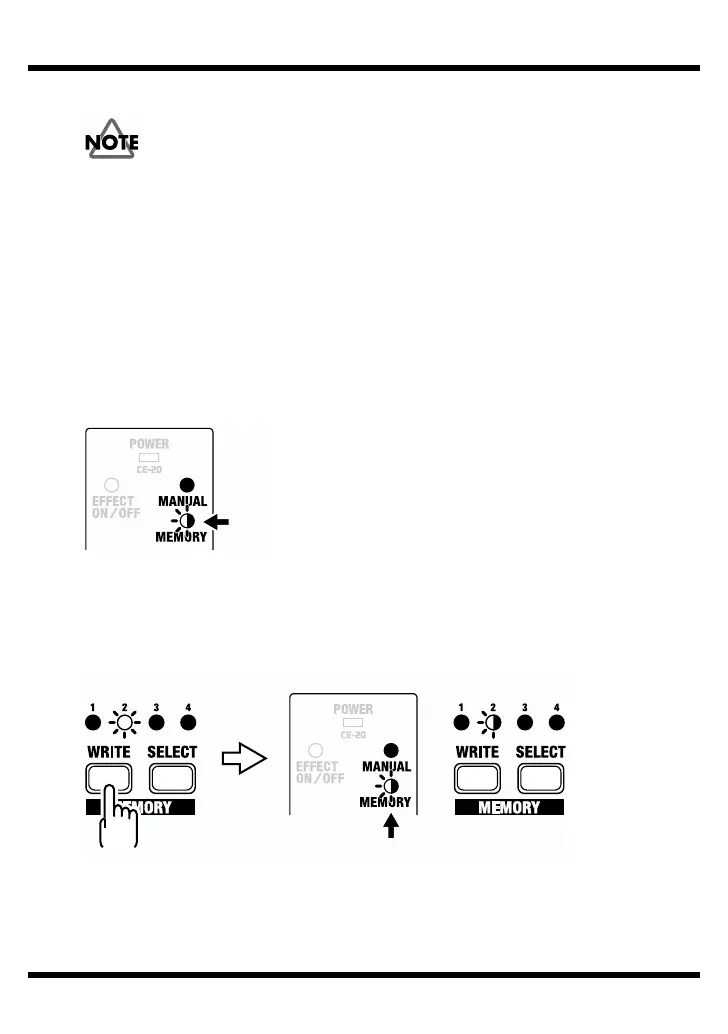
When a setting changes, the MEMORY indicator flashes automatically.
fig.21
3.
Press the WRITE button.
The MEMORY indicator and the indicator for the currently selected MEMORY
number start to flash, and the CE-20 is put into write standby.
fig.22
Blink
Blink
Write standby
BlinkLit



 To Next Page