17
Operation
4.
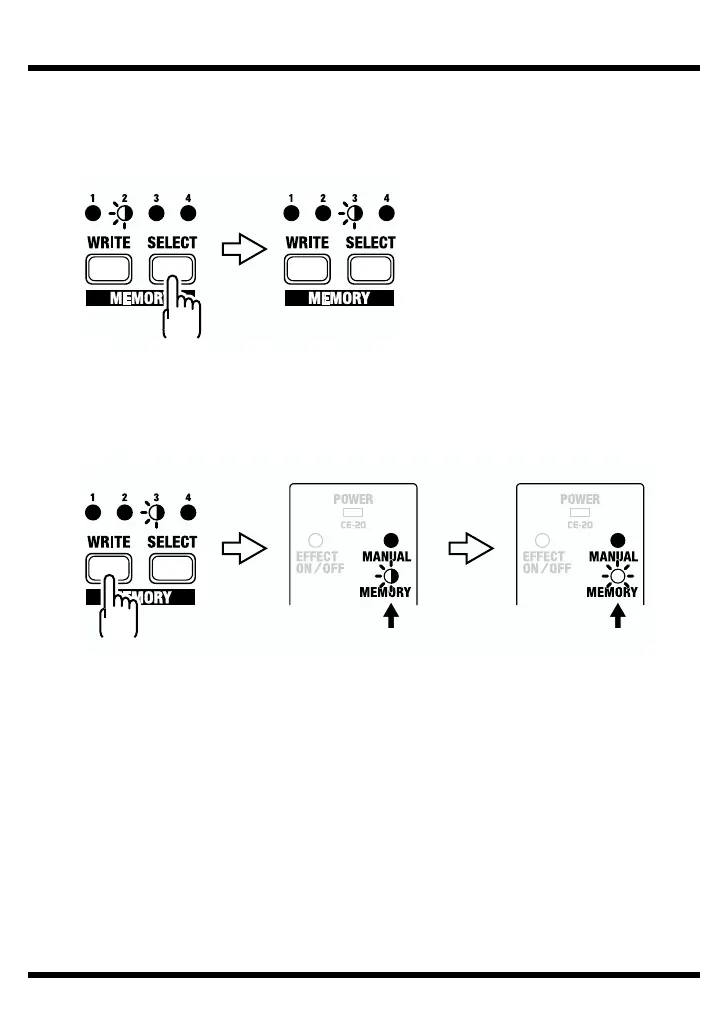
Press the SELECT button to select the memory (number) to which you want
to store the sound.
The indicator for the selected MEMORY number flashes.
fig.22a
5.
Press the WRITE button.
The write operation is completed when the MEMORY indicator and the indicator
for the write-destination memory begin to flash more rapidly.
fig.23
* If the knob or the MANUAL/MEMORY pedal position is changed before the WRITE
button is pressed, the write operation is cancelled, and the CE-20 is returned to the status
in effect in Step 2.
BlinkBlink
Writing Write finished
Blink rapidly
Lit
Blink



 To Next Page