EasyManua.ls Logo

Boss Compression Sustainer CS-2 - Page 3

Boss Compression Sustainer CS-2
4 pages
Print Icon
To Next Page IconTo Next Page
To Previous Page IconTo Previous Page
Loading...
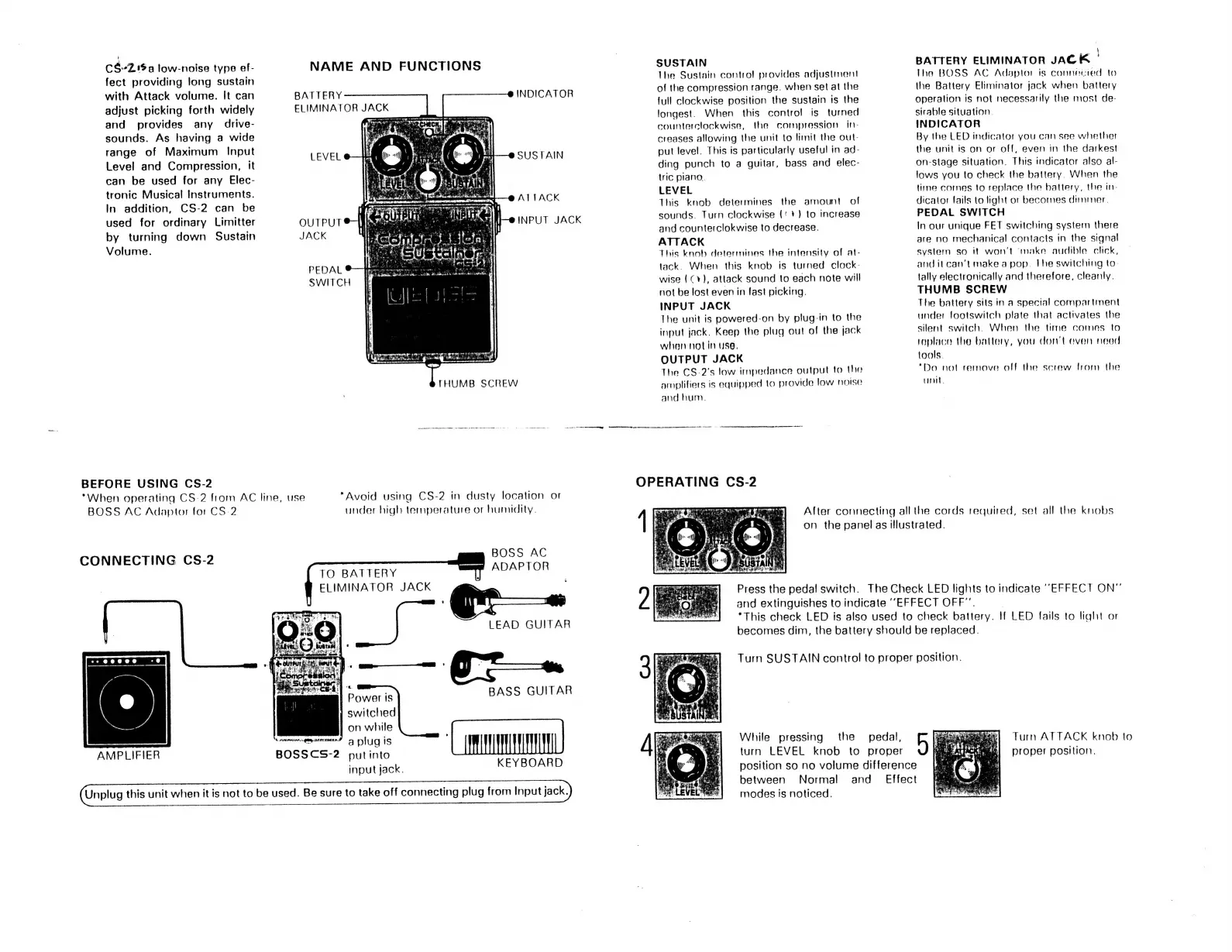
CS-2Z.15a
low-noise
type
ef-
NAME
AND
FUNCTIONS
fect
providing
long
sustain
with
Attack
volume.
It
can
BATTERY
adjust
picking
forth
widely
ELIMINATOR
JACK
and
provides
any
drive-
ran
sounds.
As
having
a
wide
:
range
of
Maximum
Input
Level
and
Compression,
it
can
be
used
for
any
Elec-
tronic
Musical
Instruments.
In
addition,
CS-2
can
be
used
for
ordinary
Limitter
OUTPUT
by
turning
down
Sustain
JACK
Volume.
INDICATOR
SUSTAIN
ATTACK
INPUT
JACK
PEDAL
SWITCH
e
a
Md
ge
eed
ya
ard
ği
BEFORE
USING
CS-2
"When
operating
CS-2
from
AC
line,
use
BOSS
AC
Adaptor
for
CS
2
"Avoid
using
CS-2
in
dusty
location
or
under
high
temperature
or
humidity.
BOSS
AC
ADAPTOR
CONNECTING
CS-2
TO
BATTERY
ELIMINATOR
JACK
LEAD
GUITAR
|
Power
is
BASS
GUITAR
switched
İ
on
while
A
ONGs
AMPLIFIER
BOSSCS-2
putinto
input
jack.
KEYBOARD
Unplug
this
unit
when
it
is
not
to
be
used.
Be
sure
to
take
off
connecting
plug
from
Input
jack.
SUSTAIN
The
Sustain
control
provides
adjustment
of
the
compression
range.
when
set
at
the
full
clockwise
position
the
sustain
is
the
longest.
When
this
control
is
turned
counterclockwise,
the
compression
in-
creases
allowing
the
unit
to
limit
the
out-
put
level.
This
is
particularly
useful
in
ad-
ding
punch
to
a
guitar,
bass
and
elec-
tric
piano.
LEVEL
This
knob
determines
the
amount
of
sounds.
Turn
clockwise
('
+)
to
increase
and
counterclokwise
to
decrease.
ATTACK
This
knob
determines
the
intensity
of
at-
tack.
When
this
knob
is
turned
clock-
wise
(Cv),
attack
sound
to
each
note
will
not
be
lost
even
in
fast
picking.
INPUT
JACK
The
unit
is
powered-on
by
plug-in
to
the
input
jack.
Keep
the
plug
out
of
the
jack
when
not
in
use,
OUTPUT
JACK
The
CS-2's
low
impedance
output
to
the
amplifiers
is
equipped
to
provide
low
noise
and
hum.
BATTERY
ELIMINATOR
JACK
|
Ihe
BOSS
AC
Adaptor
is
connected
to
the
Battery
Eliminator
jack
when
battery
operation
is
not
necessarily
the
most
de-
sirable
situation.
INDICATOR
By
the
LED
indicator
you
can
see
whether
the
unit
is
on
or
off,
even
in
the
darkest
on-stage
situation.
This
indicator
also
al-
lows
you
to
check
the
battery.
When
the
time
comes
to
replace
the
battery,
the
in-
dicator
fails
to
light
or
becomes
dimmer.
PEDAL
SWITCH
In
our
unique
FET
switching
system
there
are
no
mechanical
contacts
in
the
signal
system
so
it
won't
make
audible
click,
and
it
can't
make
a
pop.
Ihe
switching
to-
tally
electronically
and
therefore,
cleanly.
THUMB
SCREW
The
battery
sits
in
a
special
compartment
under
footswitch
plate
that
activates
the
silent
switch.
When
the
time
comes
to
replace
the
battery,
you
don’t
even
neod
tools.
"Do
not
remove
off
the
screw
from
the
unit.
After
connecting
all
the
cords
required,
set
all
the
knobs
on
the
panel
as
illustrated.
Press
the
pedal
switch.
The
Check
LED
lights
to
indicate
“EFFECT
ON”
and
extinguishes
to
indicate
“EFFECT
OFF”.
“This
check
LED
is
also
used
to
check
battery.
If
LED
fails
to
light
or
becomes
dim,
the
battery
should
be
replaced.
Turn
SUSTAIN
control
to
proper
position.
Turn
ATTACK
knob
to
While
pressing
the
pedal,
b
proper
position.
turn
LEVEL
knob
to
proper
position
so
no
volume
difference
between
Normal
and
Effect
modes
is
noticed.

Related product manuals