EasyManua.ls Logo

Boss DS-1W - User Manual

Boss DS-1W
8 pages
Print Icon
To Next Page IconTo Next Page
Loading...
DS-1W
Owner’s Manual
Question and Answer IconNeed help?

Do you have a question about the Boss DS-1W and is the answer not in the manual?

Summary

DS-1 W Owners Manual

Introduction and Safety Information

Manual introduction and reference to safety leaflets for safe operation.

Panel Descriptions

DC IN Jack

Connects the AC adapter for power supply.

CHECK Indicator

Indicates effect ON/OFF status and battery level.

OUTPUT Jack

Connects the unit's output to an amplifier or effect unit.

INPUT Jack

Connects the input from a guitar or other instrument.

Controls and Operation

Pedal Switch

Activates or deactivates the effect.

DIST Knob

Adjusts distortion depth and sustain.

LEVEL Knob

Adjusts the output volume.

TONE Knob

Modifies the tonal character, adjusting bass and treble.

MODE Switch

Selects between standard and custom sound variations.

Power On;Off Procedure

Safe steps for turning the unit and amplifier on and off.

Battery Replacement

Battery Replacement Guide

Detailed procedure for replacing batteries, including diagrams and safety notes.

Main Specifications

Product Specifications Details

Technical details including input/output levels, impedance, power, dimensions, and weight.

Summary

DS-1 W Owners Manual

Introduction and Safety Information

Manual introduction and reference to safety leaflets for safe operation.

Panel Descriptions

DC IN Jack

Connects the AC adapter for power supply.

CHECK Indicator

Indicates effect ON/OFF status and battery level.

OUTPUT Jack

Connects the unit's output to an amplifier or effect unit.

INPUT Jack

Connects the input from a guitar or other instrument.

Controls and Operation

Pedal Switch

Activates or deactivates the effect.

DIST Knob

Adjusts distortion depth and sustain.

LEVEL Knob

Adjusts the output volume.

TONE Knob

Modifies the tonal character, adjusting bass and treble.

MODE Switch

Selects between standard and custom sound variations.

Power On;Off Procedure

Safe steps for turning the unit and amplifier on and off.

Battery Replacement

Battery Replacement Guide

Detailed procedure for replacing batteries, including diagrams and safety notes.

Main Specifications

Product Specifications Details

Technical details including input/output levels, impedance, power, dimensions, and weight.

Overview

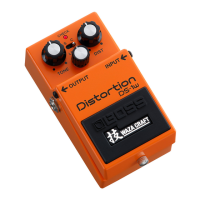
The BOSS DS-1W is a Waza Craft series distortion pedal designed for electric guitar and other musical instruments, offering both classic and custom distortion sounds. As part of the Waza Craft series, it signifies a commitment to exceptional tone and craftsmanship, providing a premium experience for musicians.

Function Description

The primary function of the DS-1W is to provide distortion effects, ranging from subtle grit to heavy, sustained overdrive. It features a buffered bypass, ensuring that your signal remains strong and clear even when the effect is disengaged and through long cable runs.

The pedal is equipped with several controls to shape the distortion sound:

  • [DIST] knob: This knob adjusts the depth of the distortion and the length of the sustain. Turning it clockwise increases the intensity of the distortion effect and lengthens the sustain, allowing for heavier, more saturated tones.
  • [LEVEL] knob: This control sets the overall volume of the effect when it is active. It's important to adjust this to balance the effect's volume with your clean signal or other pedals in your chain. Turning it fully counterclockwise will mute the sound.
  • [TONE] knob: This knob allows you to sculpt the tonal character of the distortion. Turning it clockwise boosts the high frequencies and cuts the low frequencies, resulting in a brighter, more "cutting" tone. Conversely, turning it counterclockwise boosts the low frequencies and cuts the high frequencies, producing a warmer, more "mellow" tone.
  • [MODE] switch: This switch provides two distinct sound variations:
    • S (standard): This mode recreates the sound of the original DS-1 pedal, utilizing a newly-designed circuit to deliver that classic distortion tone.
    • C (custom): This mode offers a custom-tuned sound that is designed to be more dynamic and thicker, providing a modern twist on the distortion effect.

The pedal also includes a Pedal switch to toggle the effect ON/OFF, and a CHECK indicator (LED) that illuminates when the effect is active. This indicator also serves a dual purpose as a battery check indicator.

Usage Features

The DS-1W is designed for straightforward integration into any pedalboard setup. It features standard 1/4-inch phone type INPUT and OUTPUT jacks. The INPUT jack not only receives your instrument's signal but also acts as the power switch; inserting a plug turns the unit on, and disconnecting it turns the unit off. This convenient feature helps conserve battery life when the pedal is not in use. The OUTPUT jack connects to your amplifier or the next effect unit in your chain.

For power, the DS-1W can operate on a 9V battery (either alkaline or carbon-zinc) or an optional AC adaptor (PSA series, sold separately). Using an AC adaptor is recommended for extended play sessions to avoid running out of battery power. If an AC adaptor is connected while the unit is powered on, the power supply will automatically switch to the adaptor.

Turning the Power On/Off:

To prevent malfunctions and equipment damage, it's crucial to follow the correct power-up and power-down sequence. Always ensure the volume of all connected units is turned down before making any connections or turning the unit on/off.

  • To turn on: Connect all cables, then turn on your amplifier last.
  • To turn off: Turn off your amplifier first, then disconnect the cable from the INPUT jack.

Maintenance Features

The DS-1W is designed for user-friendly maintenance, particularly regarding battery replacement. The CHECK indicator serves as a visual cue for battery status:

  • When operating on battery power, the indicator's brightness will dim as the battery level decreases.
  • If the LED becomes dim or does not light when the effect is engaged, it's time to replace the battery.

Battery Replacement Procedure:

  1. Hold down the pedal and loosen the thumbscrew. You don't need to remove the thumbscrew completely.
  2. Open the pedal upward.
  3. Remove the old battery from its housing and disconnect the battery snap.
  4. Connect the battery snap to the new 9V battery, ensuring correct polarity (+ versus -).
  5. Place the new battery inside the battery housing.
  6. Slip the coil spring onto the spring base located on the back of the pedal.
  7. Carefully close the pedal, making sure the snap cord, coil spring, and battery housing are not caught.
  8. Hold down the pedal and tighten the thumbscrew into the guide bush hole.

Important Notes on Battery Use:

  • Always install or replace batteries before connecting other devices to prevent malfunction and damage.
  • Improper handling of batteries can lead to explosion or fluid leakage. Always refer to the "USING THE UNIT SAFELY" and "IMPORTANT NOTES" leaflets for proper battery handling guidelines.
  • The device comes with test batteries from the factory, which may have a shorter lifespan than new batteries.
  • If the batteries are nearly depleted, the sound may distort. This is not a malfunction; simply replace the batteries or use an AC adaptor.

The robust construction and thoughtful design of the DS-1W ensure reliable performance and ease of use for musicians seeking a high-quality distortion effect.

Boss DS-1W Specifications

General IconGeneral
Warranty period5 year(s)
Best usesGuitar
Output level-20/0 dB
Product typeExpression pedal
Product colorYellow
Output impedance1000 Ω
Nominal input level-20 dB
Status LED indicatorYes
6.35 mm (1⁄4-inch) output1
Battery voltage9 V
Power consumption15 mA
Power source typeAC, Battery
Weight and Dimensions IconWeight and Dimensions
Depth129 mm
Width73 mm
Height59 mm
Weight430 g

Related product manuals