2
Panel descriptions
1
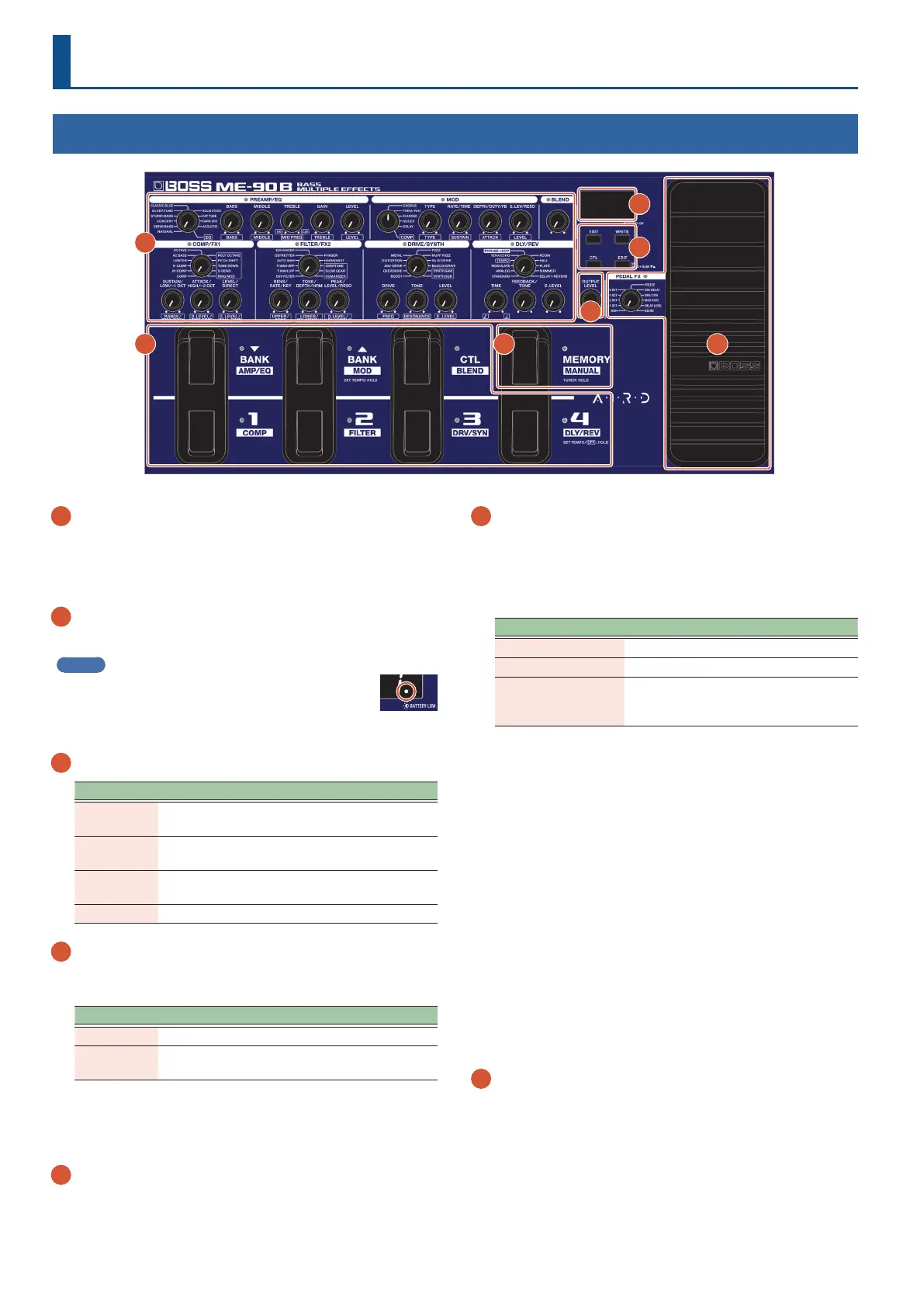
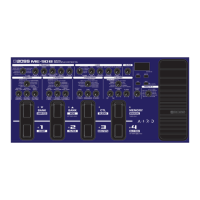
Eect conguration knobs
Use these knobs to congure the various eects built into the
ME-90B.
* For details on the eect parameters, refer to the “ME-90B
Parameter Guide” (BOSS website).
2
Display
Shows various information for the ME-90B.
MEMO
When the batteries are running low, the BATTERY LOW
indicator blinks on the display.
Replace the batteries with new ones.
3
[EXIT], [WRITE], [CTL], [EDIT] buttons
Button Explanation
[EXIT]
Press to return to the previous screen or to undo an
operation.
[WRITE]
Press to save your memory settings or to execute a
copy operation (p. 6).
[CTL]
In memory mode, this congures the operation of
the [CTL] pedal (p. 6).
[EDIT] Enters memory edit mode (p. 7).
4
Expression pedal
Press the toe end of the pedal to switch the pedal eect on/o
(the PEDAL FX indicator turns on/o).
Pedal eect Indicator Pedal operation
O Unlit Volume pedal
On Lit
Controls the eect (such as wah) that
you set using the [PEDAL FX] knob.
* When you operate the expression pedal, please be careful not
to get your ngers pinched between the movable part and the
unit. In places where small children are present, make sure that an
adult provides supervision and guidance.
5
[MEMORY/MANUAL] pedal
Switches between memory mode and manual mode (p. 6).
Keep this pressed for two seconds or more to turn the tuner on
(p. 4).
6
Pedal switch
Switches between banks and memories when the unit is in
memory mode. In manual mode, this turns each eect on/o.
When in memory mode
Use the pedal switches to switch between banks and memories.
Switch Function
[BANK É], [BANK Ç]
Switches between banks.
[1]–[4] Switches between memories.
[CTL]
Performs the operation that’s set in
“Conguring the [CTL] (control) pedal
functions” (p. 10).
When in manual mode
Use the pedal switches to individually switch each eect (COMP/
FX1, FILTER/FX2, DRIVE/SYNTH, AMP/EQ, MOD, DLY/REV, BLEND)
on/o.
What is “memory mode”?
The eect combinations and settings (sounds) are recalled as
“memories”. There are 72 memories.
Out of the 72 memories, 36 (4 memories × 9 banks) can be saved
in the user banks (9 banks of presets and 9 user banks).
You can use the pedal to instantly switch between banks and
memories.
What is “manual mode”?
This mode lets you use the pedals to turn each eect on/o.
This lets you use this unit as if you were individually switching the
compact eects on an eect unit board on/o.
7
[OUTPUT LEVEL] knob
Adjusts the signal volume from the OUTPUT and PHONES jacks.
* This does not adjust the volume for the BALANCED OUTPUT
connector.
Top panel
1
2
3
4 5 6
7


 To Next Page