4
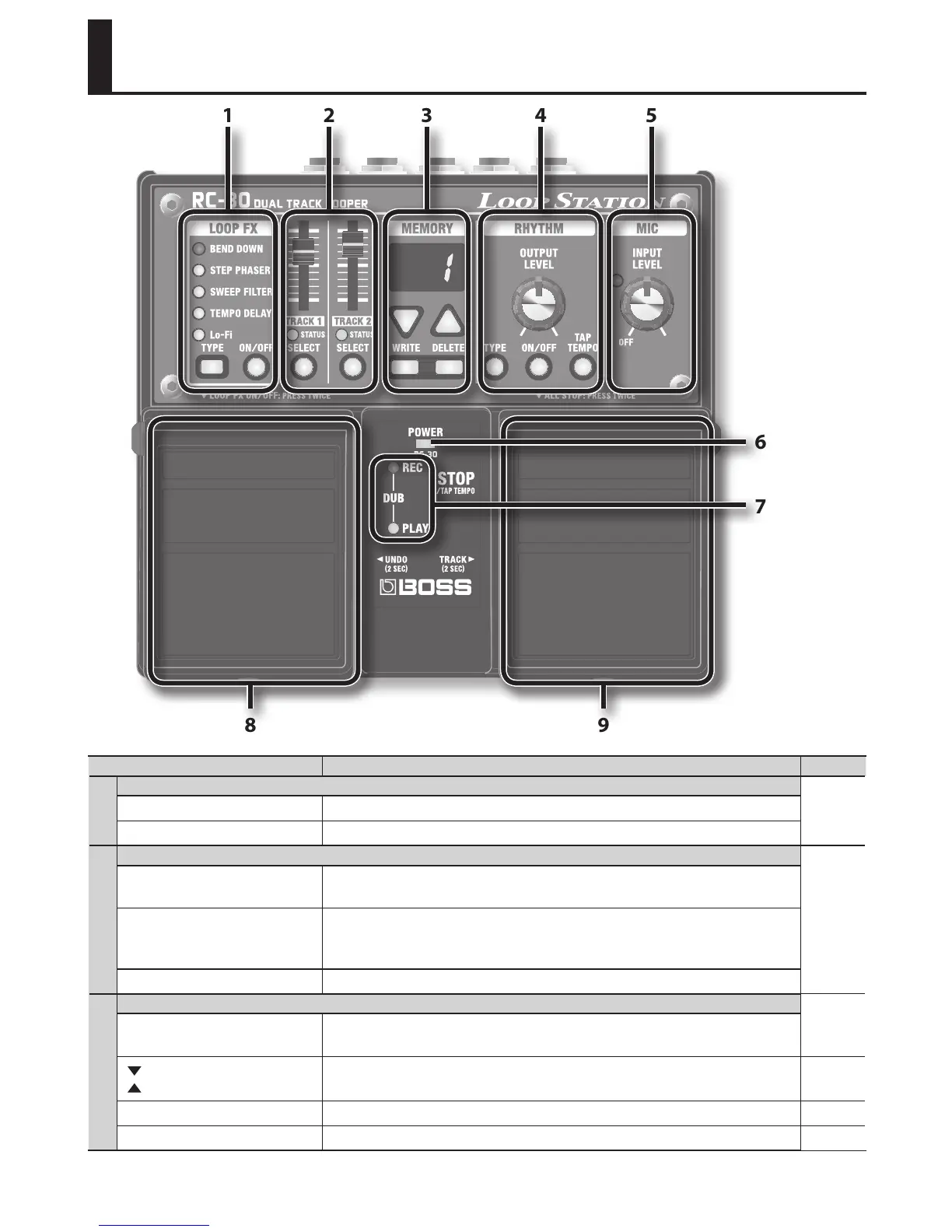
Panel Descriptions
8 9
7
6
1 2 3 4 5
Name Explanation Page
1
LOOP FX
p. 14
[TYPE] button Selects the LOOP FX type.
[ON/OFF] button Turns LOOP FX on/o.
2
TRACK 1/2
p. 8
[TRACK 1]/
[TRACK 2] slider
Adjust the volume of the phrase playback for each track.
STATUS indicator
Light when tracks 1/2 are in recording or playback mode.
While stopped, they will blink if the track contains data, and will be unlit if
the track contains no data.
[SELECT] button These buttons select a track.
3
MEMORY
p. 18
Display
This indicates the current phrase memory number, or various other
information.
[
] (DOWN)/
[
] (UP) buttons
These decrement or increment the number shown in the display. p. 8
[WRITE] button Press this to save the recorded phrase to internal memory. p. 10
[DELETE] button Deletes a phrase from internal memory. p. 10














 To Next Page