Need help?
Do you have a question about the Boss RV-200 REVERB and is the answer not in the manual?
Initial setup, installing batteries, and attaching rubber feet.
Identification and function of the RV-200's top panel controls.
Explains the functions of TIME, PRE-DELAY, E. LEVEL, PARAM, LOW, and HIGH knobs.
Details on DENSITY, MEMORY controls, and indicators.
Connecting guitars, amps, pedals, and power supply.
Information on MIDI and USB port usage for connectivity and updates.
Accessing and configuring system settings and parameters.
Descriptions of each reverb mode (ROOM, HALL, PLATE, etc.).
Steps to save, recall, and manage memory settings.
Details of factory presets like ROOM, HALL, PLATE, MODULATE, ARPVERB.
Configuring footswitches and expression pedals for expanded control.
Steps to perform a factory reset on the RV-200 unit.
Key technical specifications of the RV-200.
Essential safety information, repair advice, and legal disclaimers.
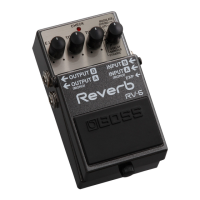
The BOSS RV-200 REVERB is a versatile guitar effects pedal designed to add a wide range of reverberation effects to your sound. This device allows musicians to sculpt their tone with various reverb types, from classic room and hall sounds to more experimental and ambient textures.
The RV-200 features a comprehensive set of controls to fine-tune your reverb. At its core, the pedal offers a "Mode" knob with 12 distinct reverb types: ROOM, HALL, PLATE, SPRING, SHIMMER, ARPVERB, SLOWVERB, MODULATE, +DELAY, LO-FI, GATE, and REVERSE. Each mode provides a unique character, simulating different acoustic spaces or creating imaginative effects.
The "TIME" knob controls the duration of the reverb decay, allowing for short, subtle echoes or long, ethereal tails. A "PRE-DELAY" knob adjusts the time before the reverb sound begins, which can help maintain clarity in your dry signal or create a sense of space. The "E. LEVEL" knob sets the overall volume of the reverb effect, balancing it against your dry signal.
A "PARAM" knob offers an additional parameter specific to each reverb mode, providing deeper customization. For instance, in ROOM mode, it controls the room size, while in PLATE mode, it adjusts low and high dampening. The "LOW" and "HIGH" knobs act as a two-band equalizer for the reverb sound, allowing you to shape its tonal characteristics by boosting or cutting low and high frequencies.
The "DENSITY" button adjusts the density of the reverb sound, influencing its thickness and smoothness. This button also serves a dual purpose for panel lock, preventing accidental changes to your settings during performance.
The RV-200 includes a memory system to store and recall your favorite settings. It features a "MEMORY" button and four "MEMORY indicators" (MAN, 1, 2, 3, 4) to navigate between manual settings and up to 127 user-defined memories. The "ON/OFF" switch activates or bypasses the reverb effect, while the "MEMORY/HOLD" switch allows for memory selection or engaging a "HOLD" function, which can sustain the reverb sound for creative effects.
The RV-200 is designed for ease of use, both in live performance and studio settings. It supports both mono and stereo connections, allowing for flexible integration into various setups. For mono use, simply connect to the INPUT A/MONO and OUTPUT A/MONO jacks. For stereo, utilize both A and B inputs and outputs.
The pedal's power is activated by inserting a plug into the INPUT A/MONO jack, and it can be powered by three AA alkaline batteries or an optional AC adaptor (PSA-S series). When using an AC adaptor, the power is drawn from the adaptor even if batteries are installed.
External control options enhance the pedal's versatility. The "CTL 1, 2/EXP" jack allows you to connect footswitches (FS-5U, FS-6, FS-7) for functions like fading effects in/out or switching memories. Alternatively, an expression pedal (EV-30, Roland EV-5, etc.) can be connected to control parameters such as reverb time, volume, or other assignable functions in real-time. This provides dynamic control over your sound without needing to bend down and adjust knobs.
MIDI connectivity via TRS/MIDI connecting cables (BMIDI-5-35, BMIDI-1-35, BMIDI-2-35, BCC-1-3535, BCC-2-3535) allows the RV-200 to be integrated into more complex MIDI setups. This enables external MIDI devices to switch memories or control various parameters, making it a powerful tool for intricate performances or automated studio environments.
The device also features a USB port, primarily for updating programs, ensuring that your pedal can stay current with the latest firmware enhancements.
To ensure safe and optimal operation, it is important to follow certain maintenance guidelines. When installing or replacing batteries, always ensure they are facing the correct way as shown in the illustration. The display will show "Lo" if the batteries are low, prompting a replacement. When handling the unit, especially when turning it over, care should be taken to protect the buttons and knobs from damage.
For battery safety, it is crucial to observe all instructions regarding proper battery handling to prevent explosion or fluid leakage. When connecting or disconnecting the AC adaptor, always turn off the power to prevent malfunction and potential data loss.
The RV-200 includes a factory reset function, which can be useful for troubleshooting or returning the unit to its original settings. This is performed by holding down the [ON/OFF] and [MEMORY/HOLD] switches while turning on the power, then confirming the reset operation.
The panel lock feature, activated by long-pressing the [DENSITY] button, is a practical maintenance feature during live use, preventing accidental changes to settings. If an operation is attempted while locked, the display will indicate "LEE."
The manual emphasizes the importance of backing up settings by writing them to memory, as data can be lost due to equipment failure, incorrect operation, or physical damage. Roland advises users to write down needed information to protect against irretrievable data loss. It also warns against using connection cables that contain a built-in resistor, as this can cause malfunctions.
 General
| Type | Reverb Pedal |
|---|---|
| Power Supply | 9V DC (PSA-series adapter) or Alkaline battery (9V) |
| Dimensions | 73mm (W) x 129mm (D) x 59mm (H) |
| Weight | 430g (without battery) |
| Input Impedance | 1 M ohm |
| Output Impedance | 1 k ohm |
| Reverb Types | Hall, Plate, Spring, Room, Shimmer, Mod |
| Input/Output | 1/4" Mono Input, 1/4" Mono Output, 1/4" Stereo Output |
| Effects | Reverb, Shimmer |
| Presets | 127 User + Panel |
| Connectivity | MIDI In |
| MIDI | MIDI In |


 To Next Page