functions may vary in certain versions of software.
(B) 1.2 Please charge this product with the congured cable for no less
(A) 1.1The company reserves the right to modify the contents of this
deep sea diving. Hot water, tea and other corrosive liquids are
than 2 hours before using it.
synchronization time and set your personal information.
destructive to the watch, and will not be able to enjoy the product
warranty and free maintenance services.
(D) 1.4 This product supports IP68 rank waterproof, not suitable for
manual without any further notication. It is normal that some
(C) 1.3 Before using the product, you need to connect the APP
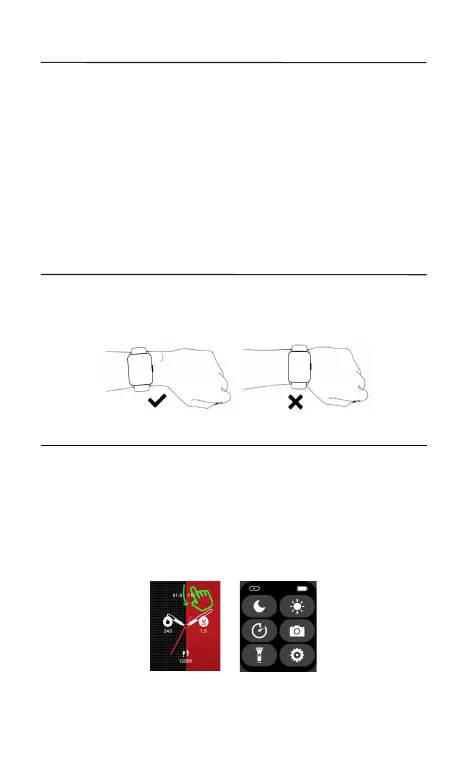
Please wear the device on your wrist correctly, about one nger from the
carpal and adjust it to comfortable position. Below picture as reference.
Tip: Please wear the device a bit little tighter when using heart rate
monitor.
02 How to download & connect to APP
2.1
3 methods to download & install APP:
A. Find the QR code on setting page. Turn on the watch, open “Settings-
-About--Download QR code” , scan QR code to download and install
“Boultt” APP.
B. Scan below “BoultFit” QR code to download and install “BoultFit” APP
C. Search “BoultFit” in App Store or Play Store to download and install
“BoultFit” APP.
2.2. Open “BoultFit” and select "Add Device" on the device page, then
follow the instructions on the screen.
Notes:
01 How to wear


 To Next Page