How to reset
If the earbuds cannot be connected to the mobile device, or the
left and right earbud cannot be connected normally, please use
the following reset method to solve the problem.
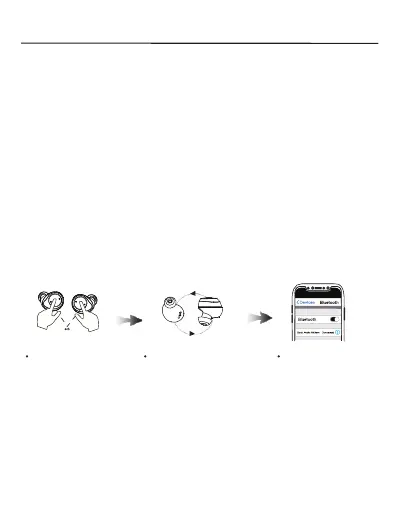
Open the charging case and take out the earbuds, when the
earbuds ash blue lights, long press the left and right earbud
touch control area for 5 seconds at the same time. The earbuds
indicators ash red and blue light alternately and then release.
They will enter into paring mode automatically.
Note: Please long press when the earbuds ashes blue light, but
loog press is invalid when ashes red and blue light.
red & blue light
Long press for 5s
Pairing automatically
Search the Bluetooth
and connect


 To Next Page