Product Specification
How to Use Your Y1 Gaming ?
Touch Controls
The Touch Area (Multi-Functional Touch Panel) is located in the
upper part of the earbuds handle.
Indicator
Light
Indicator Light
Multifunctional
Touch
Y1 Gaming
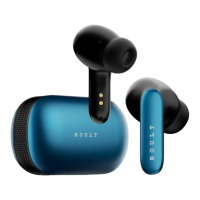
Product Name – TWS Bluetooth Headset
Model – Boult Audio AirBass
Bluetooth Range - ~10m/33ft (without any obstacles)
Earbuds Charging Time – 60 mins
Frequency Range - 20Hz - 20KHz
Technology - HFP/HSP/A2Dp/AVRCP
Input - DC5V = 1A
Charging Case
Earbuds
Type C Charging Cable
Manual
Extra Pair of Eartips
Warranty Card
LED Functions
Charing The Case
Front LED flashes green continuously, and side LEDs breathe
Wearing Earbuds
The earbud marked with L is worn on the left ear and the earbud
marked with R is worn on the right ear.
When Fully Charged
Front LED stays green, and side LEDs goes OFF
What’s in the Box ?
Know your Y1 Gaming
How to Download & Connect to ‘Boult Amp’ App
Install the ‘Boult Amp’ App from the Play Store or App Store
Your earbuds are now connected; get the most out of your
earbuds with available features on the App
Take the earbuds out of the charging case
In the Boult Amp App click on "Add Device" and search for your
Boult earbuds
Select the pairing name “Boult Audio AirBass” and complete the
pairing process
If a pop-up doesn't appear, select "go to settings" from the
App screen and select "Boult Audio Airbass" to connect your
earbuds
.
.
.
.
.
Power ON:
Auto: Open the charging case and take out the earbuds to
Power ON.
Manually: Tap and hold the multifunction button (MFB) for 3
seconds.
Power OFF
Auto: Place both the earbuds in the charging case, close the lid.
Manually: Hold MFB for 5 seconds.
Power ON/OFF:

 Need help?

 To Next Page
 General