F350/F650 Roll Laminator Manual
- 12 -
5.1.4、Setting the gear knife position, keep it at the end of film about 2-4mm;
5.1.5、Setting parameter of paper length ,speed,paper distance according the paper size;
5.2、Install film
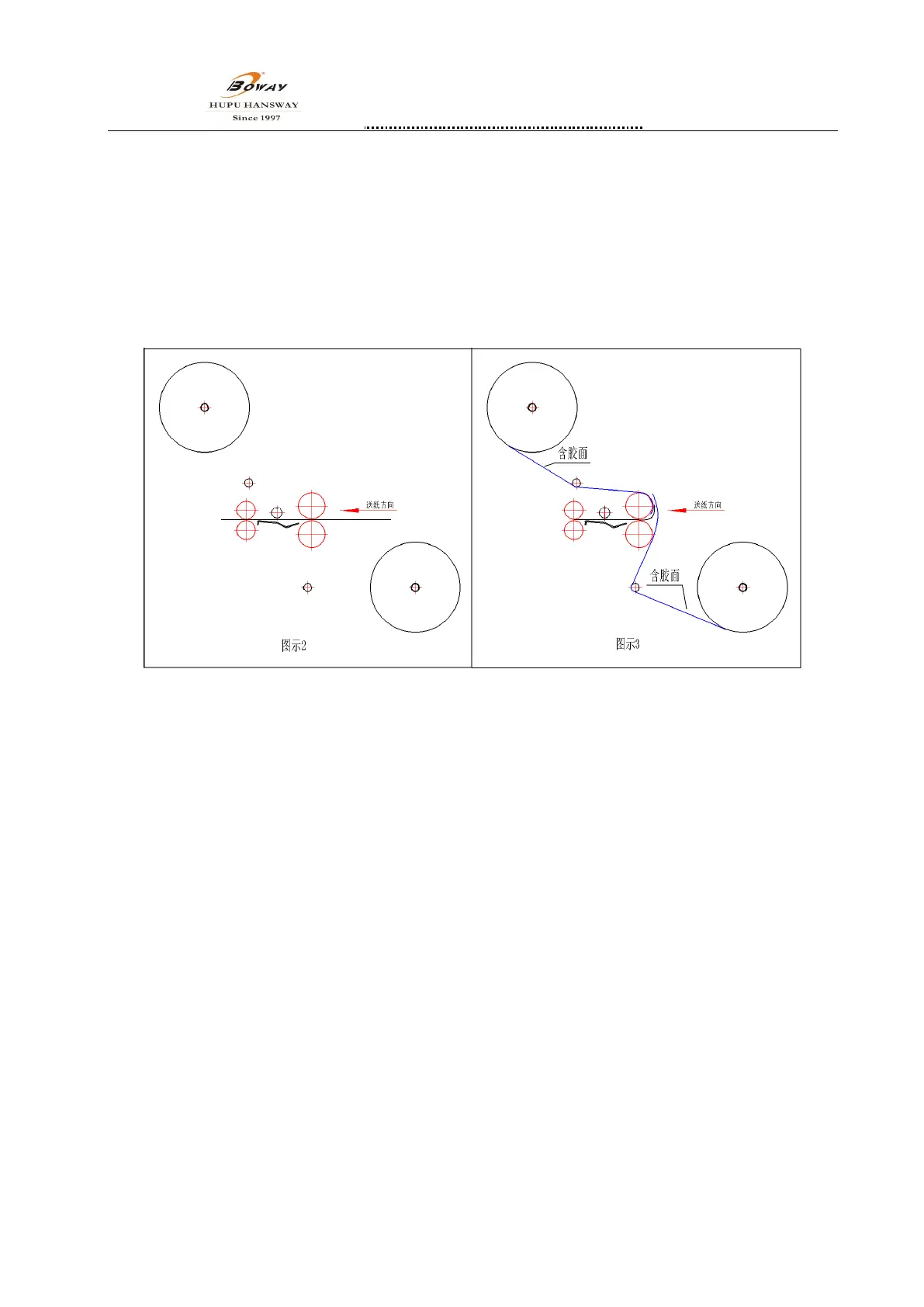
5.2.1、Install glued film to guide the paper。open the safety cover,take down the working table,take a piece
paper which same width of glued film, as guide and pass the front and back rolls,see pic.2
5.2.2、when catch the setting temperature,Put the up film on heating roll,(see pic.3)Put the guide paper on
the glue surface of film, and put the down film on the glue surface of film too,put on safety cover,
install the working table,adjust the position guide and lock, adjust the pressure wheel according to
thickness of paper and film too.
5.3、Laminating
5.3.1、 F350A、F350B、F350C、F650A、F650B
① Under manual mode,Press“start”,indicator is light, the motor will run all the time and press“start”
again, it will stop.
② Under Automatic mode,Press“start”,indicator is light, machine will be ready for working, when
paper passed cover sensor for 2 seconds, main motor runs, when the paper leave the cover sensor, main
motor stops running. Press”start” again, exit from automatic mode.
5.3.2、F350D、F350E、F650E
Press”Start key”, the paper feed automatically.Press”Start key”again,paper will stop the beginning position ,
ready for next time.
5.4、To clean the jammed film
When the roller is heating,printed matter or glued film stick on the surface of roller, cyclic rotation maybe
caused the roller is damaged and the machine is broken, don’t use any clear liquid or solvent, avoiding rollers
are burned.
Using the following solution to clean it:
5.4.1、Stopping the machine and speed to slowest,Cut the involved printed matter or glued paper,start


 To Next Page