15
BLUETOOTH
®
CONFIGURATION
BLUETOOTH
®
SPECIFICATIONS
CONNECTION PROCEDURE
Symbol off..............disconnected mode
Symbol blinking.....advertising mode
Symbol on...............connected mode
The following options can be selected to control the Bluetooth
®
module.
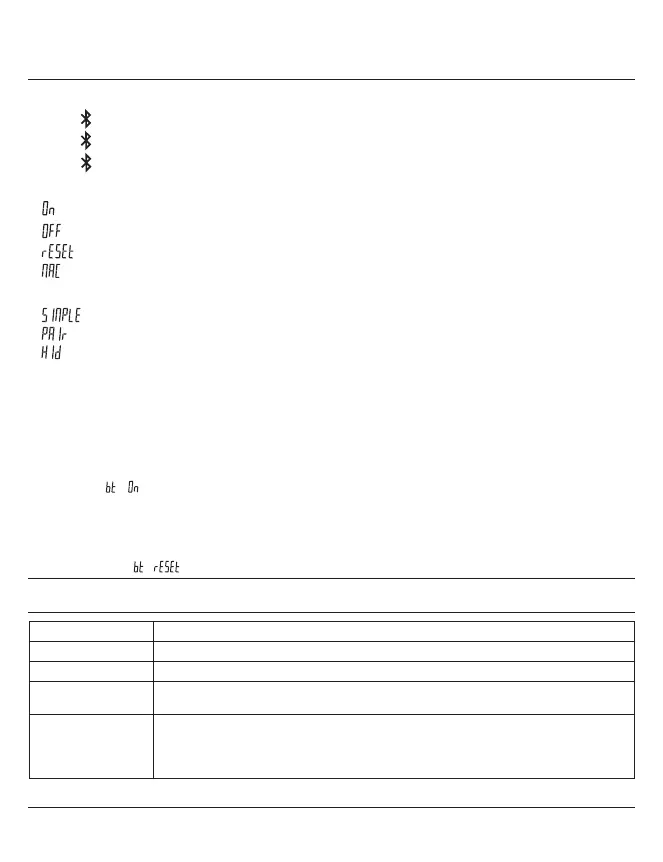
Enable Bluetooth
®
module (start advertising mode).
Disable Bluetooth
®
module (terminate active connection).
Clear pairing information.
Display the MAC (Media Access Control) address.
Three Bluetooth
®
profiles are available.
Profile without pairing (default).
Paired and secured profile.
Virtual keyboard mode (compatible with recent equipment without driver installation).
Note:
- Bluetooth
®
pairing information is cleared when the profile is changed.
Connection:
1. Activate Bluetooth
®
compatible software and hardware (Master : PC, Display Unit).
2. Start the instrument. By default the Bluetooth
®
module is active and the instrument is available for
connection (advertising mode).
3
. If no connection is established during the advertisement period reactivate the Bluetooth
®
module
using the / menu.
4. Instrument is ready to communicate (connected mode).
Only with paired profile:
Pairing with master is automatically done at first connection.
To connect the instrument to a new master (new pairing), pairing information on the instrument must be
cleared using the / menu.
Frequency Band 2.4 GHz (2.402 - 2.480 GHz)
GFSK (Gaussian Frequency Shift Keying)
Class 3: 1mW (0dBm)
Open space: up to 15 m
Industrial environment: 1-5 m
Continuous : up to 2 months - Always connected with 4 values / sec.
Saver : up to 5 months - The instrument sends value only when the position has changed.
Blind/Push : up to 7 months - Value is sent from the instrument (button) or requested
from the computer.
Modulation
Max. output power
Range
Battery life
Other specifications on the manufacturer's website.


 To Next Page
 Loading...