23
2. Exit
Click the close button to return to the main interface. If the current document is not saved,
the saving prompt window is popped out, and users can enter the file name and save the current
document; if the current document is saved, then you do not need to save it again. You can
directly exit the software and return to the main interface.
Android Function
(3) Import
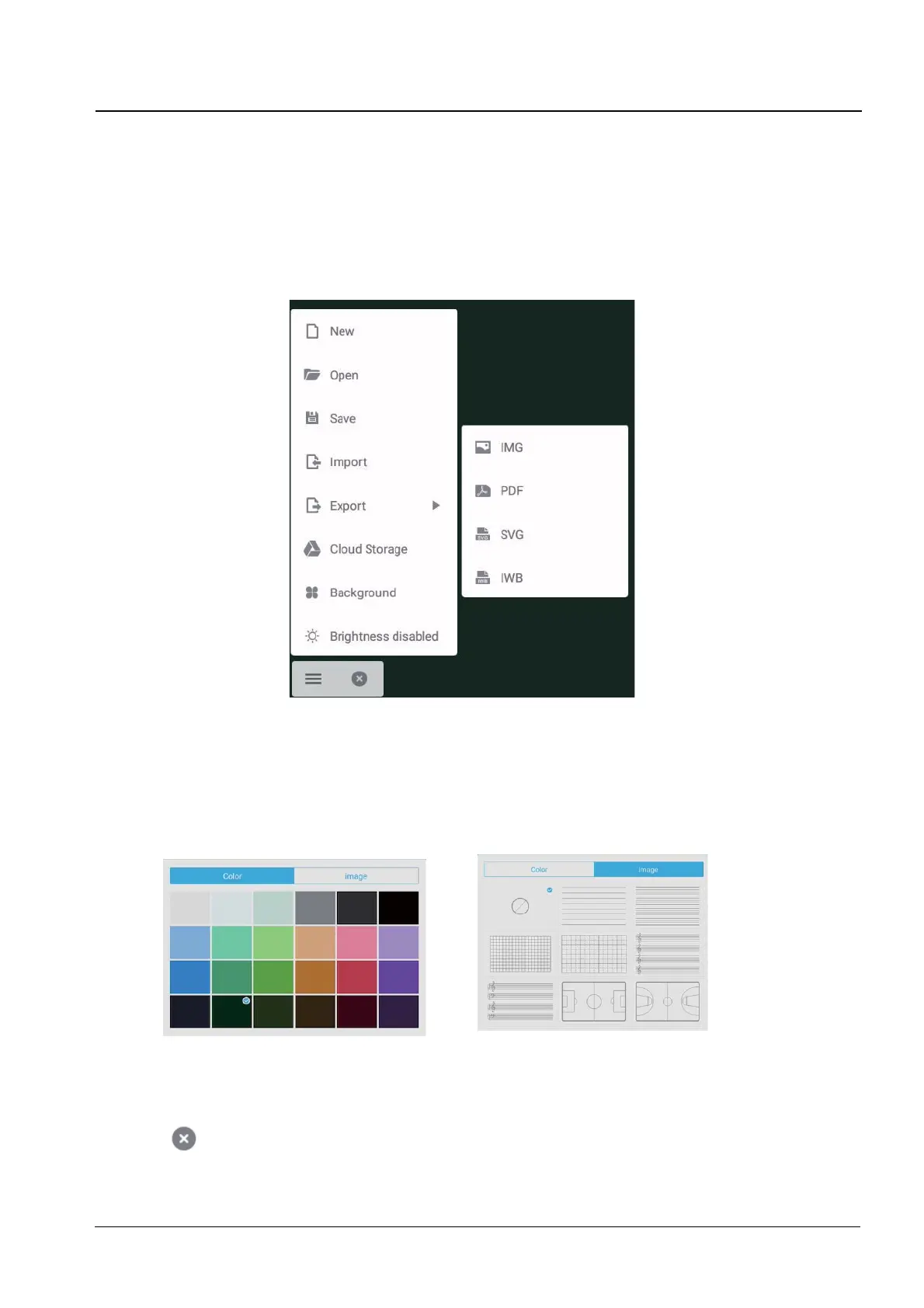
To import the image, PDF, or SVG, to current document.
(4) Save
7RVDYHWKHFXUUHQWGRFXPHQWWRWKH¿OHEURZVLQJLQHQEIRUPDW
(5) Export
To export the current whiteboard courseware in IMG,PDF,SVG or IWB format.
(6) Cloud Storage
7RH[SRUWDQGXSORDGWKHFXUUHQW¿OHWR*RRJOH'ULYHDQG2QH'ULYH
(7) BackGround
To switch the current page background color, which is black by default. Click any color to switch
the page background color to the color you select. You also can change the background by
texture with color,texture with image, or custom image.
(8) BrightnessDisable
To activate the automatic brightness adjustment, which is disabled by default.


 To Next Page