24
Android Function
1. Select
Click
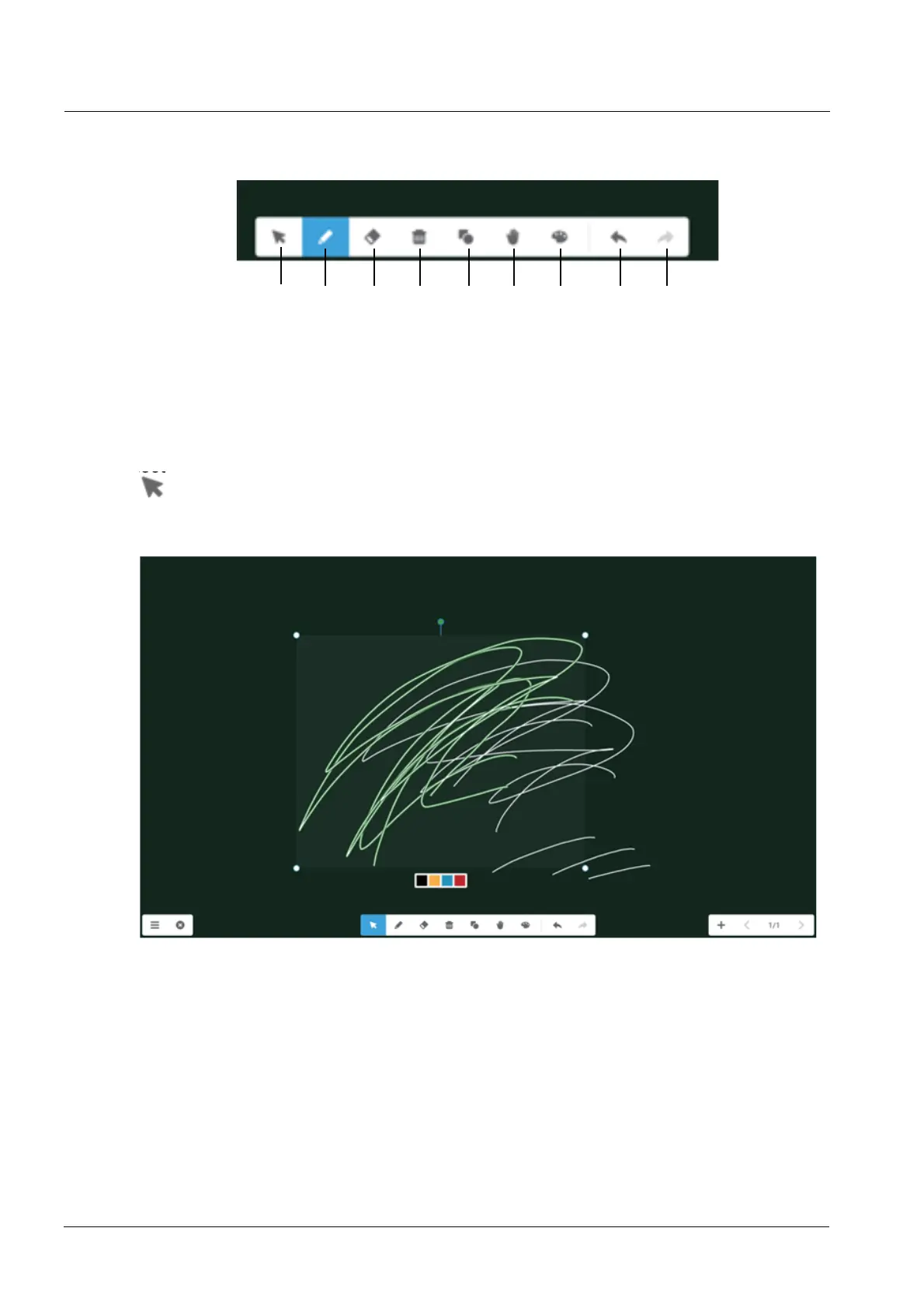
button to perform selection operation on the objects of the page. By drawing any close
¿JXUHRUFOLFNLQJWKHREMHFWRQWKHLQWHUIDFH\RXFDQPRYHRU]RRPLQRURXWWKHREMHFW\RXVHOHFW
as shown as below:
(1) Move. Select by circling and drag the selected object to move the current object to any location.
(2) Zoom in or out.
a. Select by circling and operate the selected object by two points to zoom in or out the current
object, and change the color of the current object to black, yellow, blue or red.
b. Single scale by the four points
c. Rotate by the green point
d. Operate the page by two points to globally zoom in or out the current page.
1. Select
2. Pen
3. Eraser
4. Delete
5. Shapes
1
2
34 56
7
89
6. Roaming
7. Drawing Board
8. Withdrawing
9. Recover
3.
Bottom Men



 To Next Page