Adjusting the LED Display
Turning the Display On/Off
Once the display is connected, use either the Power button on the front of the display, or the power button found
on the remote control. Confirm your display’s status by checking the LED light on the front of your display.
Power is Off (Standby Mode)
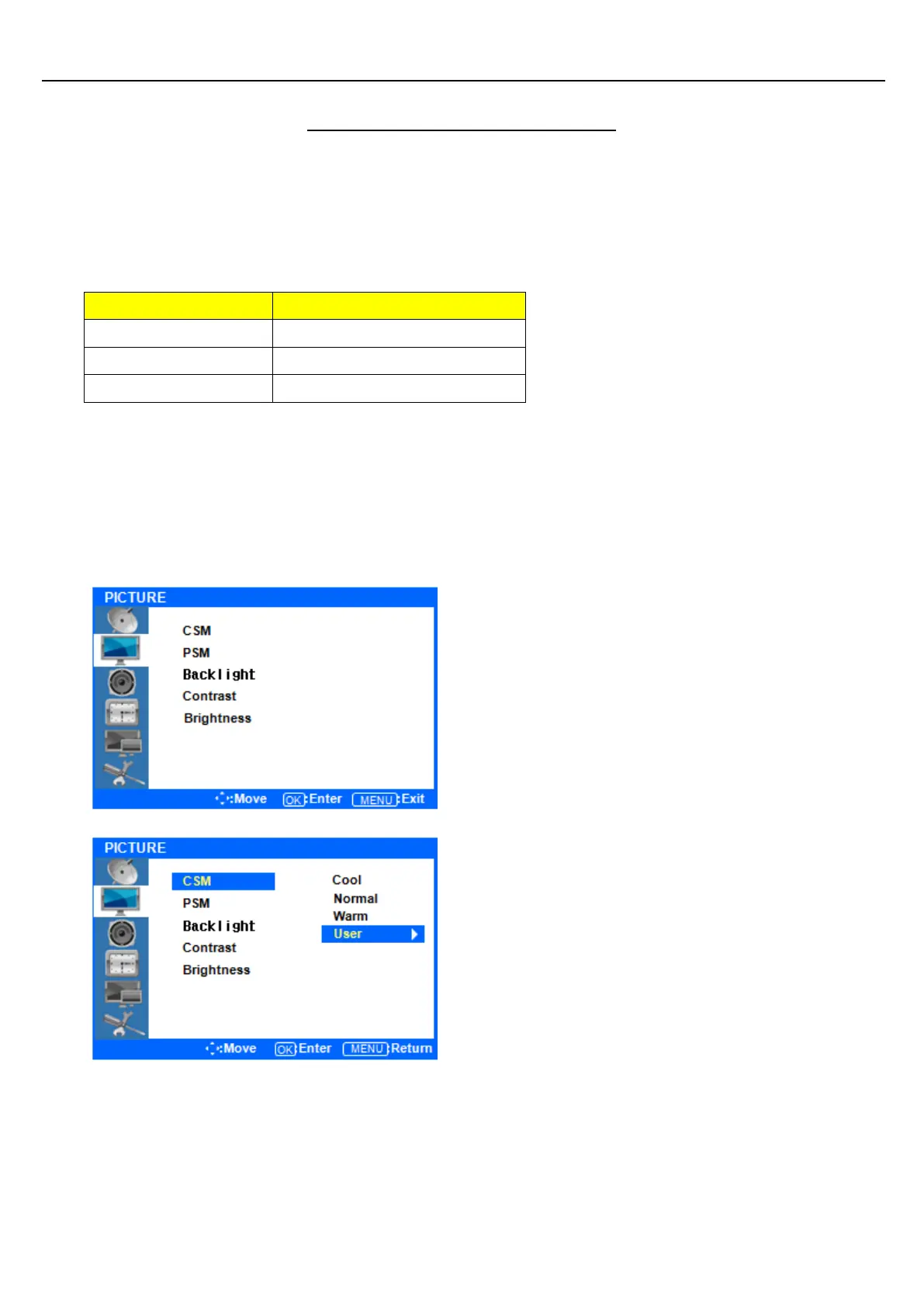
Picture Menus
◆ Press the [MENU] Button.
The OSD Main MENU will be shown.
Press the ▲/▼ buttons to move through options in
the PICTURE Menu. When you have moved to the
option you would like to adjust, press the ENTER
button and you will enter its settings.
◆ Adjustment CSM(Color Status Mode)
Press the ▲/▼ buttons to move to CSM. Press the
ENTER Button to select it.
Press the ▲/▼ buttons to move to either Cool,
Normal, Warm, or User. Cool, Normal and Warm are
preset color options. If you want to adjust the color
settings individually, select USER and press the
ENTER Button.



 To Next Page